Contractor Stack · Part 33
Building a $500K Contractor Stack from Zero
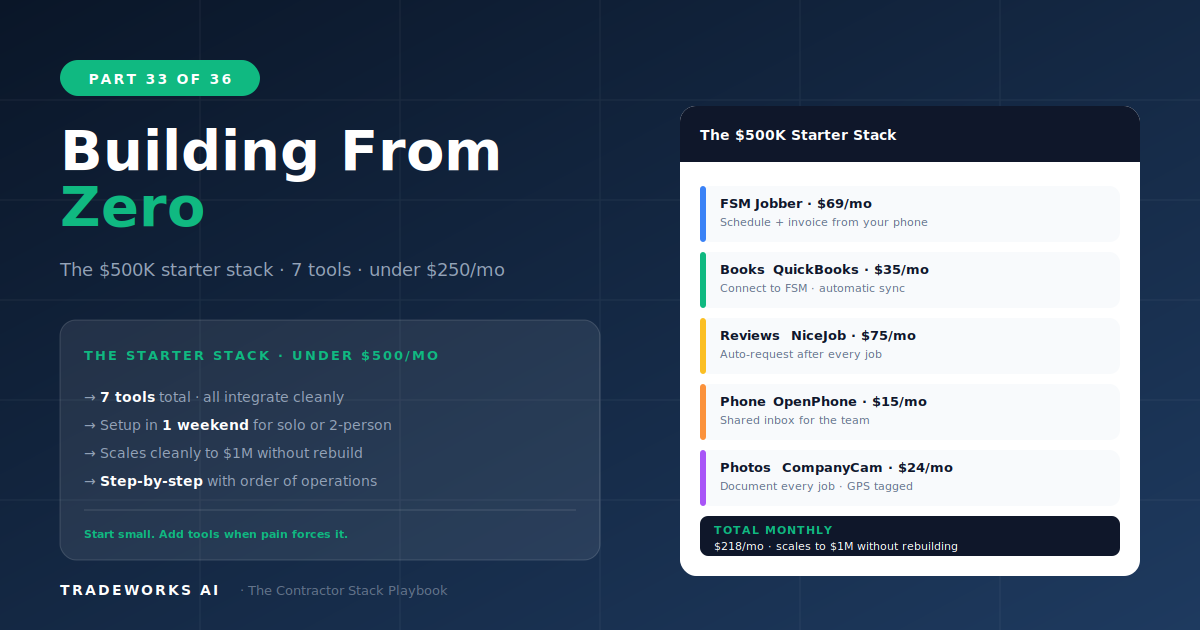
A complete software stack for a startup or small contractor generating up to $500,000 in annual revenue can be assembled in 5 days for $1...
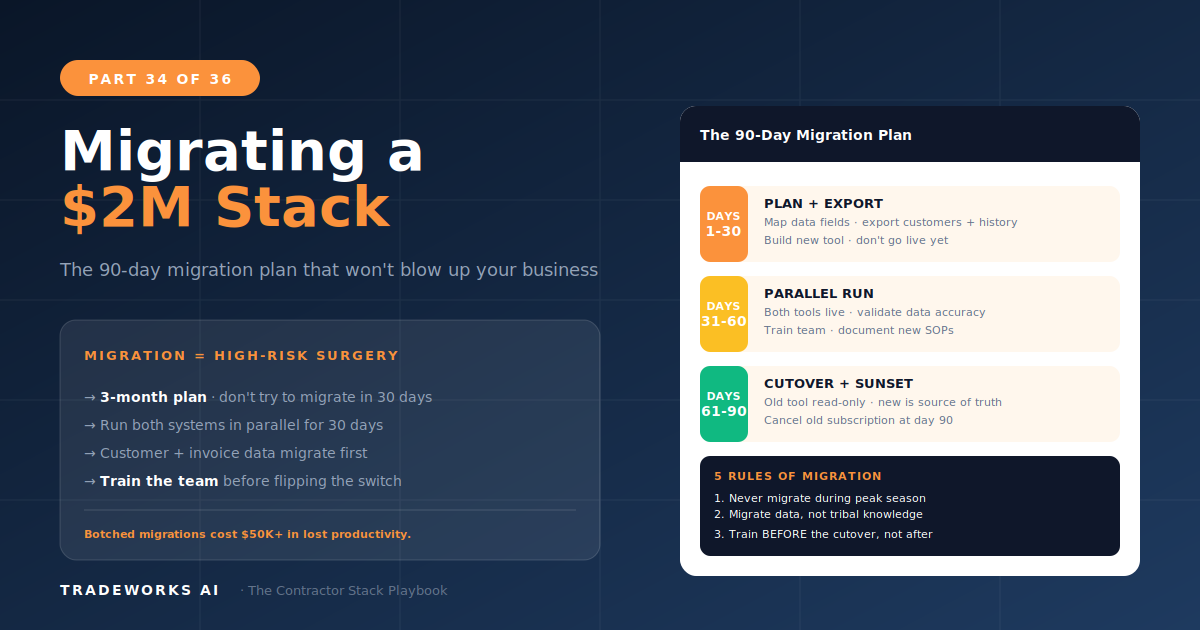
Migrating a contractor’s software stack from one FSM platform to another takes 8 to 10 weeks and costs $5,000 to $15,000 in transition expenses including implementation fees, parallel subscription costs, team retraining time, and temporary productivity loss. The migration follows a five-phase sequence: data export and planning (weeks 1–2), new platform configuration (weeks 3–4), data import with parallel running (weeks 5–6), team training (weeks 7–8), and cutover with cleanup (weeks 9–10). The most common migration for $2 million contractors is Housecall Pro or Jobber to ServiceTitan, driven by the need for pricebook management, membership tracking, and marketing attribution that mid-market FSMs do not provide. This guide covers the complete migration playbook with specific data transfer procedures, team change management, and the cost-of-switching analysis that determines whether migration is justified.
Not every frustration with your current software justifies a migration. Switching platforms is expensive, disruptive, and risky. The 8-Criteria Framework from Part 2 provides the objective scoring system: if your current platform scores 8 or more points below the alternative, and the gap is in criteria that directly impact revenue (trade fit, integration, mobile experience), migration is likely justified. If the gap is 4 points or less, optimizing your current platform is usually the better investment.
The most common justified migration for $2 million contractors is from Housecall Pro or Jobber to ServiceTitan. The triggers: the business needs pricebook management with Good/Better/Best presentation (Part 11), membership plan tracking with automated renewals, marketing attribution with call tracking, and dispatch board optimization with technician performance scoring. These are capabilities that mid-market FSMs cannot match, and workarounds become increasingly expensive as the operation scales.
The most common unjustified migration is switching FSMs because of a single frustration (reporting limitations, a specific feature gap, or a sales demo from a competitor) when the overall platform scores well on the 8-Criteria Framework. A $10,000 migration to fix a $200/month Zapier workaround does not make financial sense. Fix the workaround; keep the platform.
The subscription price difference between platforms is the smallest component of migration cost. The true cost includes:
Implementation fees: ServiceTitan charges $2,000 to $5,000+ for onboarding and configuration. Some platforms waive this during promotional periods.
Parallel subscription costs: Running both platforms simultaneously for 4 to 6 weeks costs the old platform’s monthly fee plus the new platform’s monthly fee. For a 10-technician move from HCP to ServiceTitan: $299 + $2,500–$5,000 = $2,800–$5,300 for the parallel period.
Team productivity loss: Technicians using an unfamiliar platform work 15–25% slower for the first 2–4 weeks. For a 10-technician team averaging $1,500/tech/day in revenue, a 20% slowdown costs $3,000/day or $30,000–$60,000 over 2–4 weeks.
Data transfer risk: Customer records, job history, and financial data must transfer accurately. Missing or corrupted data creates accounting reconciliation nightmares (Part 6) and customer service gaps.
Integration reconnection: Every Zapier workflow, accounting sync, review automation, and email marketing connection must be rebuilt for the new platform (Part 16).
Total realistic migration cost for a 10-technician operation: $8,000 to $15,000 in direct costs plus $30,000 to $60,000 in productivity impact. This investment must be recovered through measurable improvement in revenue per technician, close rate, or operational efficiency within 6 to 12 months. If the math does not work, optimize the current platform instead.
Before configuring anything on the new platform, export everything from the old one. Every customer record, every job history entry, every invoice, every communication log. Most platforms export to CSV format. Verify the export is complete by counting records: if your FSM says you have 1,847 customers, the CSV export should contain exactly 1,847 rows. Any discrepancy means data was missed.
Map data fields between platforms. Customer “First Name” in Housecall Pro maps to “First Name” in ServiceTitan. But “Customer Tags” may not have an equivalent field. Identify every field that does not map cleanly and decide how to handle it before import.
Configure the new platform completely before importing customer data. Set up services and pricing, build pricebooks (if applicable), create team accounts, configure payment processing, set up notification templates, and connect QuickBooks. Test the complete workflow with a fictional customer: create, schedule, dispatch, complete, invoice, collect payment, verify in QuickBooks. Fix everything that breaks before real data enters the system.
Import customer data into the new platform. Verify record counts match the export. Spot-check 20 random customer records for data accuracy: correct phone numbers, addresses, email addresses, and job history.
Run both systems in parallel for 2 to 4 weeks. Every new job gets entered in both the old and new system. This is expensive and time-consuming but essential: it validates that the new system handles real workflows correctly before you depend on it exclusively. If the new system fails during parallel running, you still have the old system operational.
Training is where most migrations fail. The new platform may be better, but the team learned the old platform over months or years. Change resistance is natural. Designate one power user per team (usually the most tech-comfortable person) who learns the new system deeply and supports their teammates during the transition. Update all SOPs (Part 18) to reflect new platform workflows. Allow 2 weeks of supported use where the power user is available for questions before removing access to the old system.
Deactivate the old platform but keep it in read-only mode for 90 days. Team members will need to reference old job history during the transition. Reconnect all integrations to the new platform: QuickBooks sync, NiceJob review automation, ActiveCampaign email triggers, Zapier workflows, and OpenPhone CRM logging. Test every automation end-to-end. Verify that the first month’s financial data reconciles correctly between the new FSM and QuickBooks.
Both systems show the same customer count and contact information
New jobs entered in both systems produce matching invoices
Payments recorded in the new system sync correctly to QuickBooks
Automated review requests trigger from the new system’s job completion
Technician mobile experience is functional (test with the least tech-savvy team member)
Dispatch board handles a full day’s schedule without errors or conflicts
Customer notifications (confirmations, reminders, invoices) send correctly from the new system
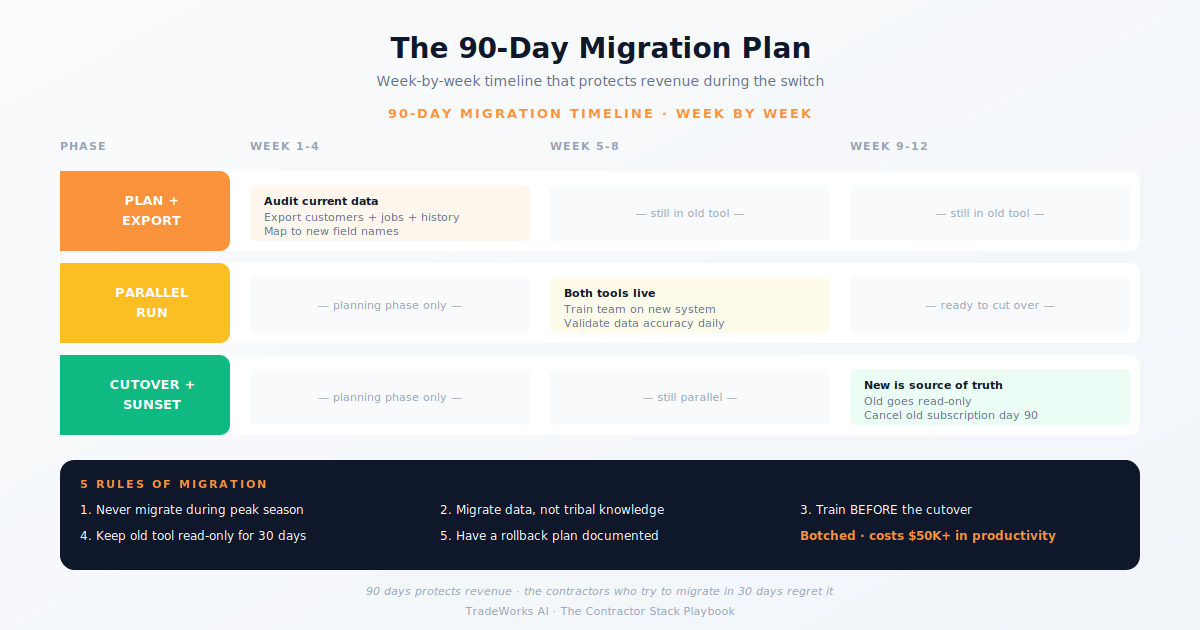
8 to 10 weeks following the 5-phase playbook: 2 weeks planning, 2 weeks configuration, 2 weeks parallel running, 2 weeks training, 2 weeks cutover. Rushing the process — particularly skipping parallel running — dramatically increases data loss and team disruption risk.
Direct costs: $5,000 to $10,000 including ServiceTitan implementation ($2,000–$5,000), parallel subscriptions ($2,800–$5,300 for 4–6 weeks), and integration rebuilding (10–20 hours of setup). Indirect costs: $30,000 to $60,000 in team productivity loss during the 2–4 week learning curve. Total: $35,000 to $70,000 for a 10-technician operation. The investment must show ROI within 6–12 months.
Yes. Most platforms export customer records, job history, and invoices to CSV format. The quality of the migration depends on field mapping accuracy and data verification. Count records before and after. Spot-check 20 random records for accuracy. Run parallel systems for 2–4 weeks to catch any data that did not transfer correctly.
When the 8-Criteria Framework gap between your current platform and the alternative is 4 points or less. When the frustration driving the switch can be solved with a Zapier workaround or a $50/month add-on tool. When the team has been on the current platform for less than 12 months (you may not have explored its full capability yet). Optimize before you migrate.
Most contractors are paying $400–900 per month for software they barely use, while losing thousands more in hidden costs from manual processes and missed callbacks. Our free audit grades your stack against the maturity model and identifies the highest-ROI changes you can make this quarter.
A complete software stack for a startup or small contractor generating up to $500,000 in annual revenue can be assembled in 5 days for $1...
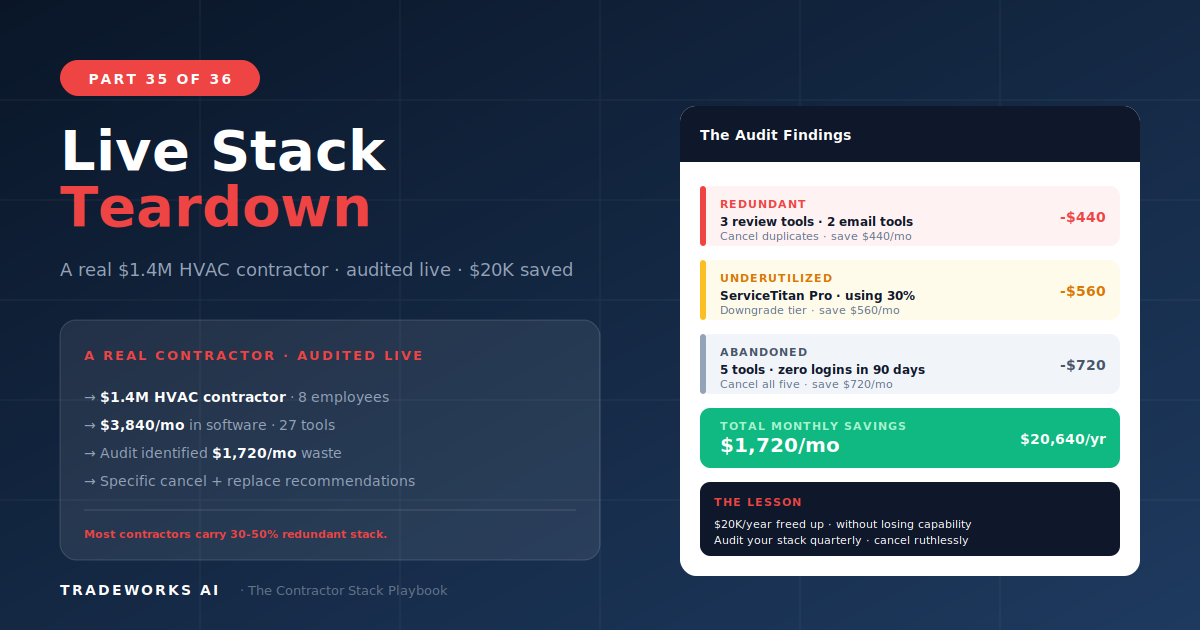
A live teardown of a $1.8 million HVAC contractor’s software stack revealed $518 per month ($6,216 per year) in wasted, redundant, or aba...