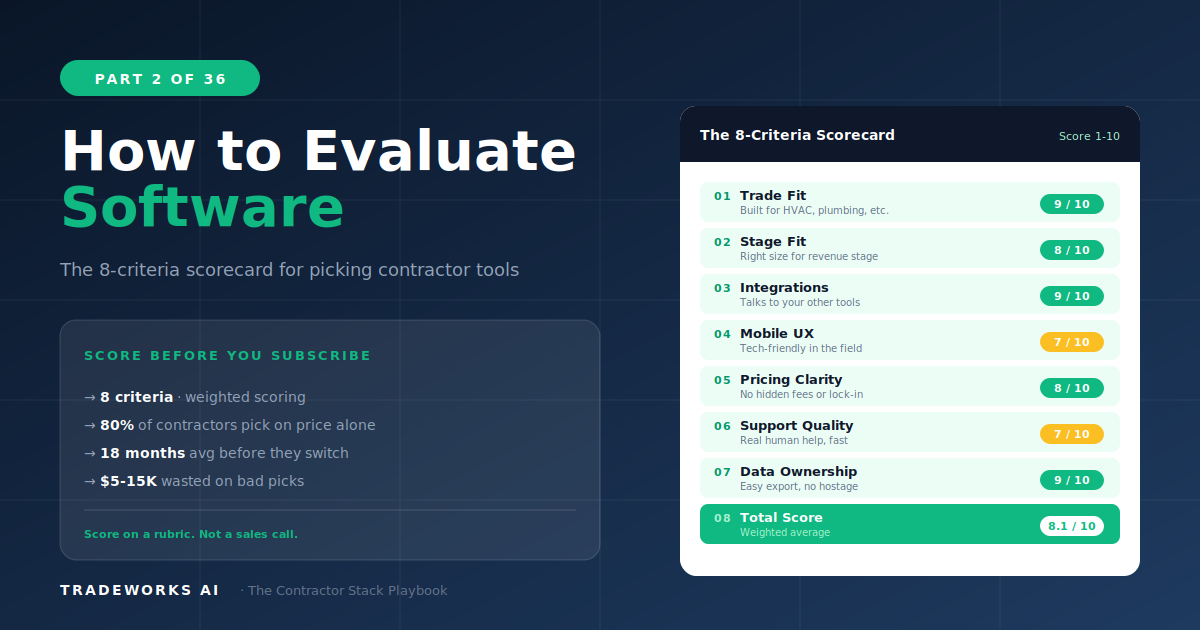
Contractor Stack · Part 2
How to Evaluate Software: The 8-Criteria Framework
The best way to evaluate contractor software is to score each product against eight specific criteria before comparing price: trade fit, ...
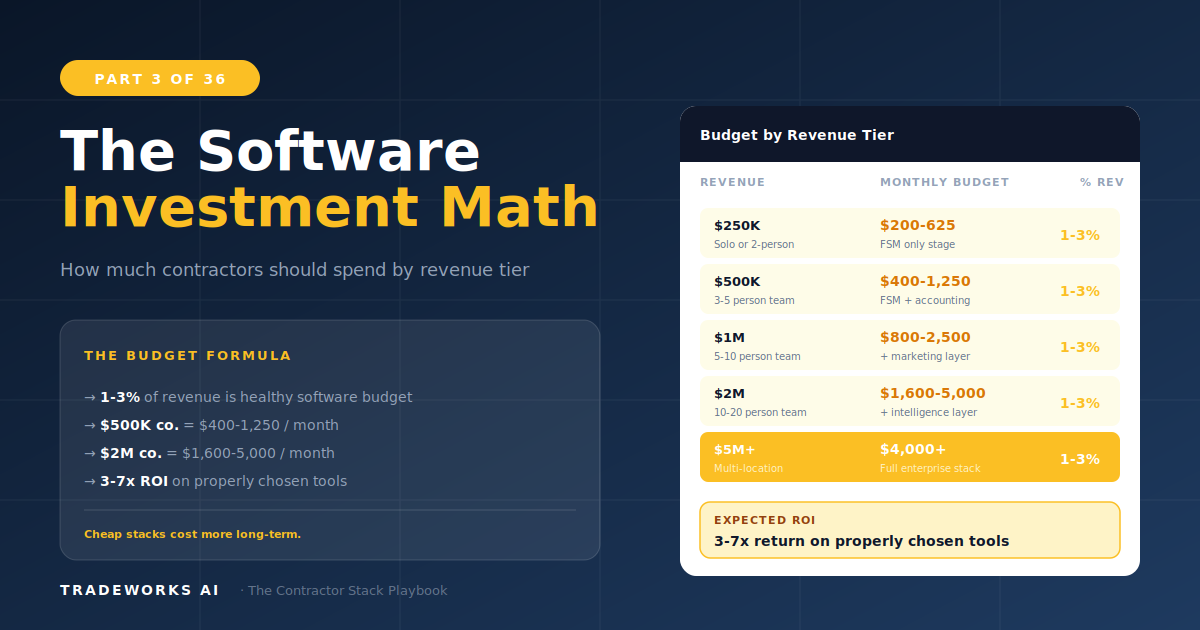
A home service contractor should spend between 1 and 3 percent of annual revenue on software tools. For a $500,000 company, that means $300 to $800 per month. For a $2 million company, $1,200 to $3,000 per month. This range covers all five layers of the contractor software stack: operations, financial, customer, marketing, and intelligence. The specific amount depends on the business’s maturity stage, team size, and growth trajectory. Underspending creates manual workarounds that cost more in labor than the software would. Overspending locks capital into features the team will not use for 12 to 24 months. This guide provides exact budget ranges by revenue tier, ROI expectations by software category, and the upgrade signals that tell you when to invest more.
The simplest budgeting framework for contractor software is the 1–3% rule: total software spend should fall between 1 and 3 percent of annual gross revenue. This range accounts for all recurring software subscriptions, implementation fees amortized over 12 months, and any ongoing integration or automation costs.
Below 1 percent typically means the business is underinvesting — relying on manual processes, spreadsheets, or personal phone calls for functions that software handles faster, more reliably, and at lower total cost. Above 3 percent usually indicates over-staging: paying for enterprise-tier tools at a small business revenue level, carrying redundant subscriptions, or purchasing features the team has not been trained to use.
The sweet spot within this range depends on the business’s maturity stage. A Stage 2 contractor spending 0.7% of revenue on basic digital tools is appropriately positioned. A Stage 4 contractor at 1.5% is investing in optimization that drives measurable margin improvement. The table below maps specific budget ranges to revenue tiers and maturity stages.
Not every software dollar returns the same value. Some categories deliver immediate, measurable ROI in the first 30 days. Others require 6 to 12 months of consistent use before the return becomes visible. Understanding the return profile of each category prevents two common mistakes: abandoning a tool too early because the ROI has not materialized yet, and continuing to pay for a tool that has delivered its maximum value and is now coasting.
Expected return is expressed as a multiple of monthly cost. An FSM with a 3–8x return means a $200/month platform should generate $600 to $1,600 per month in reduced missed jobs, improved dispatch efficiency, and faster invoicing. If it does not, the platform is either underutilized or poorly fit.
Email marketing consistently shows the highest ROI multiple because the cost of sending email is near zero and the revenue from reactivating dormant customers and selling maintenance plans is substantial. A $50/month email platform that generates even one additional maintenance plan signup per month at $15/month recurring has paid for itself 3.6 times in the first year alone.
Review management shows high ROI because review velocity directly impacts local search ranking, which drives organic leads. A single additional 5-star review per week, compounding over 12 months, can move a contractor from position 8 to position 3 in the local pack — a difference of 200 to 400 additional profile views per month.
The most expensive mistake in contractor software is buying for the business you want to be instead of the business you are. A $600,000 HVAC company does not need a $500/technician/month enterprise FSM. A $3 million plumbing operation should not be running on a $39/month starter plan that cannot handle their call volume.
Priority investment: Basic FSM (scheduling, dispatching, invoicing) + accounting integration
Monthly budget: $100–$400
Recommended stack: Jobber or Housecall Pro ($49–$149/mo) + QuickBooks Online ($30–$90/mo) + Google Workspace ($7–$14/user/mo)
What to skip: CRM, marketing automation, AI tools. These deliver ROI only at higher volume.
Priority investment: Upgrade FSM + add review management + add email marketing
Monthly budget: $300–$1,500
Recommended additions: NiceJob or Birdeye ($75–$300/mo) + ActiveCampaign ($29–$149/mo) + OpenPhone or Grasshopper ($15–$80/mo)
What to skip: Enterprise FSM (ServiceTitan at this stage is overspending), custom integrations, AI voice agents
Priority investment: Dedicated CRM if FSM CRM is limiting, marketing automation, analytics dashboard, automation layer (Zapier/Make)
Monthly budget: $1,200–$3,000
Recommended additions: HubSpot or ActiveCampaign CRM ($50–$300/mo) + Zapier ($20–$100/mo) + CompanyCam ($19–$29/user/mo)
Evaluation point: Is ServiceTitan justified? At $2M+ with 10+ technicians, potentially yes. Run the 8-Criteria Framework from Part 2.
Priority investment: AI voice agents for after-hours, predictive dispatching, advanced analytics, full integration architecture
Monthly budget: $2,500–$5,000+
Recommended additions: Goodcall or Rosie for AI voice ($100–$400/mo) + Titan Intelligence or custom dashboards + dedicated integration management
What to skip: Nothing is off-limits at this stage, but every tool must show measurable ROI within 90 days or face cancellation.
Moving from one maturity stage to the next is not triggered by a revenue number alone. Revenue is a proxy, but the real signals are operational: capacity constraints, team workarounds, customer experience gaps, and competitive disadvantage.
The most common timing mistake is upgrading too late. Contractors wait until the pain is acute — missed appointments, angry customers, overwhelmed office staff — before investing in the next stage of tools. By that point, they have already lost revenue and potentially damaged their reputation. The best time to upgrade is when you first see the signals, not when the signals become emergencies.
To calculate your optimal software budget, follow this three-step process:
Step 1: Calculate 1–3% of your trailing 12-month gross revenue. This is your total annual software budget envelope.
Step 2: Identify your current maturity stage using the 5-Stage model from Part 1. Cross-reference with the budget table above to confirm your range.
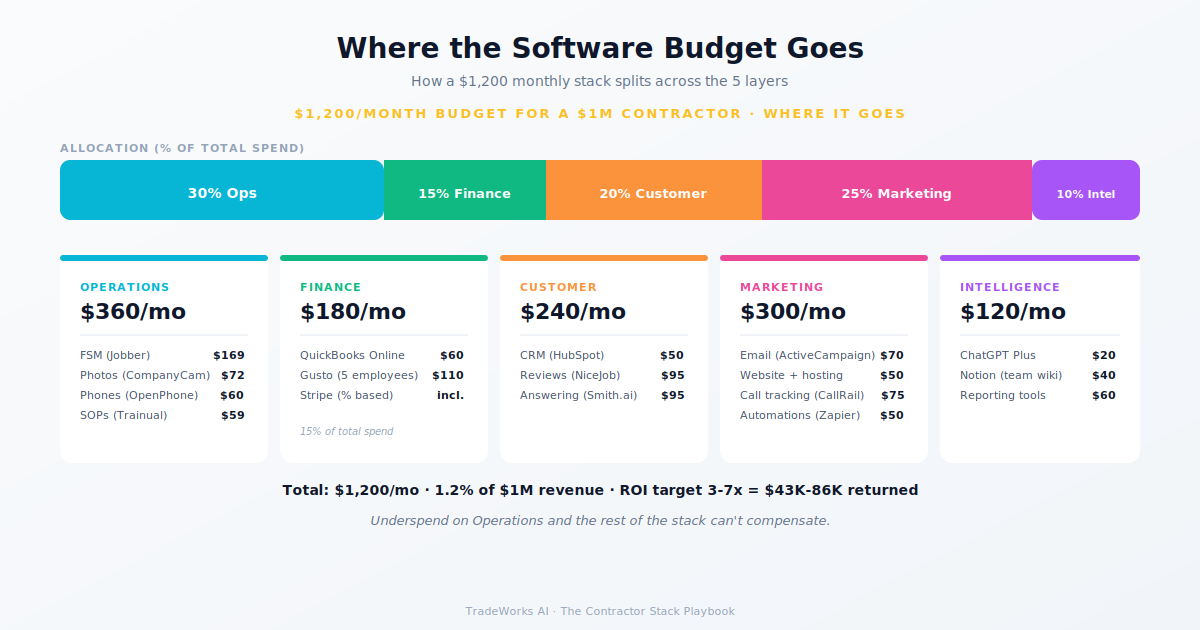
Step 3: Allocate by priority. Operations (FSM) gets 30–40% of the budget. Financial (accounting) gets 10–15%. Customer (CRM + reviews) gets 15–25%. Marketing (email + automation) gets 15–25%. Intelligence (analytics + AI) gets 5–15%.
If your current spend is below the 1% floor, you are almost certainly carrying hidden costs in manual labor, missed opportunities, and operational friction that exceed the savings from underinvesting. If your current spend is above the 3% ceiling, run the Underutilization Audit from Part 1 before adding anything new.
For most contractors between $500,000 and $5 million in revenue, yes. The 1–3% range covers a complete stack across all five layers when tools are properly selected for the business’s maturity stage. Contractors below $500K often spend less than 1% because basic tools at Stage 1–2 are inexpensive. Contractors above $5M may spend above 3% during major platform migrations or AI tool adoption, but should return below 3% once implementation is complete.
Field service management. Your FSM is the operational backbone — scheduling, dispatching, invoicing, and customer records all live there. A properly functioning FSM reduces the need for several other tools and provides the data foundation that makes every subsequent investment more effective. Part 4 is a complete deep dive on FSM selection.
Measure what the tool saves or generates against what it costs. For an FSM, count missed appointments before and after adoption. For review management, track review volume and local search ranking movement. For email marketing, measure revenue from reactivation campaigns and maintenance plan signups. If a tool does not have a measurable metric attached to it, question whether you need it.
Monthly for the first 6 to 12 months, then switch to annual if the tool has proven its value. Annual contracts typically save 10 to 20 percent, but they also lock you in. If you discover the tool is a poor fit three months in, you have nine months of sunk cost. Pay monthly until you are confident in the fit, then negotiate annual pricing.
Buying Stage 4 tools at Stage 2 revenue. A $400,000 contractor paying $500 per technician per month for ServiceTitan is spending 3 to 4 percent of revenue on a single tool — leaving no budget for review management, email marketing, or any other category. The right tool at the wrong time is the wrong tool. Match your investments to your maturity stage, and upgrade as the business grows into the next tier.
Most contractors are paying $400–900 per month for software they barely use, while losing thousands more in hidden costs from manual processes and missed callbacks. Our free audit grades your stack against the maturity model and identifies the highest-ROI changes you can make this quarter.
The best way to evaluate contractor software is to score each product against eight specific criteria before comparing price: trade fit, ...
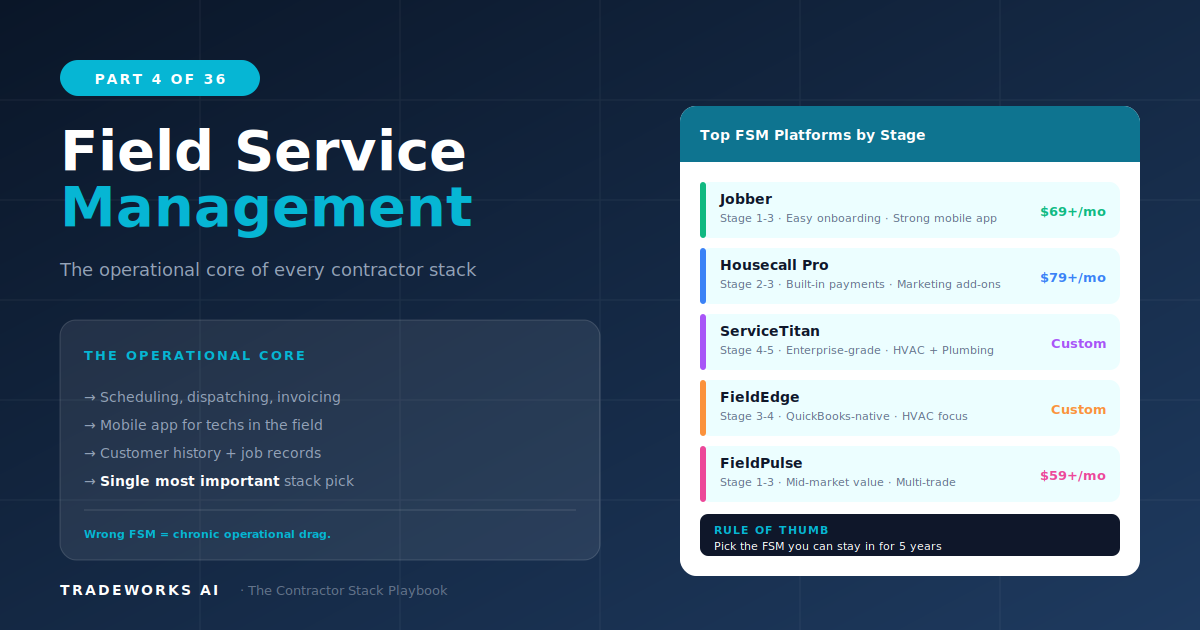
The best field service management software for contractors in 2026 depends on trade, team size, and revenue stage. For HVAC, plumbing, an...