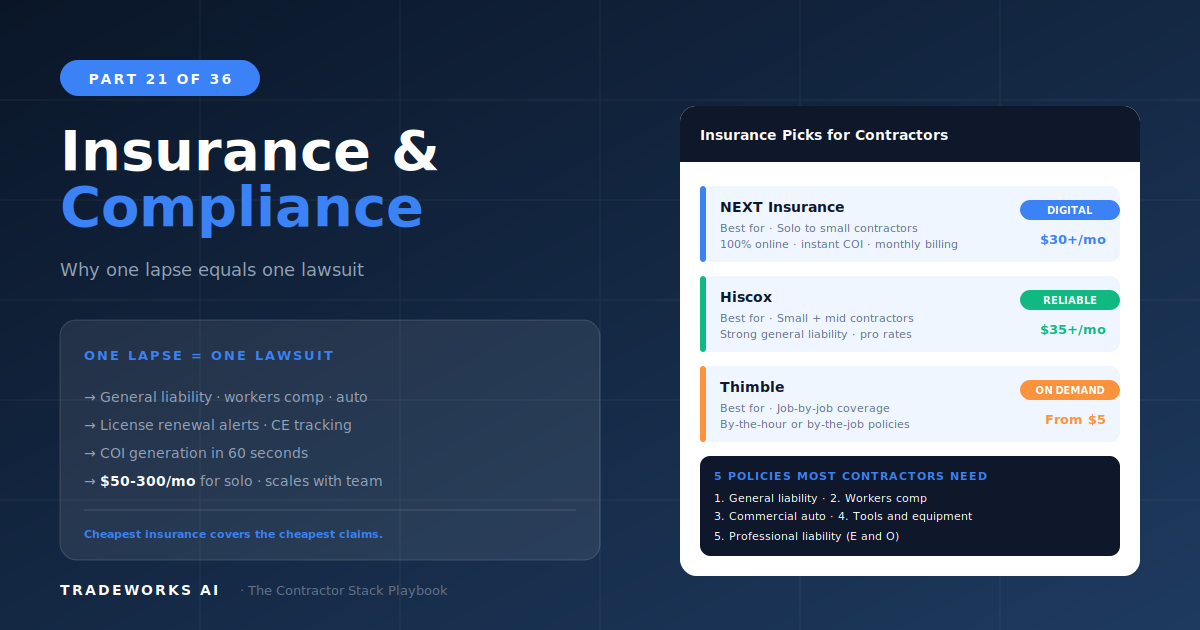
Contractor Stack · Part 21
Insurance and Licensing Compliance
The best insurance platform for most contractors getting started or shopping for competitive rates is Next Insurance ($25–$300+ per month...
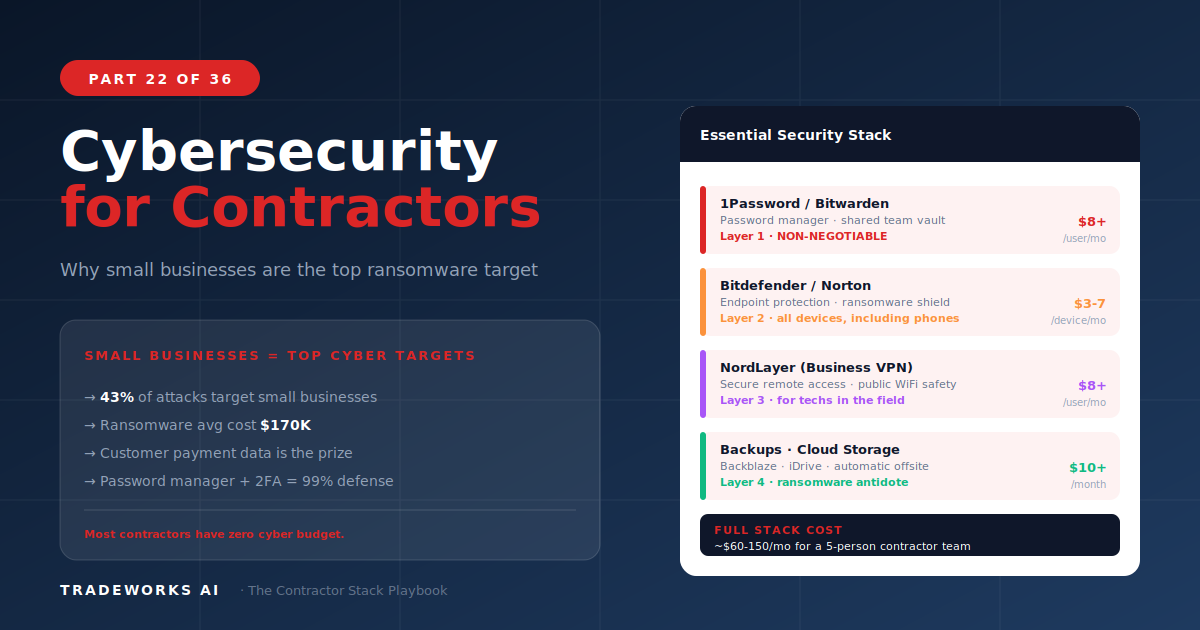
A complete cybersecurity stack for contractors costs approximately $50 per month and protects against threats that cost unprotected small businesses an average of $200,000 or more per ransomware incident. The essential stack includes a password manager like 1Password ($4–$8/user/month), multi-factor authentication on every business platform (free to $3/user), cloud backup ($6–$20/month), and endpoint protection ($3–$7/device/month). Contractors are increasingly targeted because they store customer financial data, home addresses, access codes, and property information — and most operate with zero cybersecurity measures. This guide provides the non-technical contractor’s security checklist with specific tools, costs, and implementation steps.
Contractors are attractive cybersecurity targets for three reasons. First, they store high-value personal data: customer names, home addresses, phone numbers, email addresses, credit card information, and in many cases, garage codes, alarm codes, and key lockbox combinations. A breach of this data creates liability for the contractor and risk for every customer in the database.
Second, most contractors operate with minimal security. The same password is used across 5 to 10 platforms. Multi-factor authentication is not enabled on the FSM, email, or banking. Technician phones accessing business systems have no security software. Office computers run without backup. This lack of protection makes contractors the path of least resistance for attackers who target small businesses rather than hardened enterprise targets.
Third, ransomware specifically targets businesses that cannot afford downtime. A contractor whose dispatch board, customer database, and invoicing system are encrypted by ransomware faces a choice: pay the ransom (average $50,000 to $200,000 for small businesses) or rebuild from scratch. Most do not have backups. Many pay.
A password manager generates and stores unique, complex passwords for every platform the business uses. Instead of one password shared across FSM, email, banking, QuickBooks, and social media, each platform gets a unique 20+ character password that the team never has to remember. When a technician or office employee leaves, changing access is a single action rather than hunting through every platform to update shared credentials.
1Password is the recommendation for contractor teams at $4 to $8 per user per month. The business tier includes shared vaults (the team can access shared logins without seeing the passwords), admin controls (the owner can revoke access instantly when someone leaves), and breach monitoring (alerts if any stored credential appears in a known data breach).
MFA adds a second verification step beyond the password: a code from an app, a text message, or a biometric scan. Enable MFA on every platform that supports it, prioritized in this order: banking and financial accounts, email, FSM, accounting software (QuickBooks/Xero), and social media accounts. Most platforms offer MFA for free. Use an authenticator app (Authy, Google Authenticator, or 1Password’s built-in authenticator) rather than SMS codes, which can be intercepted.
MFA is the single most effective security measure a contractor can implement. It blocks 99 percent of automated attacks because the attacker needs both the password and physical access to the second factor. If you implement nothing else from this part, enable MFA on email and banking today.
Business email through Microsoft 365 ($6–$22/user/month) or Google Workspace ($7–$18/user/month) includes built-in phishing protection, spam filtering, and account security that free email providers like Gmail personal or Yahoo do not match. Both platforms flag suspicious emails, block known malicious attachments, and provide admin controls for the business owner to manage team accounts.
The most common attack vector for contractors is phishing: an email that appears to be from a vendor, customer, or bank requesting a password reset, payment, or login. Training your team to verify sender addresses and never click login links from email is free and prevents the majority of phishing attempts.
Cloud backup ensures that if ransomware encrypts your computer, a hard drive fails, or a device is lost or stolen, your business data can be recovered. Backblaze ($6/month per computer, unlimited storage) and IDrive ($10–$20/month for multiple devices) back up continuously in the background without user action. Recovery from a ransomware attack with a current backup takes hours, not days — and eliminates the ransom payment entirely.
Every device that accesses business systems — office computers, technician phones, tablets — needs malware protection. Malwarebytes ($3–$5/device/month) and Bitdefender ($4–$7/device/month) provide real-time protection against malware, ransomware, and viruses with minimal performance impact. Install on every device, enable automatic updates, and verify protection is active monthly.
A contractor can implement the core security stack in one afternoon:
Hour 1: Sign up for 1Password business. Import existing passwords. Generate new unique passwords for FSM, email, banking, and QuickBooks. Invite team members to the vault.
Hour 1 (continued): Enable MFA on banking, email, FSM, and accounting. Use 1Password’s built-in authenticator or Authy.
Hour 2: Install Backblaze on all office computers. Verify first backup completes. Install Malwarebytes on all devices. Verify protection is active.
Total cost: approximately $30–$60/month for a 3-person team. Total setup time: 2 to 3 hours. Protection level: blocks 95 percent or more of common attack vectors targeting small businesses.
Every contractor (non-negotiable): 1Password + MFA on banking and email. This is the minimum viable security stack. Cost: $4–$11/user/month.
Stage 2+ (3+ team members): Full stack: 1Password + MFA + Microsoft 365 or Google Workspace + Backblaze + Malwarebytes. Cost: $30–$60/month total.
Stage 3+ (customer data at scale): Add VPN for remote access, formal security policy, and annual security review. Consider cyber liability insurance (Next Insurance offers it as an add-on, Part 21).
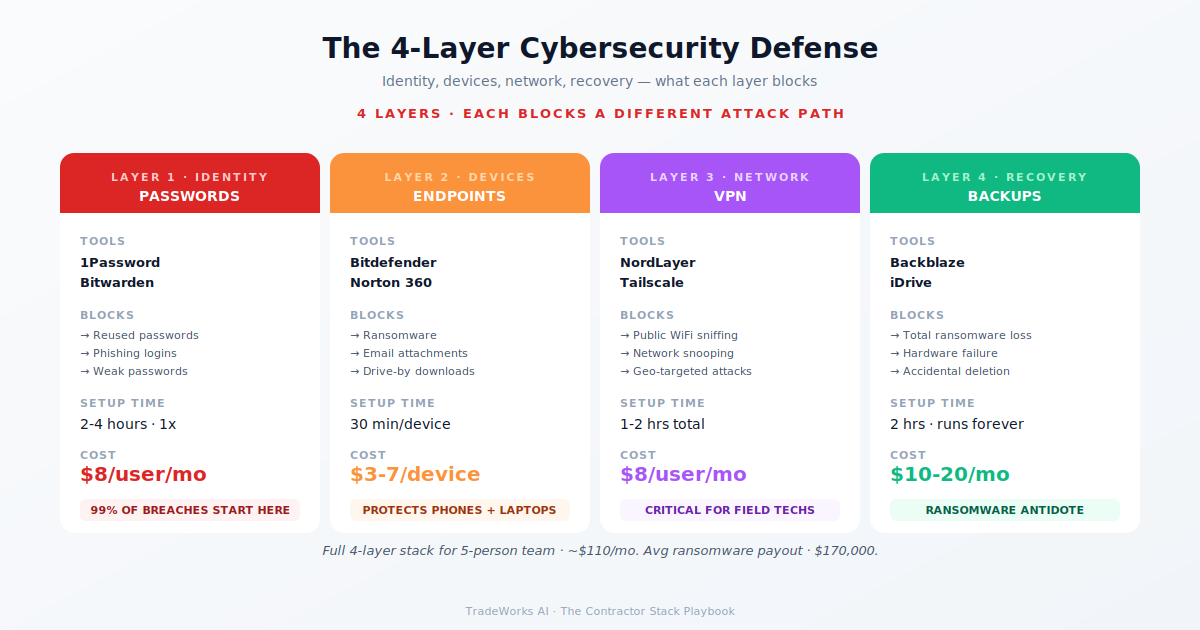
A complete security stack costs $30 to $60 per month for a team of 3 to 5 people: password manager ($4–$8/user), cloud backup ($6–$20), and endpoint protection ($3–$7/device). MFA is free. Compare this to the average ransomware cost for small businesses ($200,000+) and the investment is trivial.
Enable multi-factor authentication on your email and banking accounts today. MFA blocks 99 percent of automated attacks and costs nothing. If you do one thing from this part, do this. Everything else can follow over the next week.
Increasingly yes, especially for contractors storing customer financial data or access codes. Cyber liability insurance covers breach notification costs, legal fees, data recovery, and business interruption from cyber incidents. Next Insurance and CoverWallet (Part 21) offer cyber liability as add-on coverage, typically $30 to $100 per month.
Most contractors are paying $400–900 per month for software they barely use, while losing thousands more in hidden costs from manual processes and missed callbacks. Our free audit grades your stack against the maturity model and identifies the highest-ROI changes you can make this quarter.
The best insurance platform for most contractors getting started or shopping for competitive rates is Next Insurance ($25–$300+ per month...
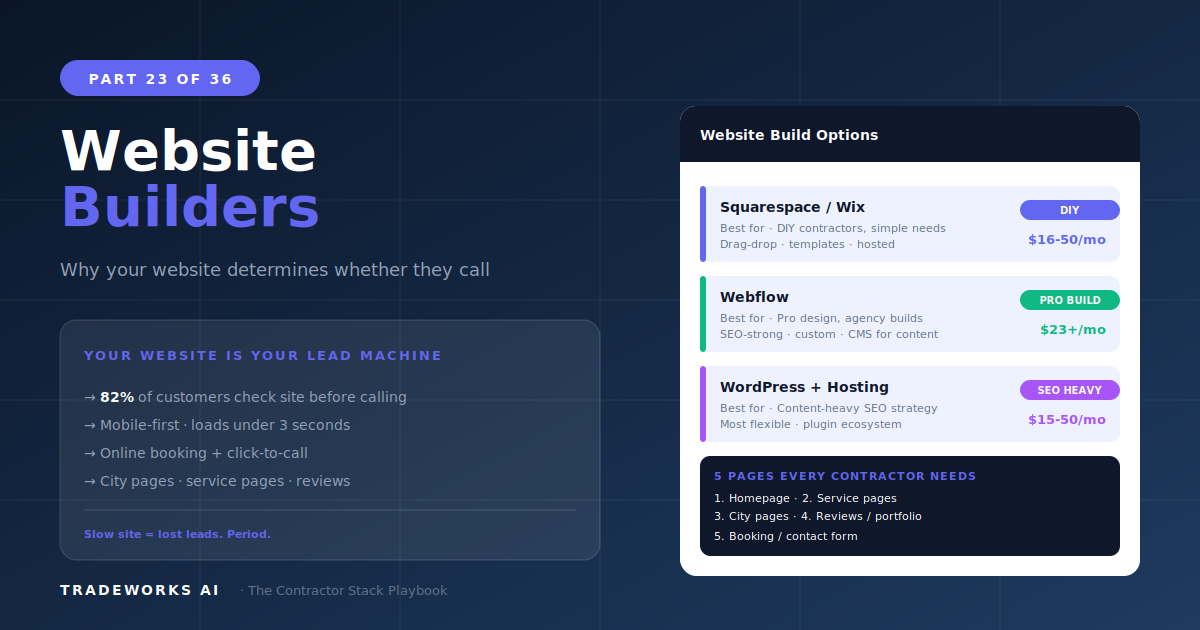
The best website platform for home service contractors who want maximum lead generation and SEO capability is WordPress ($10–$50/month ho...