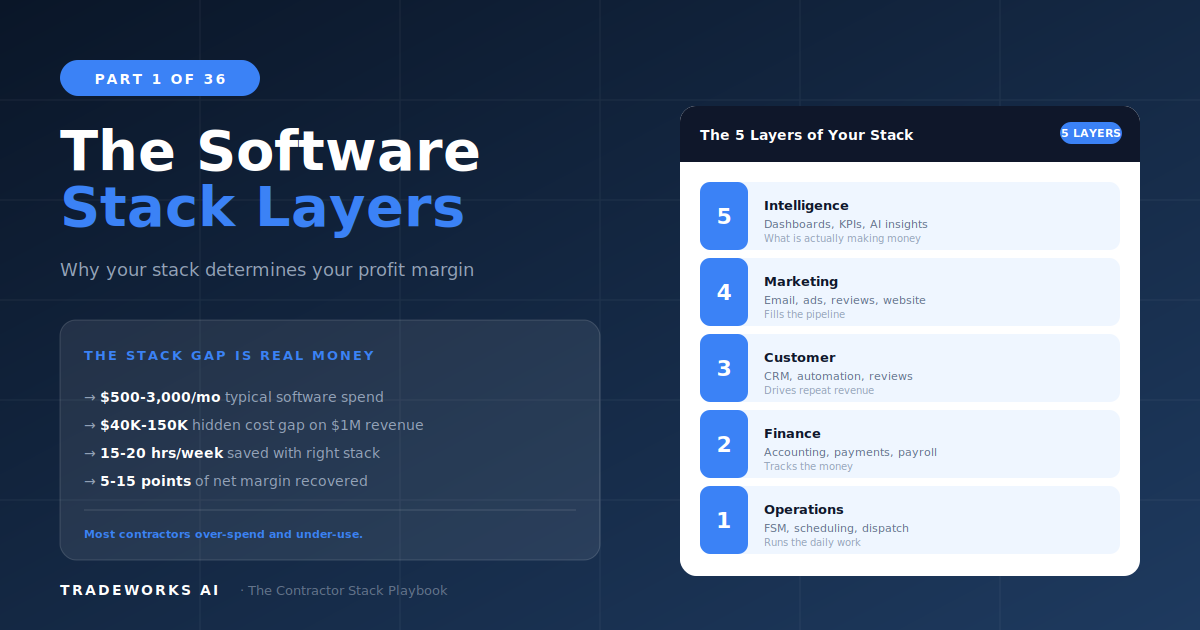
Contractor Stack · Part 1
Why Your Software Stack Determines Your Profit Margin
A contractor software stack is the complete set of digital tools a home service business uses to run its operations, finances, customer r...
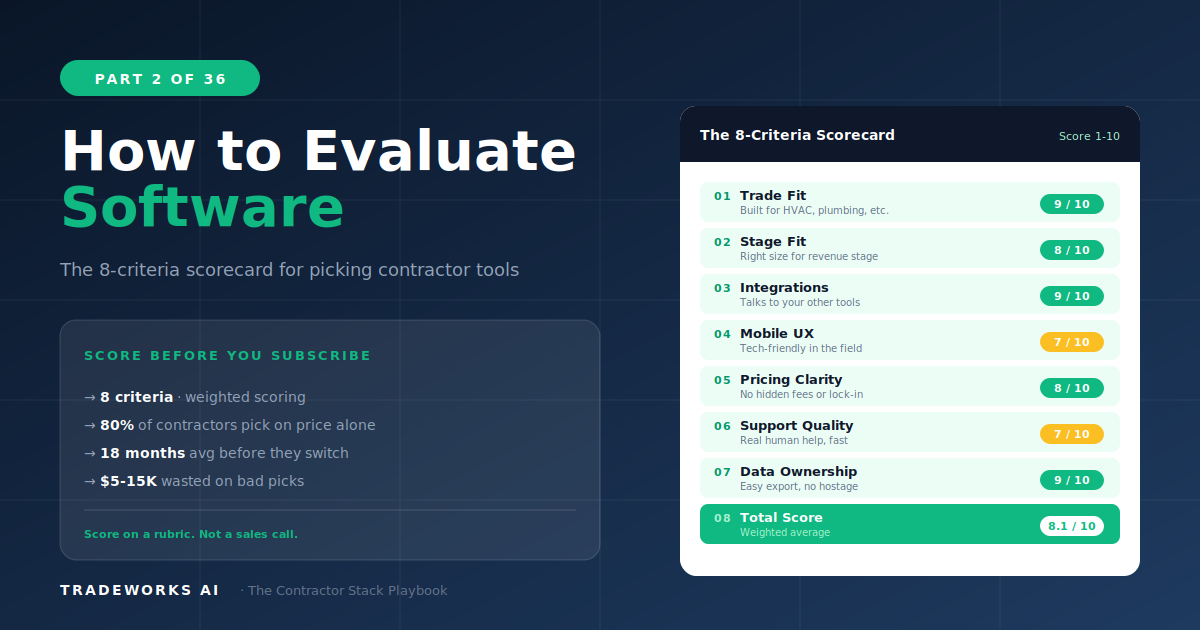
The best way to evaluate contractor software is to score each product against eight specific criteria before comparing price: trade fit, business size alignment, integration capability, mobile experience, learning curve, pricing model transparency, data ownership, and support quality. Eighty percent of contractors who regret a software purchase chose based on price or a sales demo alone. The 8-Criteria Evaluation Framework gives home service business owners a repeatable, structured process for comparing any software product — FSM, CRM, accounting, review tools, or marketing automation — against what actually matters for their trade, team, and growth stage. This framework is used throughout The Contractor Stack series to evaluate every product category.
The typical contractor software purchase follows a predictable and expensive pattern. The owner hears about a tool from another contractor, watches a polished demo, compares two or three monthly prices, and picks the cheapest one that looked good on screen. Eighteen months later, the team is frustrated, adoption is low, and the business switches — losing data, retraining staff, and spending more in total than if they had selected correctly the first time.
Price-first selection fails because the cheapest tool is often the most expensive one over 24 months. A $49/month platform that does not integrate with your accounting system creates $200/month in bookkeeper reconciliation time. A $79/month FSM with a poor mobile app costs you a technician’s patience and eventually a resignation. The monthly subscription fee is the smallest component of total software cost. The real cost is time, friction, data loss, and opportunity cost.
The 8-Criteria Framework replaces gut-feel purchasing with a structured scoring system. Every product gets evaluated on eight dimensions. The product with the highest composite score for your specific situation wins — regardless of whether it is the cheapest or the most expensive option on the list.
Score each criterion on a 1–5 scale. Weight criteria by importance to your business (a two-technician residential shop weights Mobile Experience higher than a 40-person commercial operation that uses tablets). Total score determines fit.
Generic software forces you to build workarounds. A CRM designed for real estate agents does not understand maintenance agreements, equipment history, or warranty tracking. A project management tool built for marketing agencies does not handle dispatch, route optimization, or parts inventory.
Trade fit means the software was either built specifically for your trade or has been deeply adapted for it with purpose-built features. When evaluating trade fit, ask: does this product have customers in my exact trade? Can the vendor show me a case study from an HVAC company, a plumbing company, or a roofing company — not just a generic “field service” reference? Does the product handle trade-specific workflows without custom configuration?
A $400,000 plumbing company does not need ServiceTitan. A $3 million HVAC operation has outgrown Jobber’s basic tier. Size alignment means the product is designed for businesses at your current revenue stage and team size — and ideally supports one stage of growth beyond where you are now.
Watch for products that require minimum seat counts above your team size, charge implementation fees that exceed your monthly software budget, or market enterprise features that your office manager will never configure. The 5-Stage Stack Maturity Model from Part 1 maps which products fit each revenue tier.
A tool that does not connect to your existing stack creates data silos. Integration capability means the product has native, pre-built connections to the tools you already rely on — especially your FSM and your accounting system. An “open API” without pre-built integrations is a promise, not a feature. Unless you have a developer on staff or a Zapier/Make budget, open API alone does not count.
Check the vendor’s integration directory. Count the number of relevant integrations, not the total. A product with 500 integrations but none for QuickBooks or your FSM is not well-integrated for a contractor.
Your technicians live on their phones. If the mobile app is slow, clunky, or a wrapped version of the desktop site, adoption dies in the field. Check the App Store and Google Play ratings independently of the desktop product’s reputation. Read the one-star reviews specifically — they reveal the real pain points. Test the app on the oldest phone your team currently carries, not the newest device in the demo.
Every day of training is a day your team is not producing revenue. Learning curve measures how long it takes from first login to productive daily use. Products that require paid implementation consultants, multi-week onboarding programs, or certification courses score low on this criterion unless the complexity is justified by equivalent capability.
Ask the vendor: what does the first week look like? How many hours of training does the average team need? Is there self-serve onboarding, or does everything require a scheduled call with a rep?
Transparent pricing means you can calculate your exact monthly cost before signing a contract. Products with published per-user or flat-rate pricing score higher than quote-based models where the price depends on a sales conversation. Watch for hidden costs: implementation fees, per-transaction charges, overage pricing, annual lock-in discounts that punish monthly flexibility, and feature tiers that gate critical functions behind premium plans.
Calculate the 24-month total cost of ownership, not just the monthly rate. Include implementation, training, add-on modules, and any per-transaction fees. The cheapest monthly rate often becomes the most expensive 24-month cost.
Your customer list, job history, financial records, and communication logs belong to your business. Data ownership means you can export this data in a standard format (CSV, Excel, PDF) at any time, without penalty, without negotiation, and without waiting for a support ticket.
Before signing up for any platform, test the export function. If you cannot bulk-export your customer database, job history, and invoices, you are renting your business data, not owning it. If you leave that platform in two years, you may lose years of business intelligence.
When your dispatch board crashes on a Monday morning in July, can you reach a human who understands what a dispatch board is? Support quality measures response time, channel availability (phone, chat, email), technical competence, and trade-specific knowledge. Chat-only support with 24-hour response times is not acceptable for mission-critical operational software.
Test support before purchasing. Submit a pre-sales technical question and measure how long it takes to get a competent answer. Call the support number and see if a human answers. If the pre-sales experience is slow, post-sales will be worse.
Never evaluate software from a marketing page or a sales demo alone. The demo is designed to show you the product’s strengths, not its weaknesses. Use this protocol to get an honest evaluation:
Run the free trial first. Before scheduling a demo, sign up for the free trial and use the product for real work. Enter real customers, create real jobs, send a real invoice. Fifteen minutes of real use reveals more than a 60-minute guided demo.
Bring your own scenarios. Do not let the sales rep control the demo agenda. Come with three specific workflows from your business and ask the rep to demonstrate each one. If they cannot, the product does not fit.
Ask the “what doesn’t it do” question. Every product has limitations. A rep who cannot name three things their product does not do well is either dishonest or does not understand the product deeply enough to support you.
Check references independently. Ask for three customer references in your trade and your revenue range. Then find three customers the vendor did NOT select and ask them the same questions. Vendor-selected references are curated. Independent references are honest.
Score before you meet. Fill out the 8-Criteria scorecard from your trial experience before the demo. Use the demo to validate or adjust your scores, not to form first impressions.
Some signals are disqualifying regardless of how well the product scores on other criteria. If you encounter any of these during evaluation, move on:
No published pricing anywhere — everything is “contact sales.” This almost always means aggressive sales tactics and opaque contracts.
Annual contract required with no monthly option. You should be able to test the product for 60–90 days month-to-month before committing annually.
Customer data cannot be exported in bulk. This is a hostage situation, not a software relationship.
The mobile app has below 3.5 stars on either app store. Your field team will not use it.
The sales rep cannot explain the integration with your existing FSM or accounting platform in specific terms. “We integrate with everything” is not an answer.
Implementation requires more than 30 days for a team under 10 people. Complexity at that scale signals a product designed for enterprises, not contractors.
The 8-Criteria Framework is designed to work across every software category covered in this series. The weight you assign to each criterion shifts depending on the category:
FSM (Part 4): Mobile experience and trade fit carry the highest weight. A field service platform with a poor mobile app is functionally useless.
CRM (Part 5): Integration and data ownership matter most. Your CRM must connect to your FSM and your email system, and you must own the customer data.
Accounting (Part 6): Integration with your FSM and pricing transparency dominate. Hidden per-transaction fees destroy the value proposition.
Review management (Part 7): Integration with your FSM and learning curve are critical. If the review request is not automated from the job completion trigger, your team will forget to send it.
Marketing automation (Part 8): Trade fit and integration drive value. Generic marketing platforms require too much custom configuration for contractor workflows.
Part 3 covers the financial side: how much you should spend, ROI math by category, and stage-appropriate budgets. Together, the evaluation framework and the investment math give you a complete decision system for every software purchase.
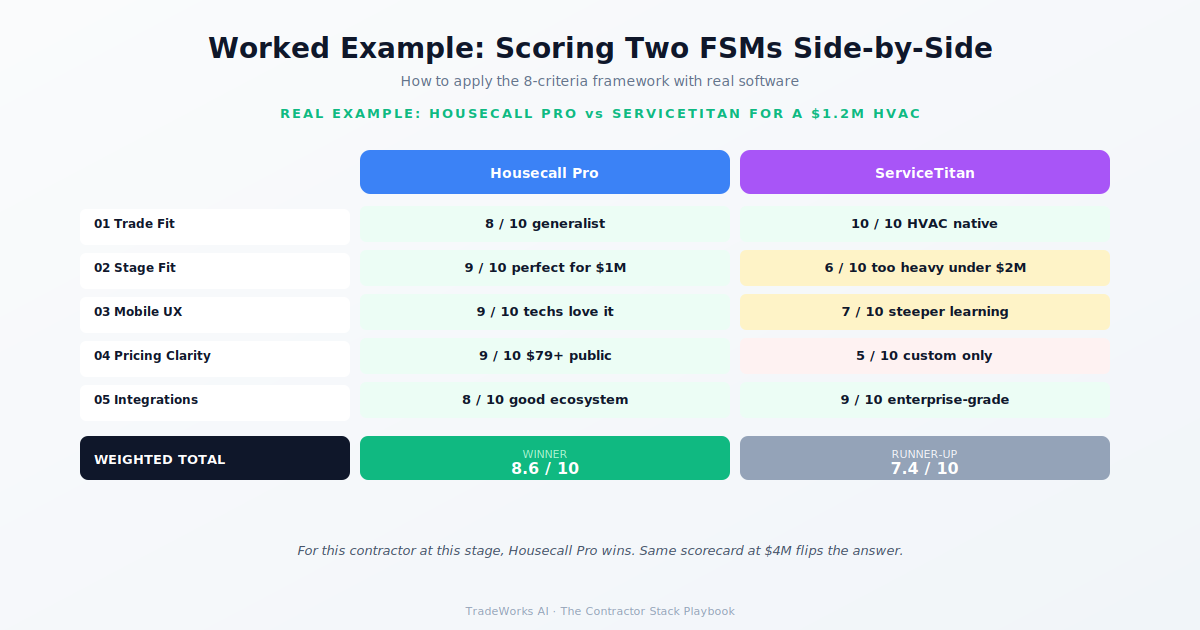
Trade fit is the single most important criterion. A platform built for your specific trade eliminates the workarounds and custom configurations that waste time and create errors. A tool that scores 5 on trade fit and 3 on pricing model will outperform a tool that scores 5 on pricing model and 2 on trade fit every time, because the daily friction of poor trade fit compounds across your entire team.
A minimum of 14 days with real data. Enter actual customers, create real jobs, run real invoices, and have at least two team members use the product in the field. Most contractors decide based on a 30-minute demo and regret it. Two weeks of real use with real workflows is the minimum for an informed decision.
Not necessarily. The framework identifies the best fit, but total cost of ownership and switching costs matter. If your current tool scores a 32/40 and the highest-scoring alternative is 36/40, the switching cost may not justify a marginal improvement. Save the switch for when the gap is 8+ points or when a specific criterion is critically failing.
The framework does not require technical expertise. Trade fit is about your daily work. Mobile experience is about using an app on your phone. Learning curve is about how fast your team gets productive. You do not need to understand APIs or database architecture. Focus on the criteria you can evaluate through direct use: trial the product, test the mobile app, call support, and ask your team for their honest feedback after one week.
Annually at minimum. Set a calendar reminder to run the Underutilization Audit from Part 1 and re-score your critical tools against the 8-Criteria Framework every January. Technology changes fast, and a product that scored 38/40 two years ago may have been surpassed by a competitor or degraded through acquisition, pricing changes, or feature bloat.
Most contractors are paying $400–900 per month for software they barely use, while losing thousands more in hidden costs from manual processes and missed callbacks. Our free audit grades your stack against the maturity model and identifies the highest-ROI changes you can make this quarter.
A contractor software stack is the complete set of digital tools a home service business uses to run its operations, finances, customer r...
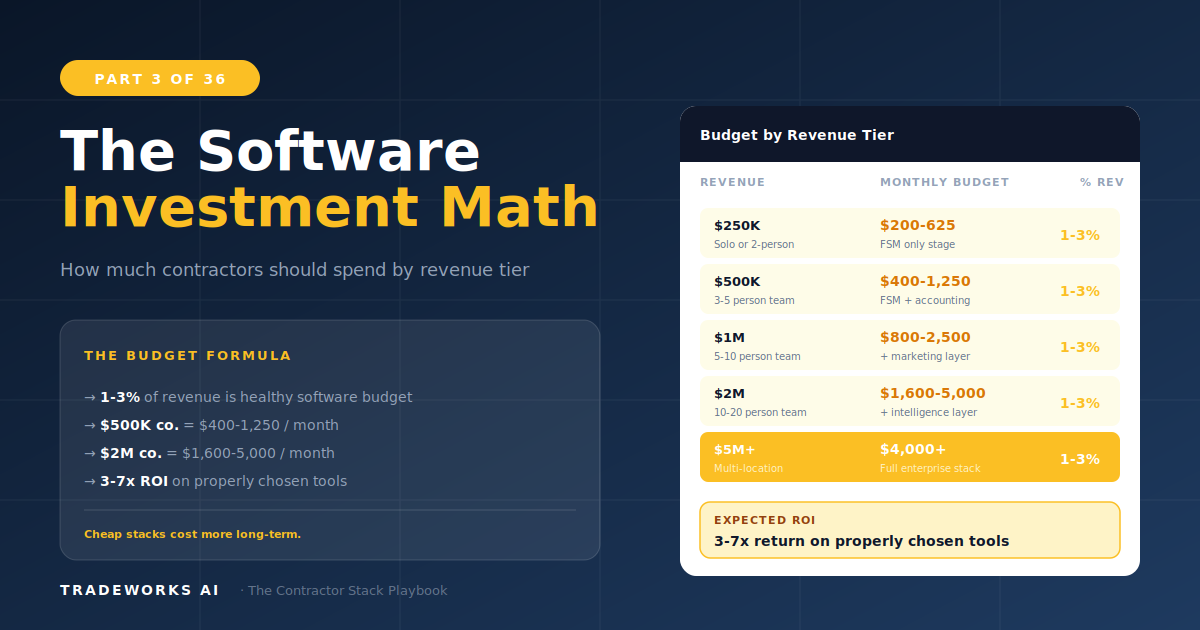
A home service contractor should spend between 1 and 3 percent of annual revenue on software tools. For a $500,000 company, that means $3...