Contractor Stack · Part 5
CRM — Managing Relationships Beyond the FSM
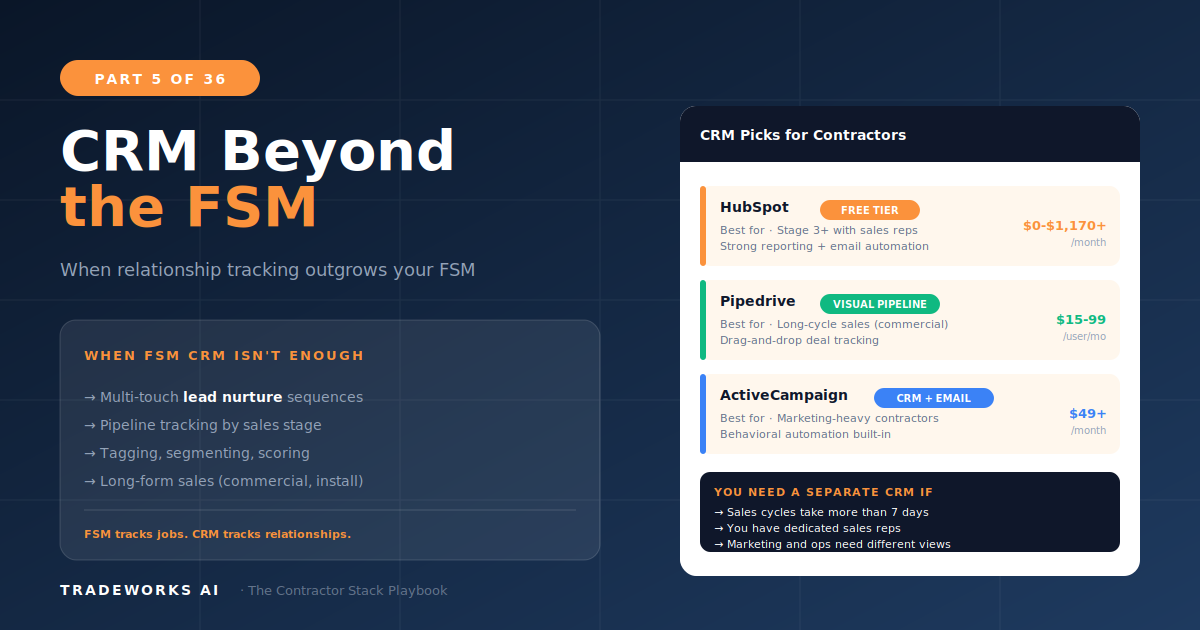
Most contractors do not need a separate CRM. The customer management features built into modern FSM platforms like ServiceTitan, Housecal...
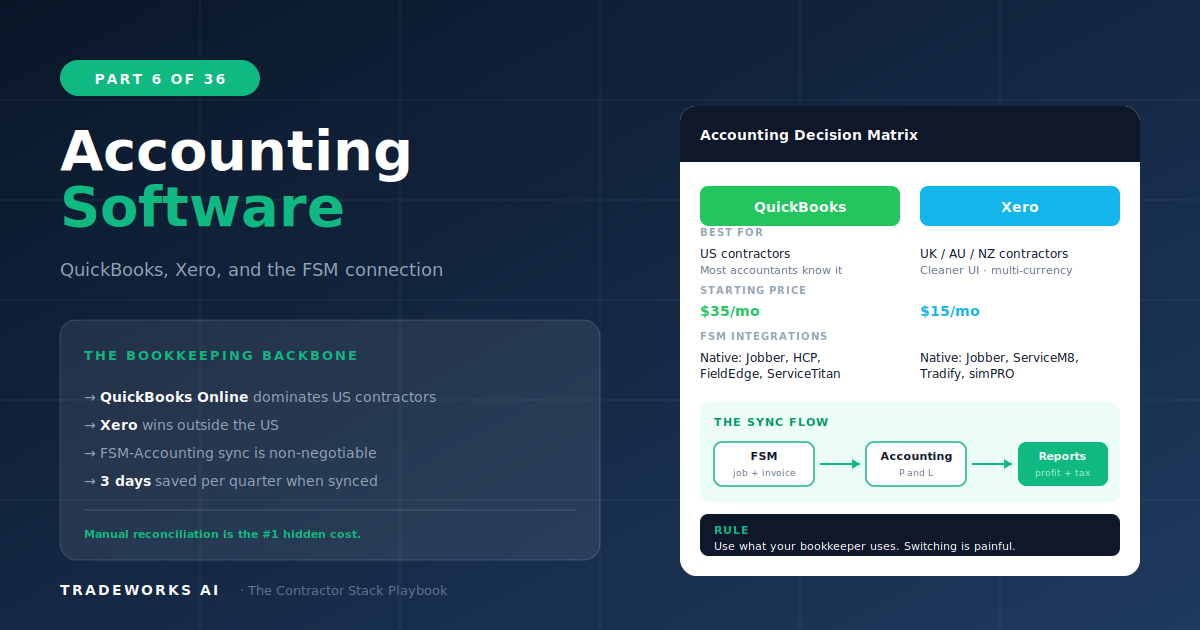
The best accounting software for home service contractors is QuickBooks Online, and the reason is not the software itself — it is the integration ecosystem. QuickBooks connects natively or via deep two-way sync with more FSM platforms than any other accounting product: ServiceTitan, Housecall Pro, Jobber, FieldEdge, Service Fusion, and Workiz all offer QuickBooks integration as a core feature. At $30 to $200 per month, QuickBooks Online is the default choice for contractors at every maturity stage. Xero ($15–$78/month) is a capable alternative with a cleaner interface and lower pricing, but fewer FSM integrations. FreshBooks and Wave serve niche roles for solo operators and startups. This guide compares all four against the 8-Criteria Framework with specific attention to FSM sync depth.
In isolation, the differences between QuickBooks Online and Xero are modest. Both handle invoicing, expense tracking, bank reconciliation, financial reporting, and payroll. Both serve small businesses competently. If you were choosing accounting software for a retail store, either would work.
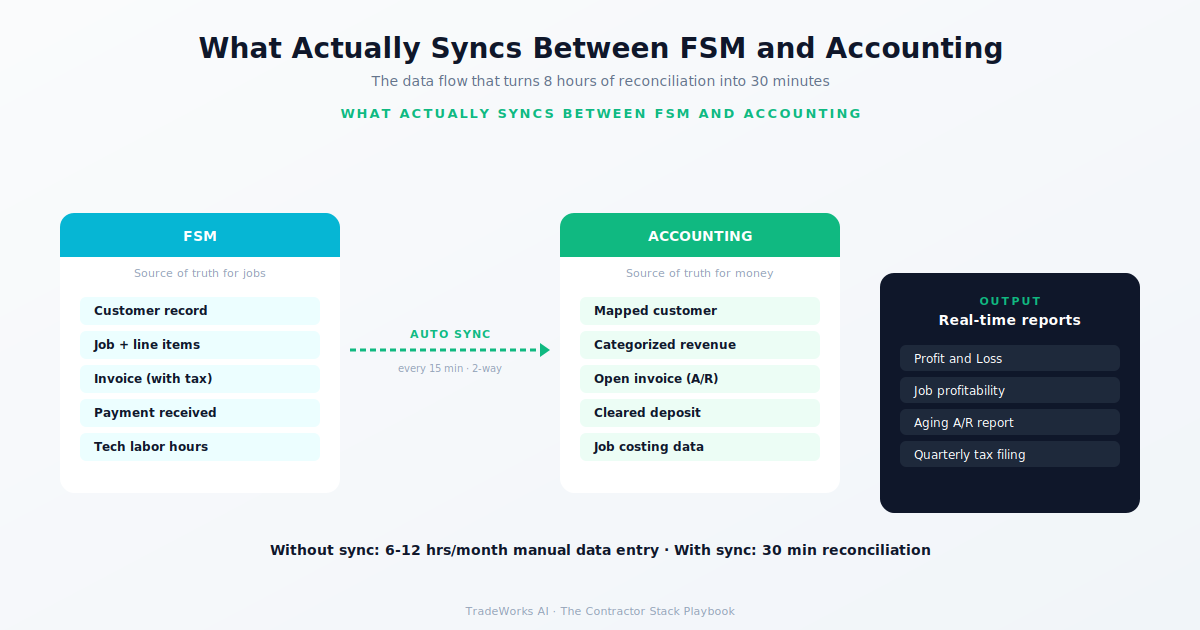
For contractors, the decision is not about accounting features. It is about how accounting data flows to and from your FSM. When a technician completes a job in the FSM, that invoice needs to appear in accounting automatically — with the correct customer, service code, revenue category, and payment status. When a payment is recorded in accounting, the FSM needs to reflect it. When a purchase order is created for parts, inventory and job costing need to update simultaneously.
Without this integration, your bookkeeper manually reconciles two systems. Every. Single. Month. At $50 to $150 per hour for bookkeeping, and 5 to 15 hours of reconciliation time per month for a $1 million contractor, the cost of poor integration is $3,000 to $27,000 per year — far more than the difference in subscription cost between any two accounting platforms.
QuickBooks Online is the default accounting platform for contractors for one reason: every major FSM integrates with it. ServiceTitan offers a deep two-way sync. Housecall Pro, Jobber, FieldEdge, and Workiz all provide native QuickBooks connections that automate invoice creation, payment recording, and customer syncing.
Beyond integration, QuickBooks benefits from the widest ecosystem of accountants, bookkeepers, and tax professionals who know the platform. When you hire a bookkeeper for your contracting business, there is a 90 percent chance they already work in QuickBooks. Training time is zero. Migration support exists. Your CPA can log in directly.
QuickBooks’s weaknesses are real: the interface has grown cluttered over years of feature additions, the support quality has declined significantly since Intuit moved to offshore call centers, and pricing has increased aggressively — Simple Start at $30/month is now more expensive than Xero’s equivalent tier. But the integration advantage and ecosystem familiarity still make it the safest default choice.
8-Criteria Score: Trade Fit 4/5, Size 5/5, Integration 5/5, Mobile 3/5, Learning Curve 3/5, Pricing 3/5, Data Ownership 4/5, Support 2/5. Composite: 29/40.
Xero is the best alternative to QuickBooks for contractors willing to verify FSM integration first. The interface is cleaner, the pricing is lower ($15–$78/month versus $30–$200), and the core accounting functionality is equivalent. Xero’s unlimited users at every tier is a significant advantage for contractors who need bookkeeper, accountant, and office manager access without per-user fees.
The limitation is integration depth. ServiceTitan does not offer native Xero integration. Housecall Pro and Jobber connect via third-party bridges (Zapier or dedicated Xero connectors), but the sync is not as deep as their native QuickBooks connections. Before choosing Xero, confirm that your specific FSM supports a reliable Xero integration — not just a listing on a marketplace, but a tested, bidirectional data flow.
8-Criteria Score: Trade Fit 3/5, Size 4/5, Integration 3/5, Mobile 4/5, Learning Curve 4/5, Pricing 5/5, Data Ownership 4/5, Support 3/5. Composite: 30/40 standalone; 26/40 when FSM integration is weighted heavily.
FreshBooks excels at invoicing and time tracking for service businesses. For solo operators who are their own technician, bookkeeper, and sales team, FreshBooks provides a simpler experience than QuickBooks with strong invoice design and client portal features. The mobile app is well-designed for creating and sending invoices from the field.
FreshBooks falls short for contractors with teams. Multi-user access is limited, job costing is basic, and FSM integration is narrow. As soon as you add a second technician or need to track profitability by service category, FreshBooks becomes a limitation rather than a tool.
8-Criteria Score: Trade Fit 2/5, Size 2/5, Integration 2/5, Mobile 4/5, Learning Curve 5/5, Pricing 4/5, Data Ownership 3/5, Support 3/5. Composite: 25/40.
Wave is free accounting software that actually works for basic bookkeeping. Invoicing, expense tracking, receipt scanning, and financial reporting cost nothing. Payroll is an add-on at $40 plus $6 per employee per month.
For a Stage 1 contractor with no FSM, no team, and zero software budget, Wave is a legitimate starting point. It gets the business out of a shoebox of receipts and into a basic financial system. But Wave has no FSM integration at all, limited reporting, and will be outgrown quickly. Think of Wave as training wheels: useful for the first 6 to 12 months, not a long-term platform.
8-Criteria Score: Trade Fit 1/5, Size 1/5, Integration 1/5, Mobile 3/5, Learning Curve 5/5, Pricing 5/5, Data Ownership 3/5, Support 1/5. Composite: 20/40.
Before committing to an accounting platform, verify these specific integration capabilities with your FSM:
Customer sync: Does a new customer in the FSM automatically create a customer record in accounting? Or does your bookkeeper enter it twice?
Invoice sync: When a job is completed and invoiced in the FSM, does the invoice appear in accounting automatically with correct line items, service codes, and tax calculations?
Payment sync: When a customer pays through the FSM’s payment portal, does accounting record the payment and close the invoice without manual entry?
Chart of accounts mapping: Can you map FSM service categories to specific revenue accounts in accounting? This is critical for job costing and profitability analysis by service type.
Sync frequency: Is the integration real-time, hourly, or daily batch? For high-volume operations (20+ jobs per day), real-time or hourly sync prevents end-of-day data conflicts.
Stage 1 (zero budget): Wave. Get out of the shoebox. Upgrade to QuickBooks when you add an FSM.
Stage 1–2 (solo operator): FreshBooks if invoicing simplicity is the priority. QuickBooks Simple Start if you plan to add an FSM within 6 months.
Stage 2–5 (any contractor with an FSM): QuickBooks Online. The integration ecosystem makes it the default. Verify the specific sync depth with your FSM before committing to a QBO tier.
Stage 2–4 (budget-conscious, verified integration): Xero. If your FSM has a tested, reliable Xero integration, the lower pricing and cleaner interface are genuine advantages. Confirm integration first.
QuickBooks Online is the safest default choice for contractors because it integrates with more FSM platforms than any alternative. The accounting features are not dramatically different from Xero or FreshBooks, but the integration ecosystem and accountant familiarity make it the lowest-risk option. The main scenarios where QuickBooks is not the best choice: budget is zero (use Wave), or your FSM has a verified deep Xero integration and you prefer the interface and pricing.
Invoice in the FSM, sync to accounting. Your technicians create invoices from the job site in the FSM. The integration pushes those invoices to accounting for bookkeeping, tax preparation, and financial reporting. Do not invoice in both systems — this creates duplicates, reconciliation nightmares, and data discrepancies.
A part-time bookkeeper for a contractor running $500,000 to $1 million in revenue typically costs $300 to $800 per month. A full-time bookkeeper or controller for a $2 million+ operation costs $3,500 to $6,000 per month. The better your FSM-accounting integration, the less bookkeeper time you need — and the more of their time goes to financial analysis rather than data entry.
You can, but schedule it at the start of a fiscal quarter. Export all transactions, customer records, and chart of accounts from QuickBooks, import into Xero, and run both systems in parallel for one month to verify accuracy. Your accountant should manage the transition to ensure tax continuity. Budget 10 to 20 hours of accountant time for the migration.
Most contractors are paying $400–900 per month for software they barely use, while losing thousands more in hidden costs from manual processes and missed callbacks. Our free audit grades your stack against the maturity model and identifies the highest-ROI changes you can make this quarter.
Most contractors do not need a separate CRM. The customer management features built into modern FSM platforms like ServiceTitan, Housecal...
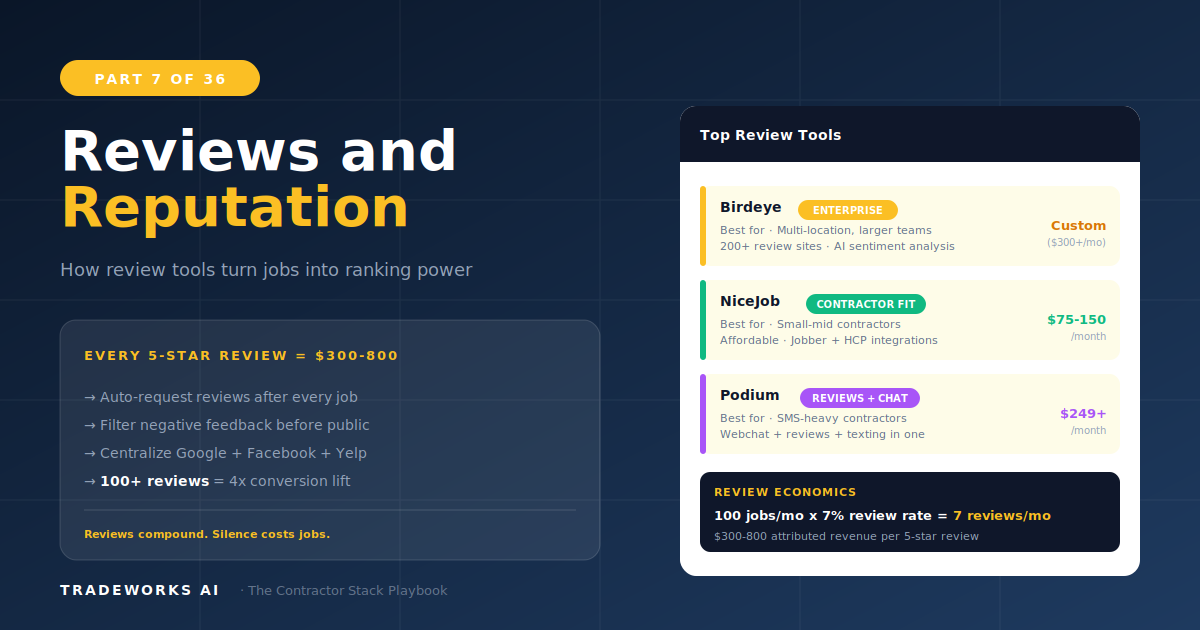
The best review management software for contractors automates the request process so every completed job triggers a review invitation wit...