Contractor Stack · Part 35
Live Contractor Stack Teardown
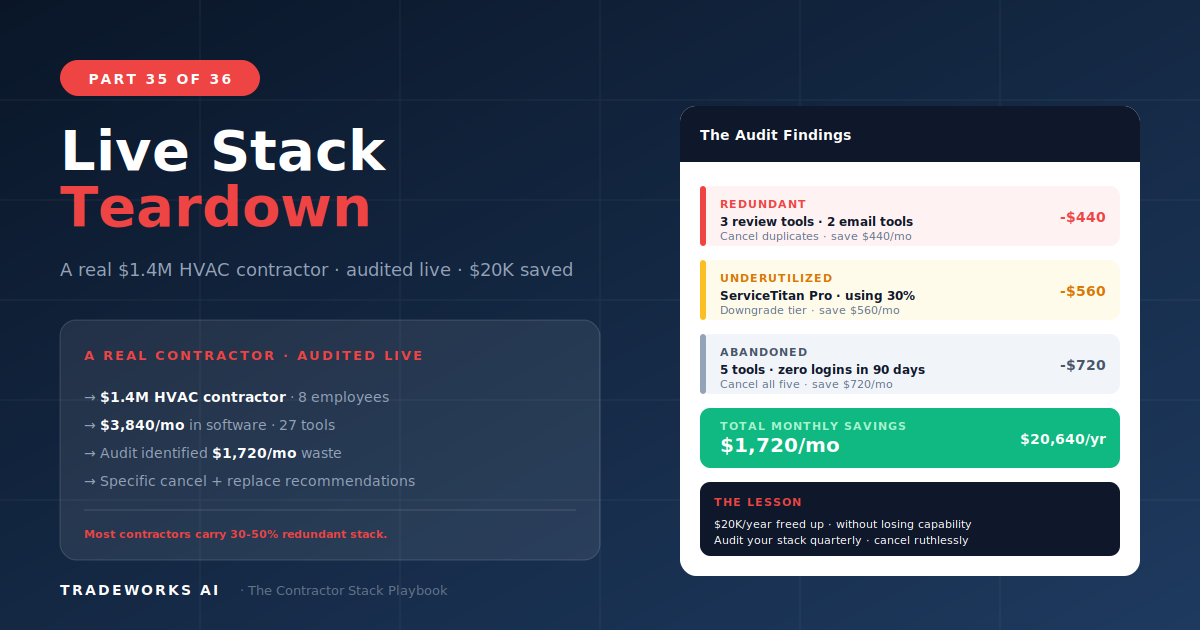
A live teardown of a $1.8 million HVAC contractor’s software stack revealed $518 per month ($6,216 per year) in wasted, redundant, or aba...
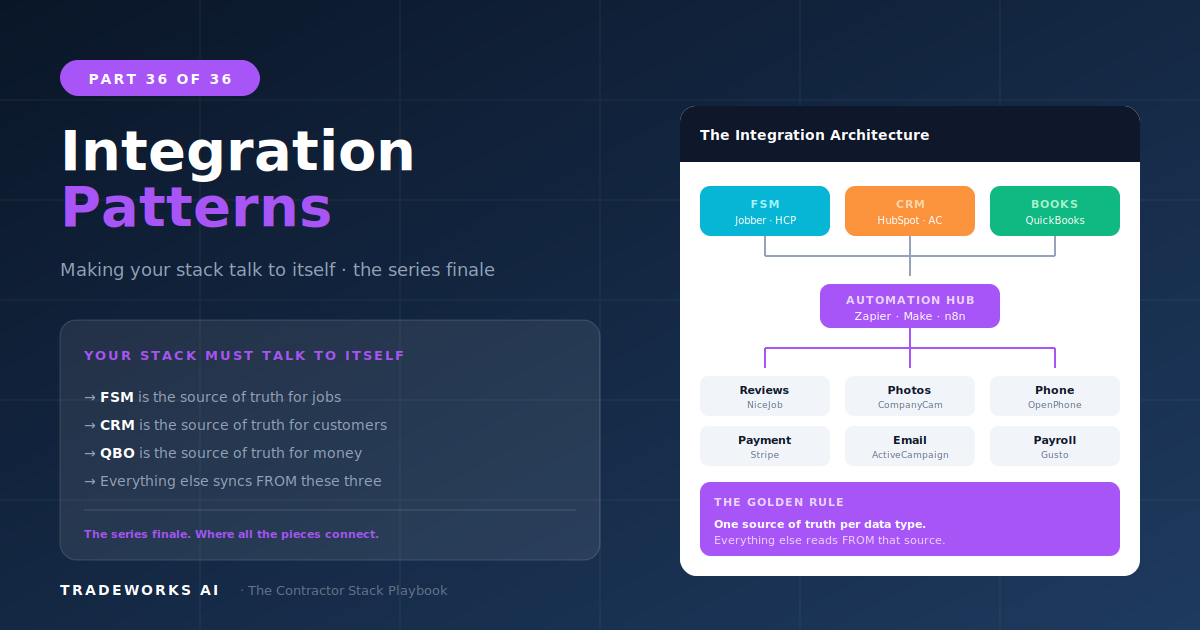
The seven integration patterns that connect a contractor’s software stack into a unified system are: job complete triggers (review request + CRM update + accounting sync), new customer workflows (CRM entry + welcome email), estimate follow-up sequences (2-hour/24-hour/48-hour automation), payment recording (accounting sync + referral request), dormant customer reactivation (12-month date trigger), new web lead instant response (60-second SMS), and positive review amplification (social media auto-post + referral request). These patterns were introduced individually across Parts 5 through 24 and in the automation deep dive of Part 16. This guide consolidates all seven into a single integration architecture document, showing how data flows between FSM, CRM, email, reviews, accounting, phone, and website as one connected system.
Every contractor stack has a single source of truth problem: which system holds the definitive customer record? When a customer’s phone number is updated in the FSM, does it update in the CRM? When a payment is recorded in the FSM, does it appear in accounting? When a review is posted on Google, does the CRM know about it?
Without integration, each tool maintains its own version of the customer record. Over 6 to 12 months, these records drift apart: different phone numbers, outdated email addresses, missing job history. The office manager becomes the human integration layer, manually checking and updating multiple systems. This is the “human API” problem described in Part 16.
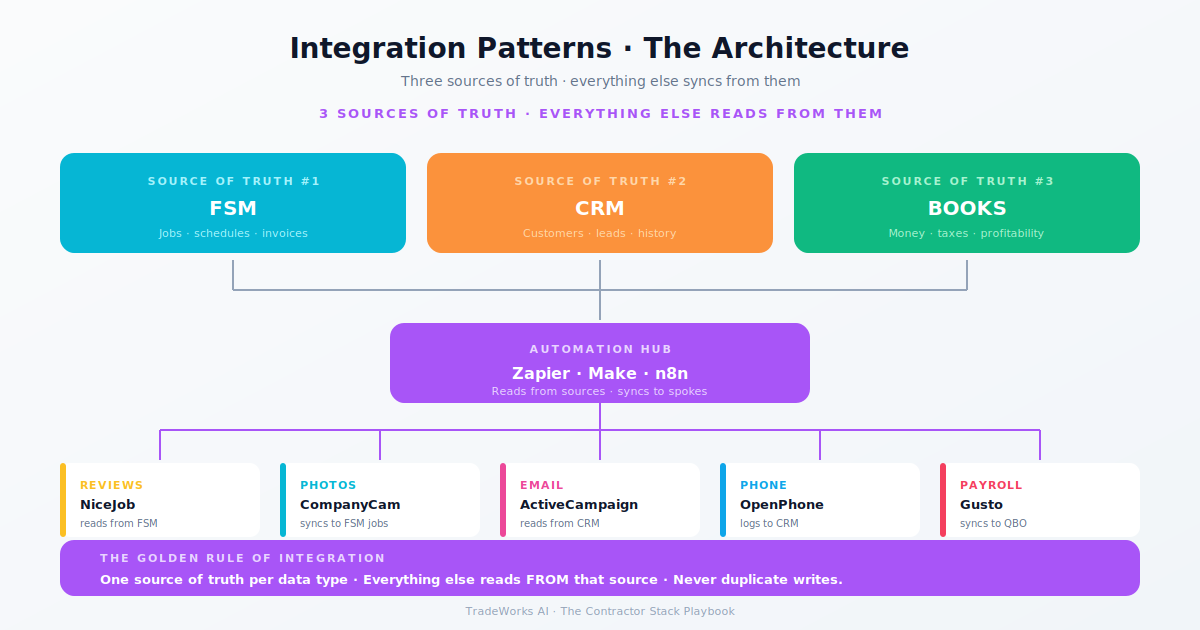
Integration patterns solve this by establishing automated data flows between tools. The FSM is the primary source of truth for operational data (jobs, schedules, invoices). The CRM is the primary source for marketing data (email engagement, lifecycle stage, communication history). Accounting is the primary source for financial data (revenue, expenses, profitability). Each system owns its domain, and integration ensures changes in one system propagate to the others automatically.
This is the most important integration pattern in the contractor stack. When a technician marks a job as complete in the FSM, three things should happen automatically: a review request sends via NiceJob or your email platform (Part 7), the customer record updates in the CRM with the completed service date and type (Part 5), and the invoice syncs to QuickBooks (Part 6).
Implementation: Zapier watches for the FSM’s “job status changed to complete” trigger. Multi-step Zap sends data to NiceJob (review request), ActiveCampaign (contact update with tags: service type, completion date), and verifies the QuickBooks sync completed (most FSMs handle QB sync natively, but Zapier can catch failures).
This single pattern fixes the three most common manual task failures: forgotten review requests, outdated CRM records, and unreconciled invoices.
When a new customer is created in the FSM (either manually by office staff or through online booking), the contact should automatically appear in the CRM with a welcome email sequence triggered. The welcome sequence (Part 8) sends three emails over 7 days: thank you + what to expect, service area and capabilities introduction, and maintenance plan invitation.
Implementation: Zapier trigger on FSM “new customer created.” Action: create contact in ActiveCampaign with source tag (online booking, phone call, referral). ActiveCampaign automation starts the 3-email welcome sequence based on the tag. Simultaneously, create a contact record in OpenPhone so the business number recognizes incoming calls from the new customer.
An unsold estimate that sits for 48 hours without follow-up has a dramatically lower close rate than one followed up within 2 hours (Part 11). The follow-up automation sends a text message at 2 hours (“Just wanted to make sure you received the estimate — any questions?”), an email at 24 hours with a testimonial from a similar project, and a phone call reminder to the office manager at 48 hours if no response.
Implementation: Zapier trigger on FSM “estimate sent.” Action: add to ActiveCampaign automation with timed steps. The 48-hour phone reminder is a Slack or email notification to the office manager — the system cannot make the call, but it ensures the follow-up does not get forgotten.
When a customer pays, the financial transaction syncs to QuickBooks (typically native FSM integration). The automation layer adds a CRM status update (customer tagged as “paid, active”) and, for customers with a positive service experience, triggers a referral request email (Part 24) 7 days after payment — enough time for the customer to experience the completed work but soon enough that satisfaction is still high.
ActiveCampaign’s date-based automation triggers when a customer’s last service date exceeds 12 months. The 4-email reactivation sequence (Part 8) deploys: “we miss you” with a service credit, educational content relevant to their last service type, social proof (recent reviews from their neighborhood), and final outreach with expiring offer. This pattern runs continuously in the background, recovering dormant revenue without any manual action.
When a lead submits a form on the contractor’s website, the integration creates a contact in the CRM, sends an SMS via OpenPhone within 60 seconds (“Thanks for reaching out! We received your request and will call you within [timeframe]”), and creates a lead or job in the FSM for the office manager to follow up. The 60-second response captures the lead while they are still on the website — before they submit the same form to a competitor (Part 9 speed-to-lead principle).
When NiceJob detects a new positive review, it automatically creates a branded social media post (Part 7). The integration layer adds: tag the customer in ActiveCampaign as “reviewer” (these are your most satisfied customers and best referral candidates), trigger a referral request email 3 days later (Part 24), and log the review in the CRM for customer lifetime value tracking.
Stage 2 (3–5 integrations): Patterns 1, 2, and 5. Job complete triggers, new customer workflow, and dormant reactivation. These three cover the highest-value automations at minimal Zapier cost.
Stage 3 (5–7 integrations): Add Patterns 3, 4, and 6. Estimate follow-up, payment referral trigger, and web lead instant response. These require more Zapier tasks and ActiveCampaign automation complexity.
Stage 4–5 (all 7 + custom): All 7 patterns active plus custom integrations: AI voice agent → CRM (Part 14), phone call → CRM logging, fleet data → reporting dashboard. At this stage, consider Make or N8N for complex multi-branch workflows (Part 16).
Each system owns a domain. Integration ensures they share data, but one system is always authoritative for each data type:
FSM: authoritative for jobs, schedules, dispatching, invoicing. All operational data starts and ends here.
CRM (ActiveCampaign): authoritative for marketing data, email engagement, lifecycle stage, communication history, and automation sequences.
Accounting (QuickBooks): authoritative for financial data, revenue recognition, expense tracking, and tax reporting.
Review platform (NiceJob): authoritative for review data, review velocity, and social proof content.
Phone (OpenPhone): authoritative for call logs, recordings, and SMS history.
When in doubt about which system holds the correct data, refer to the authoritative system for that domain. Customer phone number discrepancy? Check the FSM (where the office manager updates it). Revenue question? Check QuickBooks (where the bookkeeper reconciles). Email engagement? Check ActiveCampaign (where the automation runs).
Stage 2 contractors need 3 to 5 integrations covering the core patterns (job complete, new customer, reactivation). Stage 3 adds 2 to 3 more (estimate follow-up, payment referral, web lead response). Stage 4+ adds custom integrations for AI, fleet, and multi-branch data flows. Start with Pattern 1 (job complete → review request) and add one pattern per week.
Zapier provides error notifications when a workflow fails. Common causes: expired credentials (a platform password changed), API rate limits (too many tasks in a short period), or field mapping changes (the FSM updated its data structure). Monitor Zapier’s task history weekly. Fix failures within 24 hours to prevent data drift between systems.
Native integrations (like FSM-to-QuickBooks sync) are more reliable and should be used whenever available. Zapier fills the gaps between tools that do not have native connections. The ideal stack uses native integration for the FSM-accounting connection and Zapier for FSM-to-CRM, FSM-to-review, and CRM-to-email workflows where native options do not exist.
Most contractors are paying $400–900 per month for software they barely use, while losing thousands more in hidden costs from manual processes and missed callbacks. Our free audit grades your stack against the maturity model and identifies the highest-ROI changes you can make this quarter.
A live teardown of a $1.8 million HVAC contractor’s software stack revealed $518 per month ($6,216 per year) in wasted, redundant, or aba...
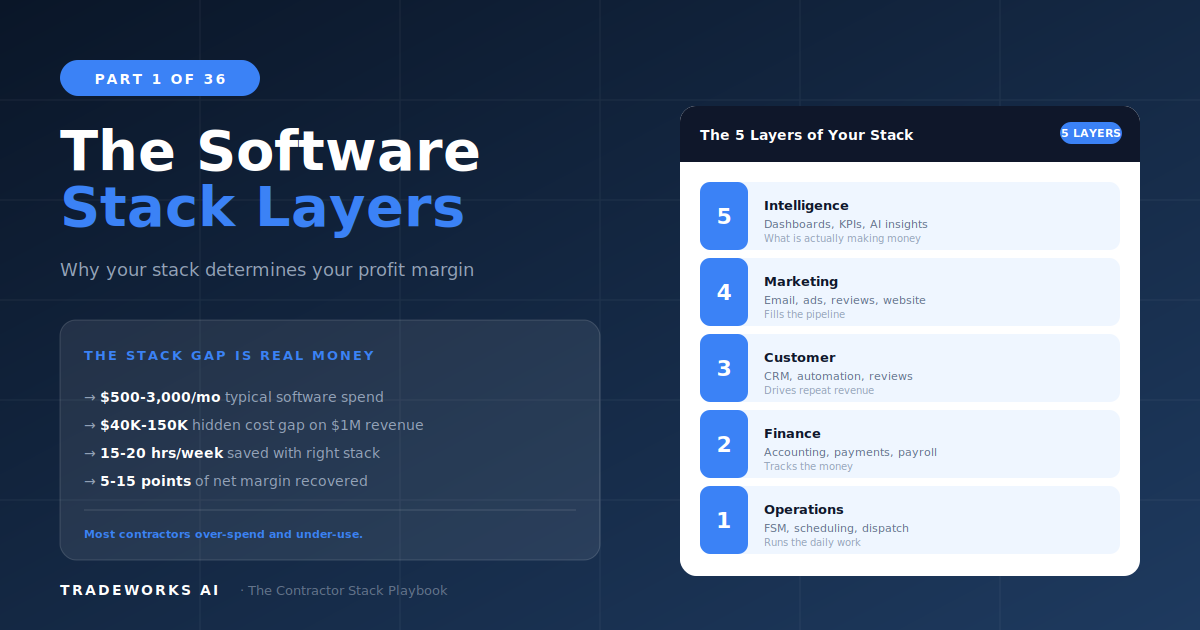
A contractor software stack is the complete set of digital tools a home service business uses to run its operations, finances, customer r...