Email Marketing Playbook · Episode 11 of 12

Email Metrics and Deliverability for Contractors: The Weekly Dashboard That Shows What Is Working

By Trevor Bennett · May 2026 · 11 min read

Series

The Email Marketing Playbook

Episode 11 of 12
Email marketing dashboard with health score gauge in green and surrounding metric panels

The only email metrics that matter for home service contractors are the ones that connect directly to revenue: booked jobs from email, revenue attributed to email campaigns, and cost per email-acquired customer. Everything else — open rates, click rates, unsubscribe rates — is a diagnostic tool that helps you fix problems, not a goal in itself.

A contractor reviewing five numbers once per week for 15 minutes can identify underperforming campaigns, diagnose deliverability issues, and optimize sequences across the entire email system. This episode provides the benchmarks, the diagnostic framework, and the deliverability checklist that keeps your emails in the inbox instead of the spam folder.

The Five Numbers That Matter: Your Weekly Dashboard

Every Friday, spend 15 minutes reviewing these five numbers:

  1. Email-attributed booked jobs. How many jobs this week came from email campaigns? Track via UTM parameters and FSM tagging.
  2. Email-attributed revenue. Total revenue from those jobs.
  3. Cost per email-acquired customer. Email platform cost divided by email-attributed bookings.
  4. List health score. Aggregate of bounce rate, unsubscribe rate, and spam complaint rate.
  5. Deliverability indicator. Inbox placement rate and sender reputation score.

Benchmark Tables: What Good Looks Like for Contractors

Campaign-Type Benchmarks

  • Welcome Sequence Email 1: 55–70% open rate, 15–25% click rate.
  • Reactivation Email 1: 25–40% open rate, 3–6% click rate.
  • Seasonal Pre-Season Email 1: 30–45% open rate, 6–12% click rate.
  • Maintenance Plan Enrollment Email 1: 40–55% open rate, 8–15% click rate.
  • Review Request: 35–50% open rate, 12–25% click-to-review rate.
  • Referral Request: 30–45% open rate, 3–8% referral conversion.

These benchmarks are specific to home service contractors sending to their own customer database, not purchased lists.

Deliverability Benchmarks

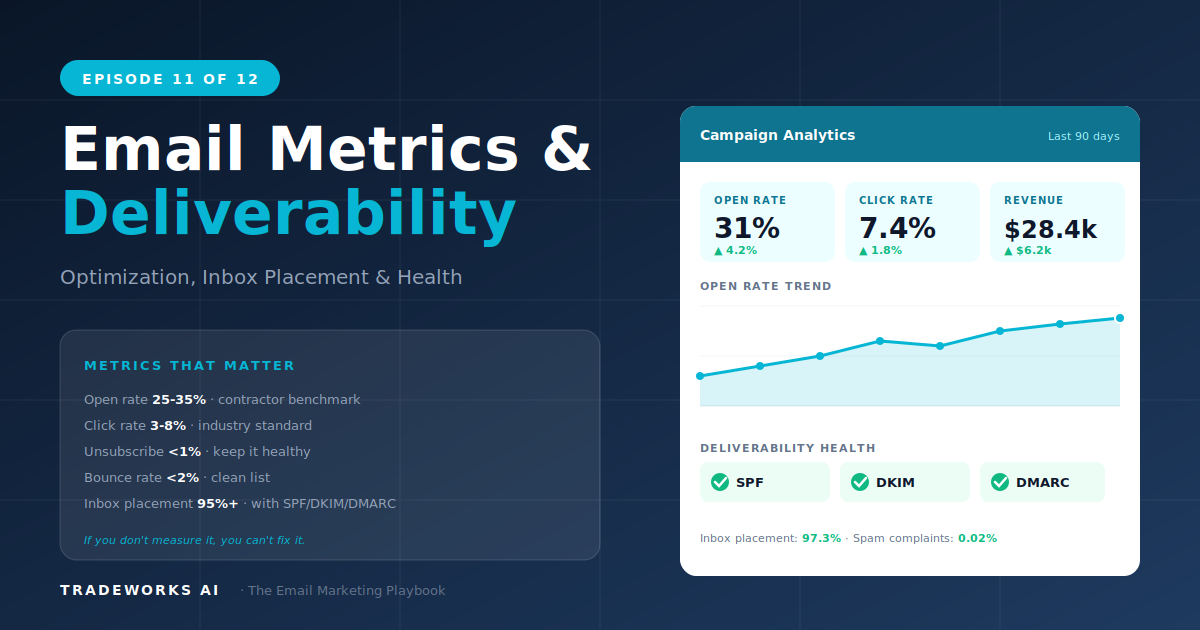
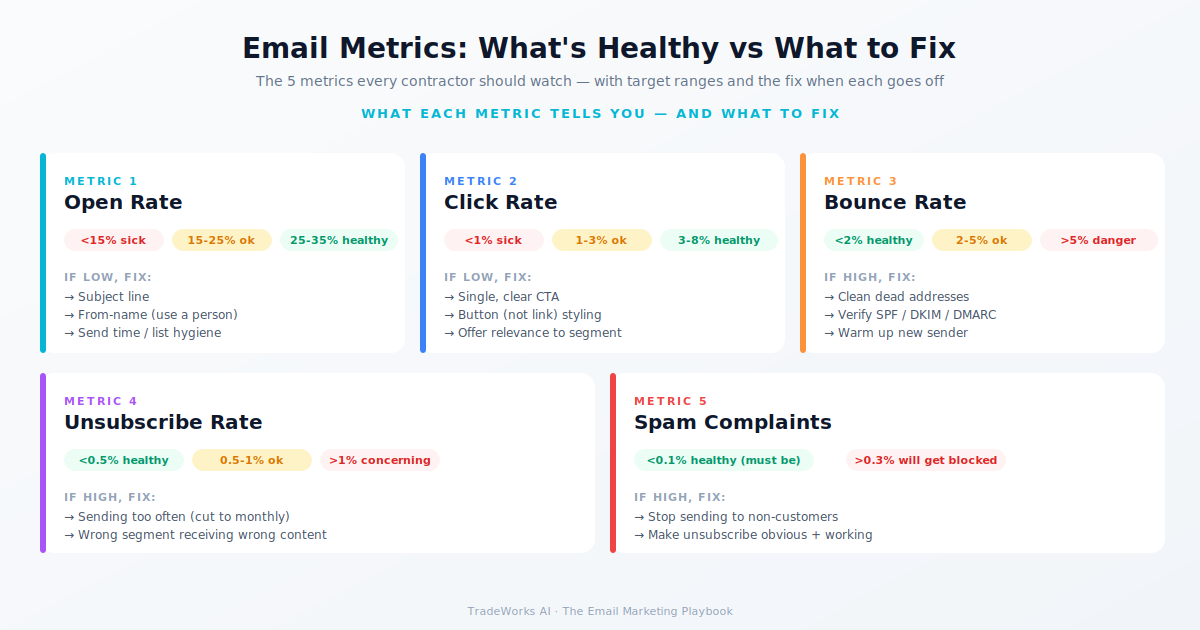
  • Bounce rate: Below 2%. Above 5% damages sender reputation.
  • Unsubscribe rate: Below 0.5% per campaign. Above 1% indicates over-sending.
  • Spam complaint rate: Below 0.10%. Above 0.30% triggers domain blocking.
  • Inbox placement rate: Above 95%. Below 90% indicates deliverability problems.

Gmail and Yahoo implemented stricter sender requirements in early 2024 that remain in effect through 2026. If your spam complaint rate exceeds 0.10%, these providers will begin routing your emails to spam automatically.

The Diagnostic Framework: When Numbers Drop

Open Rate Drops

  • Check deliverability first. An open rate drop often means emails are going to spam.
  • Check subject lines. A/B test two subject lines on your next campaign.
  • Check send timing. Weekday mornings (7–9 AM) and evenings (6–8 PM) consistently outperform.
  • Check list freshness. If you have not cleaned your list in 6+ months, inactive contacts are dragging down open rate.

Click Rate Drops

  • Check content relevance. Segmentation drift is the most common cause.
  • Check CTA clarity. Every email should have one primary CTA.
  • Check mobile rendering. 60–70% of contractor customer emails are opened on mobile.

Conversion Rate Drops

  • Check the landing experience. Slow page load, hard-to-find phone number, broken booking form.
  • Check offer fatigue. Same seasonal offer for three consecutive campaigns has self-selected the audience.
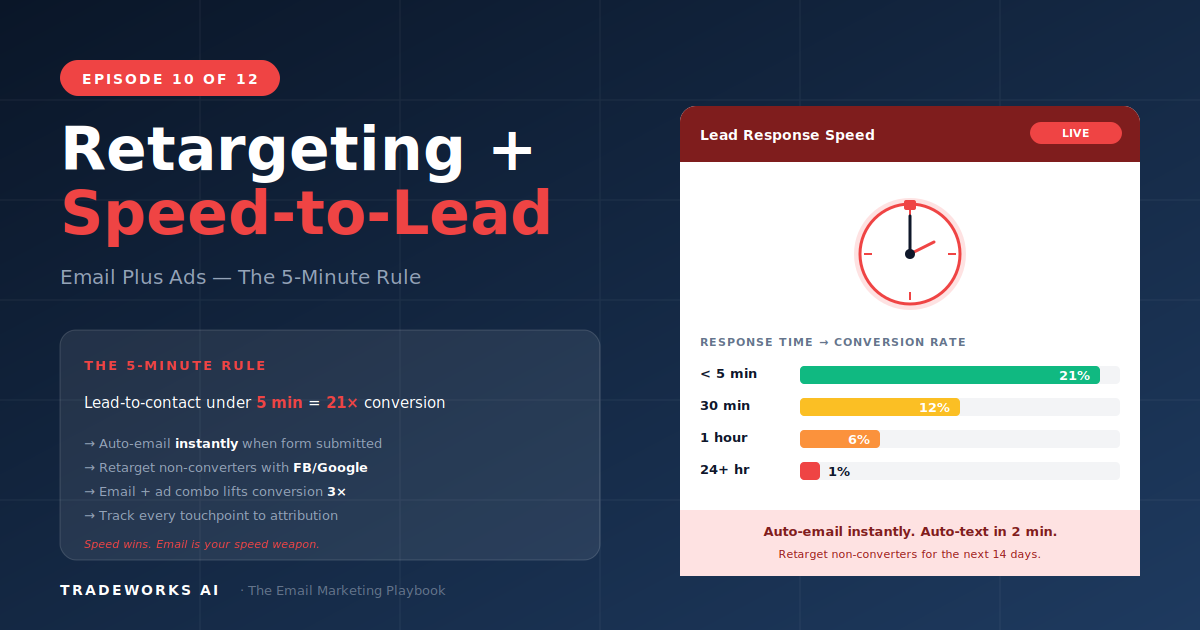
  • Check follow-up speed. If your office is taking 2 hours instead of 5 minutes, leads go cold.

Unsubscribe Rate Spikes

  • Check frequency. Increased frequency causes unsubscribes.
  • Check relevance. Segment-mismatched content drives unsubscribes.
  • Check new-subscriber quality. Low-quality contact sources trigger unsubscribes.

Deliverability: Keeping Your Emails Out of Spam

Authentication (One-Time Setup)

  • SPF record: Authorize your email platform to send on behalf of your domain. 15-minute setup.
  • DKIM signing: Cryptographic signature that proves the email was sent by an authorized server.
  • DMARC policy: Instructs receiving servers what to do with emails that fail SPF or DKIM.
  • Custom sending domain: Send from your own domain ([email protected]) rather than a shared platform domain.

If SPF, DKIM, and DMARC are not configured, Gmail and Yahoo will flag your emails as suspicious. This is non-negotiable.

List Hygiene (Ongoing)

  • Remove hard bounces immediately after the first bounce.
  • Suppress unengaged contacts after 90 days.
  • Re-verify your list annually using NeverBounce or ZeroBounce ($3–8 per 1,000 contacts).
  • Honor unsubscribes within 24 hours.

Sending Practices

  • Warm up new sending domains gradually. Start with 50–100 emails per day, increase by 50% every 3–4 days.
  • Maintain consistent send volume. No more than 2x spikes during seasonal campaigns.
  • Include a physical mailing address (CAN-SPAM requirement).
  • Make the unsubscribe link visible. A spam complaint is 10x worse for reputation than an unsubscribe.

A/B Testing: What to Test and When

Start with subject line testing on every campaign. Highest-impact, lowest-effort test available. ActiveCampaign's built-in A/B testing sends variant A to 20% of your list, variant B to 20%, waits 4 hours, then sends the winner to the remaining 60%.

Test the "from name" once: company name vs owner's personal name. For most contractors, the owner's name outperforms the company name by 10–20% on open rates. Lock in the winner.

Revenue Attribution: Connecting Email to Booked Jobs

  1. UTM parameters on every email link. Tag with utm_source=email, utm_medium=[campaign_type], utm_campaign=[name].
  2. Dedicated phone tracking numbers (CallRail, CallTrail at $30–50/month).
  3. CRM/FSM tagging. When a customer books from an email, tag the job as "Source: Email — [Campaign Name]."
  4. Monthly revenue report. Sum all email-attributed revenue and divide by total email platform cost.

For most contractors running the full playbook, email attribution should show $15–40 in revenue per $1 spent on email platform costs.
The Monthly Optimization Cycle

  • Review campaign performance by type. Allocate more creative effort to high performers.
  • Clean the list. Archive 90-day non-engagers. Remove hard bounces.
  • Refresh subject-line patterns every 3 months.
  • Audit segmentation. Are new customers landing in the correct segments?
  • Plan next month's campaigns based on the seasonal calendar.

What This Means for Your Business

Five numbers. Fifteen minutes. Once a week. That is the full operational rhythm for a contractor email program that produces $36 per $1 spent. Get the deliverability checklist done once. Run the diagnostic framework when metrics drop. Read Episode 12 next: the series finale on AI and the modern email stack.

Frequently Asked Questions

What open rate should I expect on my first campaign?

For a first-time campaign to an existing customer list, expect 20–30% if the list has not been emailed in over 6 months. If the list is fresh and recently cleaned, expect 30–45%. Open rates improve over the first 3–6 months as sender reputation builds and inactive contacts are suppressed.

Are open rates still reliable in 2026?

Apple's Mail Privacy Protection pre-loads tracking pixels for Apple Mail users, inflating open rates by 15–30%. This means your true open rate is lower than reported. However, relative comparisons (this campaign versus last campaign) are still valid. Click rates are the more reliable engagement metric in 2026.

How often should I email my customer list?

For residential contractors: 2–4 emails per month to active customers during normal periods, up to 6 during pre-season campaign windows. For maintenance plan members: 1–2 per month plus seasonal reminders. Over-sending is the number one cause of unsubscribes and spam complaints.

What do I do if my emails start going to spam?

Step 1: Verify SPF, DKIM, and DMARC authentication. Step 2: Check your spam complaint rate (must be below 0.10%). Step 3: Clean your list of inactive and bounced contacts. Step 4: Reduce send volume for 2 weeks while reputation recovers. Step 5: Gradually increase volume, starting with your most engaged segment.

Should I use an email deliverability monitoring tool?

For contractors sending fewer than 5,000 emails per month, the built-in deliverability reporting in ActiveCampaign is sufficient. For contractors sending 5,000+ per month or running multiple campaigns simultaneously, a tool like GlockApps ($15–50/month) or 250ok provides inbox placement testing across Gmail, Yahoo, and Outlook.

Where do I check my domain reputation?

Google Postmaster Tools (free, requires DNS verification) shows your sender reputation, spam rate, and authentication status from Google's perspective. Microsoft SNDS does the same for Outlook/Hotmail. Check both monthly. A reputation drop is an early warning before deliverability suffers.

Are Your Emails Even Reaching the Inbox?

If your SPF, DKIM, or DMARC isn't set up, Gmail and Yahoo are silently routing your campaigns to spam. Our free audit runs a full deliverability check and reports the gaps.

Continue the Series

Related Services

Digital Marketing Pricing