Email Marketing · Part 1
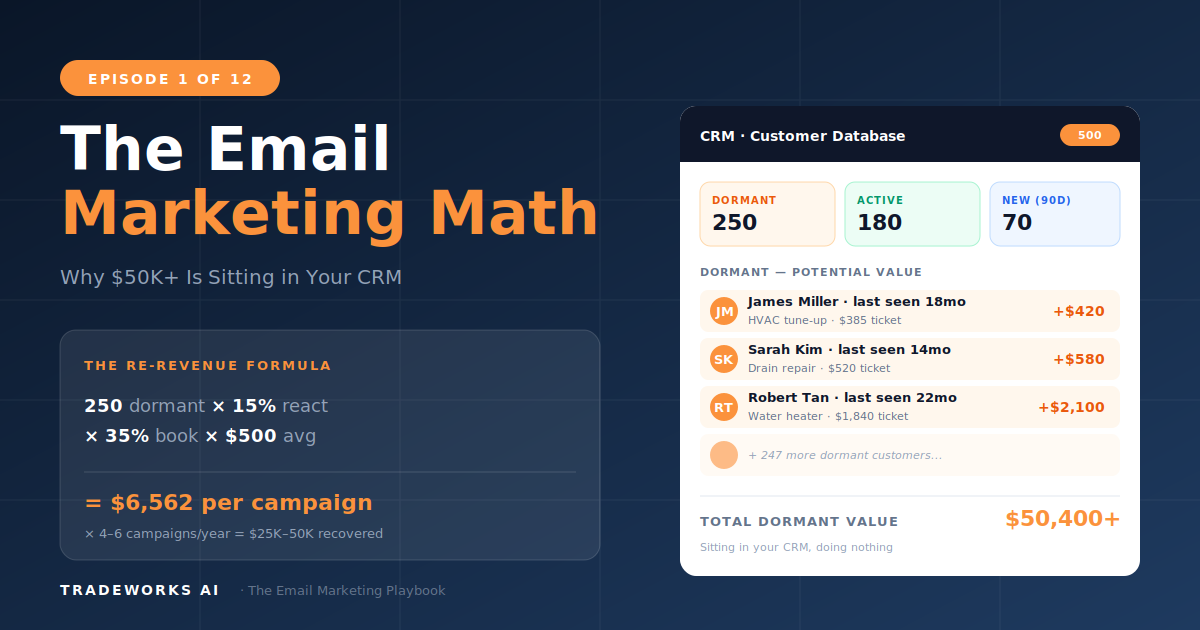
The Email Marketing Math
The math behind contractor email leads, the Re-Revenue Framework, and the $36-per-$1 ROI.
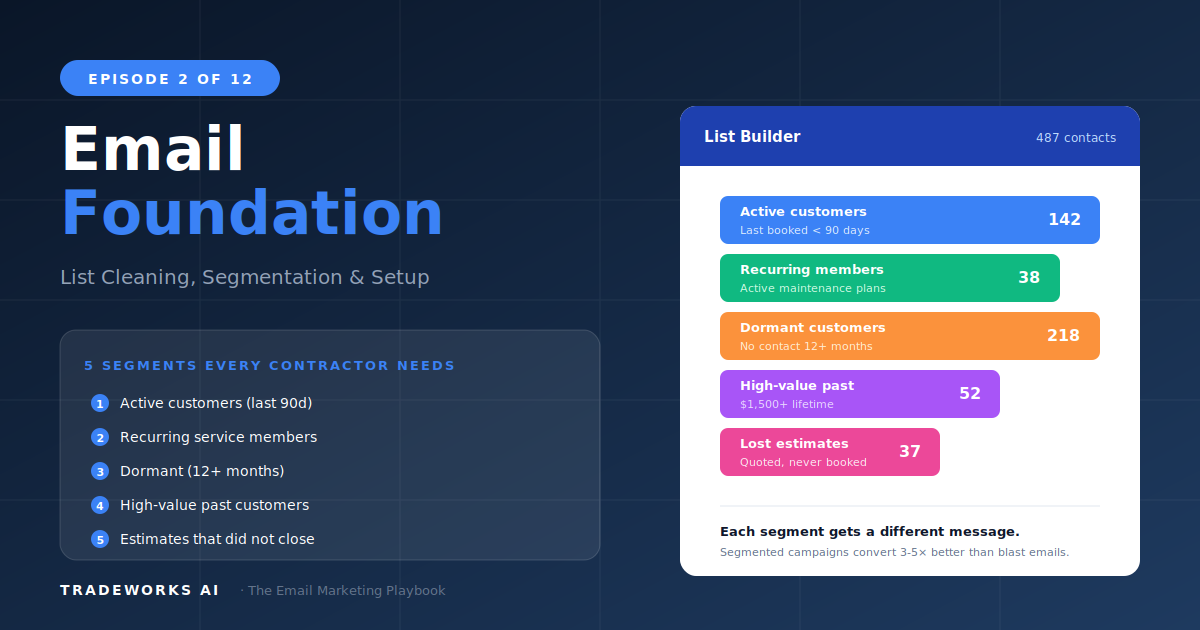
Before you send a single campaign, three operational steps separate contractors who generate revenue from email from those who send messages into the void: list cleaning (removing invalid emails, duplicates, and opt-outs so your deliverability stays high and your metrics are real), segmentation (dividing your customer list into 5 behavioral groups so each customer receives relevant content instead of generic blasts), and platform setup (configuring your FSM-native email tools or a dedicated platform like Mailchimp so campaigns can actually send).
Most contractors skip all three and jump straight to writing an email. The result is low open rates, high bounce rates, spam folder placement, and the false conclusion that email does not work for their business. This article covers the 30-minute list cleaning protocol, the 5 segments every contractor needs, the platform decision framework (FSM-native vs Mailchimp vs ActiveCampaign), and the technical setup checklist that ensures your emails reach inboxes.
Your customer list has been accumulating data for years with no hygiene. Before sending anything, clean it.
Export from your FSM (Jobber, HCP, ServiceTitan, or equivalent). Include: name, email, phone, last service date, service type, total spend, address. CSV format.
Upload your cleaned list to an email verification service. These tools check whether each email address is valid, active, and deliverable. Cost: $3–10 per 1,000 emails.
Remove all addresses flagged as invalid, disposable, or high-risk. This step alone can reduce bounce rates from 8–15% to under 2%.
Add tags based on the data you already have: last service date, service type, total lifetime spend, residential vs commercial. These tags become the foundation for segmentation.
Generic email blasts to your entire list underperform segmented campaigns by 50–75% on every metric. Five segments cover the Re-Revenue Framework from Part 1.
These customers remember you. They are warm. Content strategy: retention emails (educational, seasonal tips, maintenance reminders), review requests, referral asks, maintenance plan enrollment. Frequency: 2–4 emails per month.
Starting to forget you. Still reachable. Content strategy: seasonal service reminders tied to their last service, light reactivation, new service announcements. Frequency: 1–2 emails per month.
Forgot about you but still reachable. Content strategy: reactivation campaigns. This is the highest-revenue segment from Part 1 math. Frequency: 1 email per month or campaign-based.
May have moved, changed providers, or lost interest. Content strategy: aggressive reactivation. Low expectations — 5–10% reactivation. Frequency: quarterly campaigns only.
Your most valuable customers. Content strategy: plan renewal reminders, upcoming service scheduling, plan upgrade offers, VIP exclusive content, priority referral asks. Frequency: 2–4 emails per month with high personalization.
Three tiers of email platform for contractors, matched to business stage and complexity needs.
Jobber, Housecall Pro, and ServiceTitan all include basic email marketing. Best for: Stage 1–2 contractors who want to start immediately with zero additional cost. Limitations: basic templates, limited automation, minimal segmentation, limited analytics. Good enough to run the Re-Revenue Framework at a basic level.
Free tier up to 500 contacts with 1,000 sends per month. Best for: Stage 2–3 contractors who need better templates, basic automation, and proper analytics. The sweet spot for most contractors starting a serious email program.
Full marketing automation platform. Best for: Stage 3–5 contractors who want advanced automation sequences, CRM integration, lead scoring, and sophisticated segmentation. This is where the Re-Revenue Framework runs at full power.
(Detailed comparison in Part 4.)
Before sending your first campaign, complete this checklist to ensure deliverability:
SPF, DKIM, and DMARC sound technical but most email platforms provide setup wizards. Mailchimp and ActiveCampaign walk you through DNS record configuration. Total setup time: 15–30 minutes with the wizard.
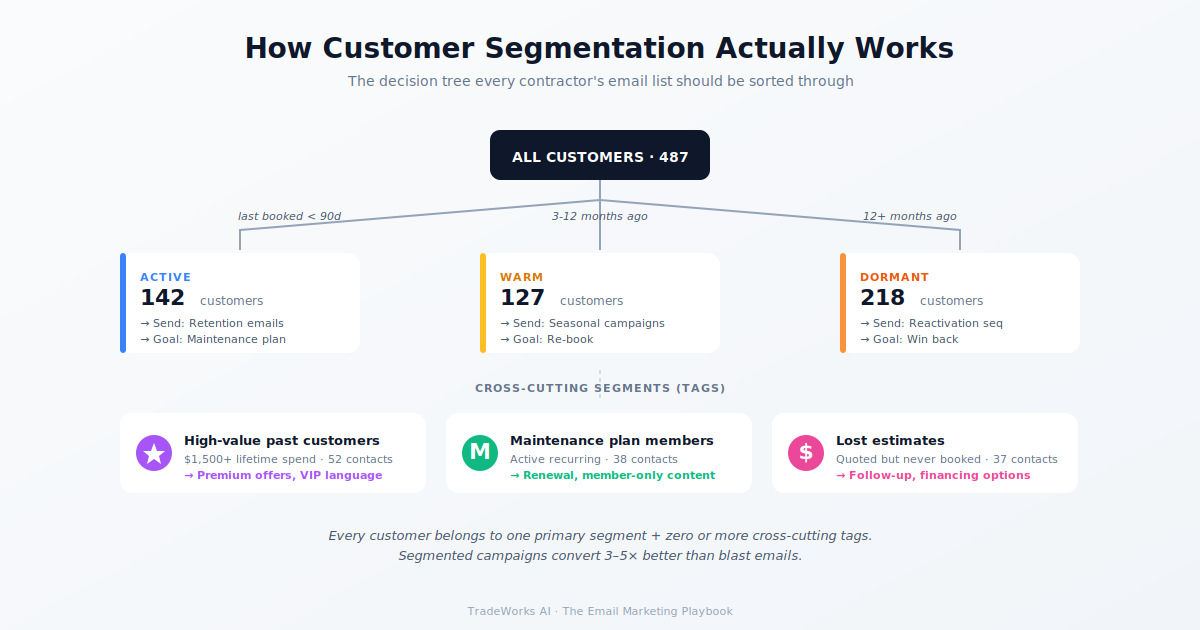
The 30-minute list cleaning protocol, the 5 segments, and the platform setup are the operational foundation. Skip them and your campaigns underperform. Complete them and every campaign you send in Parts 3–12 reaches the right customers with relevant content that drives revenue. Read Part 3 next: the Welcome Sequence.
2–3 hours total. 30 minutes for list cleaning, 30 minutes for segmentation setup, 30–60 minutes for platform configuration and DNS authentication. One afternoon investment that enables every future campaign.
Most FSMs support basic tagging and filtering. You can create segments based on last service date and service type within Jobber, HCP, or ServiceTitan. For automated segment-based campaigns with different content per segment, Mailchimp or ActiveCampaign provides more flexibility.
Start with 3 segments instead of 5: Active (last 6 months), Dormant (6+ months), and Maintenance Plan. The framework scales down. Even 50 customers in the Active segment justifies a monthly email.
CAN-SPAM applies to all US commercial email. Requirements: physical address in footer, working unsubscribe link, honest subject lines, no deceptive headers. CAN-SPAM compliance is built into every major email platform automatically.
Under 2% for a properly cleaned list. If your bounce rate exceeds 5% after cleaning, run the verification service again and check for formatting issues in your export. High bounce rates damage sender reputation and deliverability for future campaigns.
If using FSM-native email, clean within the FSM by removing/archiving invalid records. If using Mailchimp or ActiveCampaign, export the cleaned list from your FSM and import to the email platform. Set up a sync if available (ServiceTitan and HCP have Mailchimp integrations).
If you've never run a list cleaning, your bounce rate is probably 8-15% and your sender reputation is taking damage. Our free audit verifies your list and segments it for you.
The math behind contractor email leads, the Re-Revenue Framework, and the $36-per-$1 ROI.
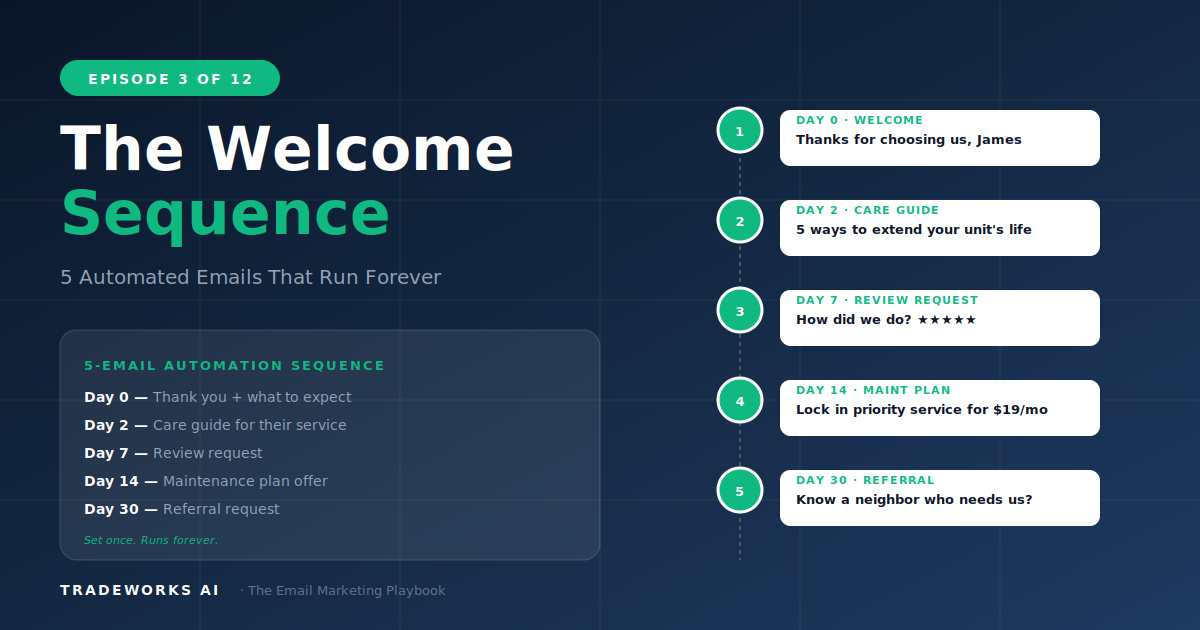
5 automated emails that turn first-time customers into repeat revenue.