Email Marketing · Part 4
Email Tools Compared
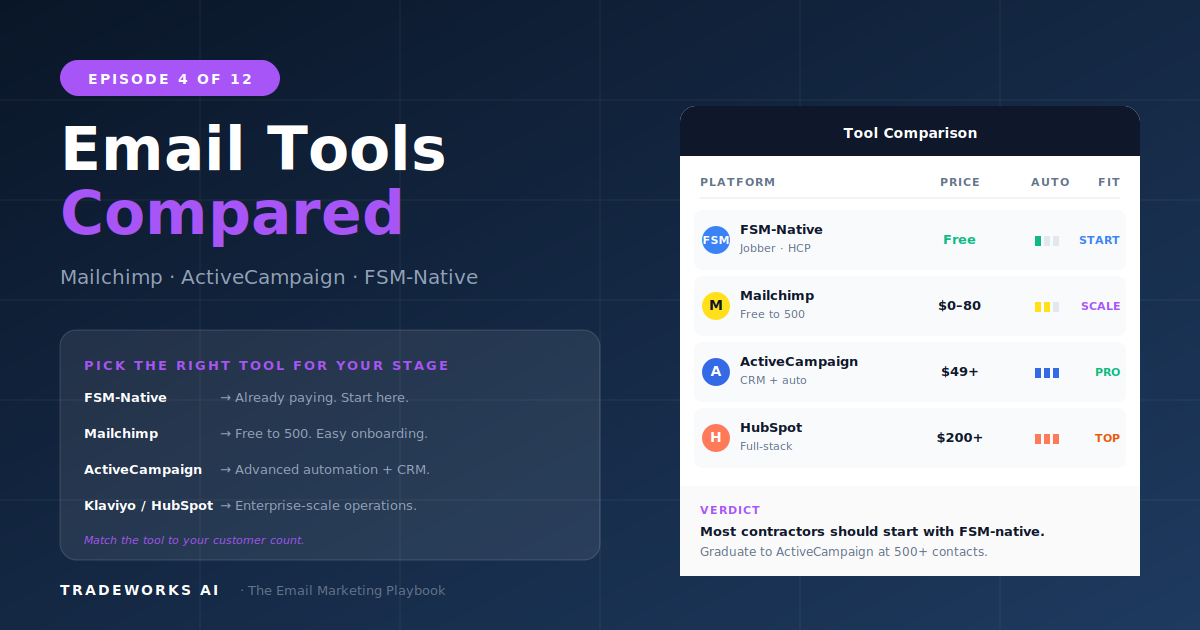
Honest comparison: Mailchimp, ActiveCampaign, Constant Contact, and FSM-native.
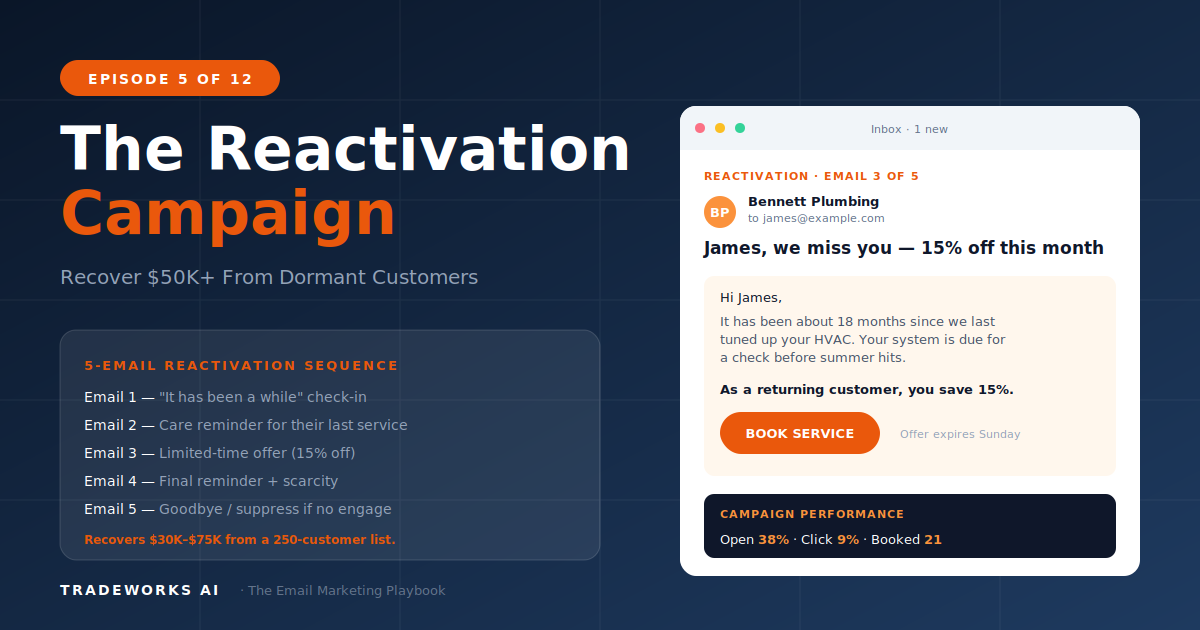
A reactivation campaign is a structured email sequence targeting customers who have not booked a service in 12 months or more. For a typical home service contractor with 2,000 to 5,000 contacts, this single campaign recovers $30,000 to $75,000 in annual revenue by converting 8 to 15% of dormant customers back into paying clients. The campaign uses a five-email sequence sent over 21 days, escalating from a soft check-in to a time-limited offer, with behavioral branching that adapts based on whether recipients open, click, or ignore each message.
This is the single highest-ROI email automation a contractor can build. Part 1 introduced the Re-Revenue Framework. Part 2 built the segmentation foundation that identifies dormant customers. Part 3 created the Welcome Sequence. Part 4 chose the platform. Now we build the campaign that makes all of that infrastructure pay for itself in the first 30 days.
Every contractor has them. Customers who called once for an AC repair, paid the invoice, and disappeared. Homeowners who had a plumbing emergency two years ago and never came back for preventive service.
These are not lost customers. They are dormant. The distinction matters: a lost customer actively chose a competitor. A dormant customer simply forgot about you. They moved on with their lives, their equipment kept running, and no trigger reminded them to schedule service.
The math on dormant customers is consistent across home service verticals:
For a contractor with 3,000 total contacts, approximately 1,000 to 1,500 are dormant. Converting 10% at an average ticket of $400 equals $40,000–60,000 in recovered revenue.
Segmentation by dormancy depth:
Run the campaign against warm dormant contacts first. This gives you the highest initial results and lets you refine the sequence before rolling it out to cooler segments.
Goal: Re-establish contact. Remind them you exist. Gauge interest through opens.
Subject lines:
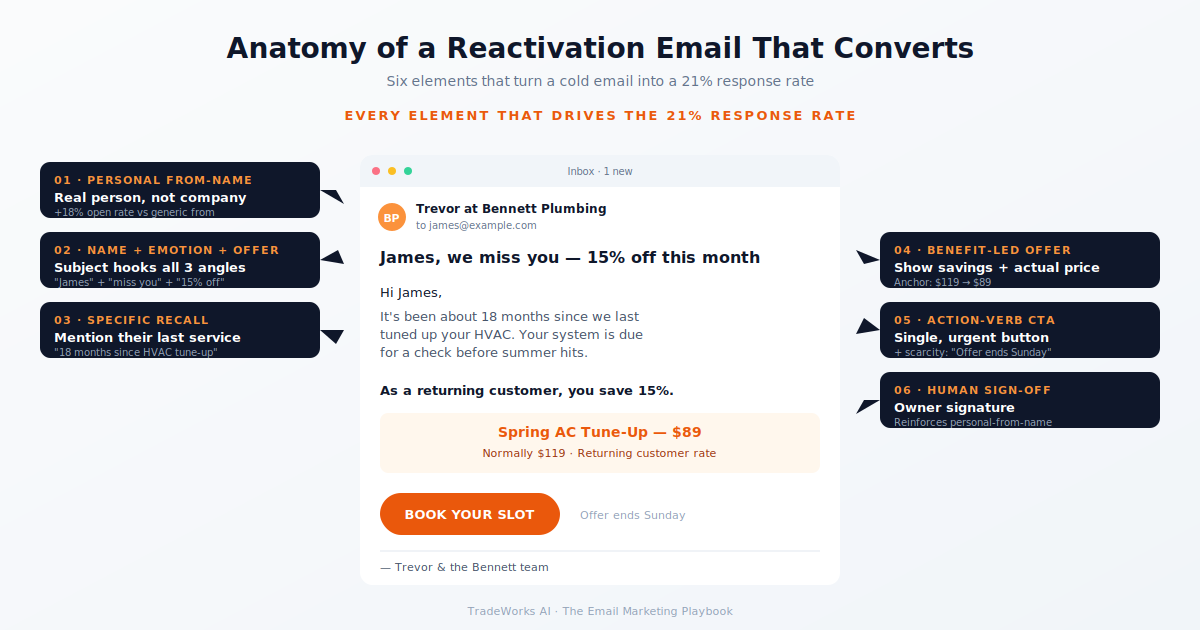
Tone: Warm, personal, no hard sell. This email comes from the owner or a named technician, not the company brand. Reference their last service. Ask a genuine question. Provide one useful tip relevant to the season. Soft CTA: "If anything comes up, we're still here." No discount. No promotion. No urgency. A handshake, not a pitch.
Goal: Demonstrate expertise. Provide genuine value. Drive a click.
Subject lines:
Body: Lead with a specific, useful insight. Example for HVAC: "The capacitor in your outdoor condenser is the most likely component to fail this summer. It costs $4 to $8 as a part, but a blown capacitor on a 95-degree day means an emergency call and $300 to $500 in labor. A 30-minute seasonal tune-up catches this before it fails." Track the click for behavioral branching.
Goal: Convert interest into a booked appointment. First hard CTA.
Subject lines:
Body: Acknowledge the relationship. Introduce the offer: a returning customer credit ($25–75 off a tune-up or service call). Make it exclusive: "This credit is for past customers only and expires in 14 days." Direct booking CTA.
Goal: Overcome hesitation with evidence from other customers.
Body: Lead with real testimonial or aggregate review data: "We've completed 847 tune-ups this season with a 4.9-star average on Google." Include 2–3 short testimonial snippets. Remind them the credit expiration is approaching.
Goal: Last attempt. Create urgency through scarcity and deadline.
Body: Be direct: "We've reached out a few times and wanted to check one more time before we close out your returning customer credit. It expires [date]. After that, we'll assume you're all set and we'll stop reaching out." Not a threat. A respectful conclusion.
Built in ActiveCampaign or equivalent platform with multi-step automation:
Never launch a reactivation campaign during your peak busy season when you cannot handle the additional call volume. The worst outcome is reactivating a customer and then making them wait 10 days for an appointment.
The reactivation campaign is the fastest path to measurable email revenue. $30,000–75,000 in recovered revenue from a single campaign. The customers are already in your database. The infrastructure exists from Parts 2–4. Run the campaign once against your warm dormant segment and the math from Part 1 stops being theoretical. Read Part 6 next: how to fill your schedule before peak season.
Run a full sequence once per year against your dormant segment. As customers age past the 12-month mark, they automatically enter the dormant segment and qualify for the next run. Some contractors run a continuous drip where contacts enter the reactivation automation automatically when they cross the 12-month threshold.
Use whatever you have. At minimum, you have their name and the fact that they were a customer. Reference the approximate time frame ('It's been over a year') rather than the specific service if you cannot pull job history. Personalization helps but is not required for the sequence to work.
Not until Email 3, and frame it as a credit rather than a discount. A '$50 returning customer credit' feels like earned value. A '15% discount' feels like desperation. The credit also anchors a specific dollar amount, which is more compelling than a percentage for service businesses.
Yes, but adjust the tone and offer. Commercial accounts respond better to efficiency arguments (cost of downtime, maintenance agreement ROI) than seasonal urgency. Replace homeowner-focused language with facility manager language and extend the sequence timeline to 30 days.
Even 200 dormant contacts can generate $5,600–12,000 at conservative conversion rates. There is no minimum list size. If you have dormant customers and valid email addresses, the campaign is worth running.
Warm up the send. Day 1 emails to the most engaged 25% of your dormant list. Day 2 to the next 25%. Day 3 the next 25%. Day 4 the rest. Sudden volume spikes from your domain trigger spam filters. Gradual ramp protects sender reputation. Part 11 covers full deliverability in depth.
We'll segment your list by dormancy depth, calculate the conservative reactivation revenue available, and show you the campaign that recovers it. Free audit, no commitment.
Honest comparison: Mailchimp, ActiveCampaign, Constant Contact, and FSM-native.
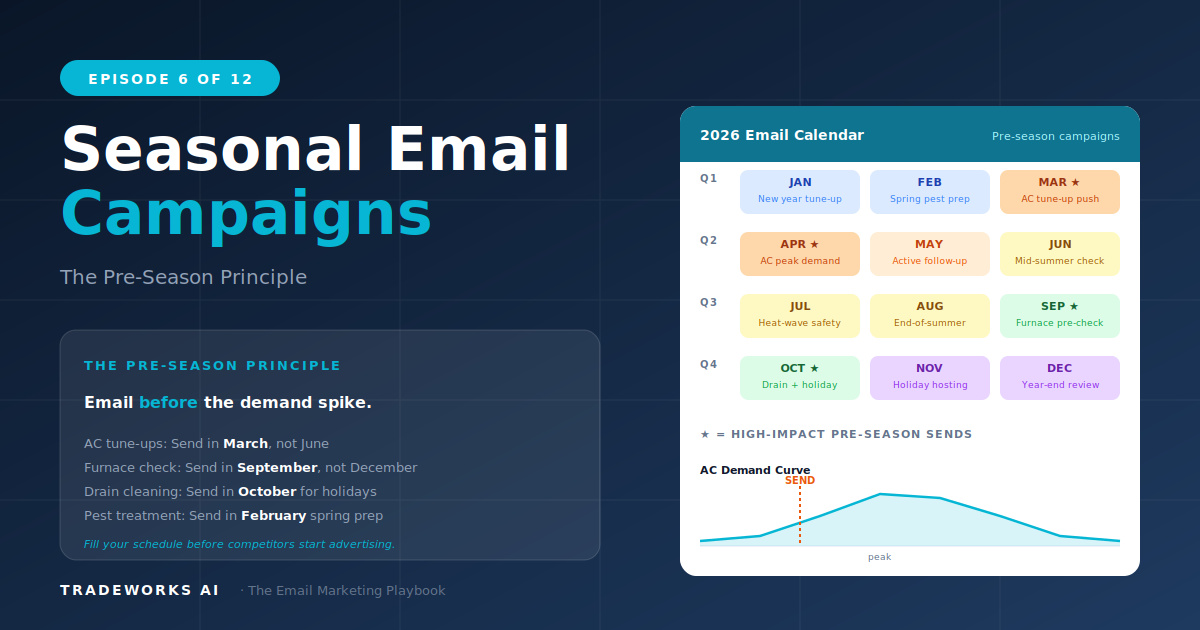
The pre-season principle and 4-email sequence by trade.