Email Marketing · Part 3
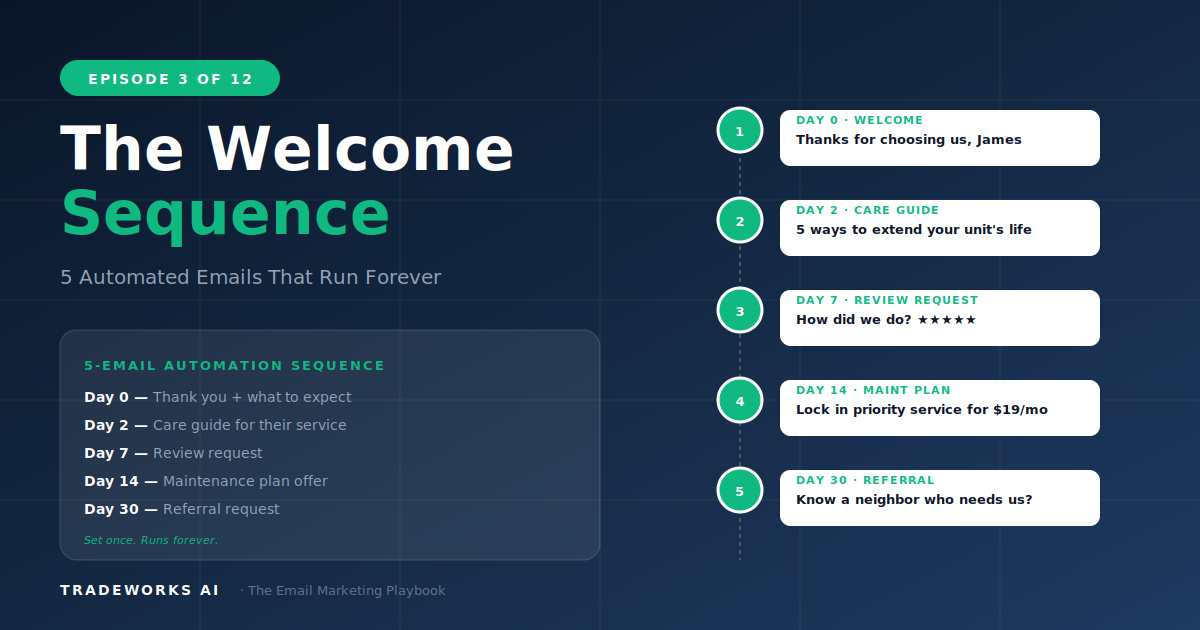
The Welcome Sequence
5 automated emails that turn first-time customers into repeat revenue.
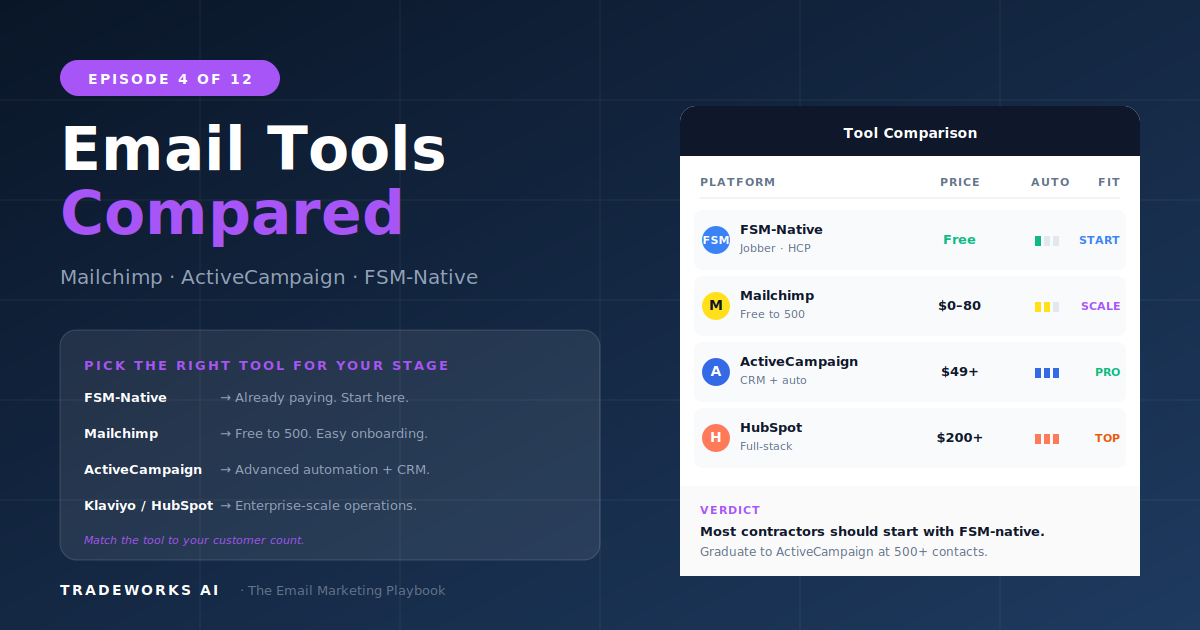
The right email platform for a contractor depends on three variables: the size of your customer list, the complexity of automations you need (the welcome sequence from Part 3 is the minimum), and whether you want your email marketing inside your FSM or in a dedicated tool. There is no universal best platform — there is a best fit for your stage and goals.
Mailchimp is the best starting point for most contractors with under 500 contacts (free tier, sufficient automation, good templates). ActiveCampaign is the best platform for contractors who want to run the full Re-Revenue Framework with sophisticated automation sequences. Constant Contact is the simplest option for contractors who want basic newsletters with zero learning curve. FSM-native email (Jobber Campaigns, Housecall Pro built-in, ServiceTitan Marketing Pro) keeps everything in one system but limits customization and automation depth.
Before comparing platforms feature by feature, the right question is: what do you actually need the platform to do?
The most popular email platform for small businesses. Strong starting point for most contractors.
Best for: Stage 1–2 contractors. Under 1,000 contacts. Starting email marketing for the first time.
The automation powerhouse. Best platform for contractors running the full Re-Revenue Framework.
Best for: Stage 2–4 contractors. 500+ contacts. Running the full Re-Revenue Framework.
The simplest option. Best for contractors who want newsletters without complexity.
Strengths: easiest learning curve, strong template library, decent event marketing features, reliable deliverability. Weaknesses: automation is basic (cannot build the full welcome sequence with conditional branching), segmentation is limited, more expensive per contact than Mailchimp.
Best for: contractors who want to send monthly newsletters and seasonal promotions with zero learning curve. Not ideal for the full Re-Revenue Framework.
Email marketing built into your field service management software. The zero-friction option.
Included in Growing plan ($49/month) and above. Basic email campaigns, customer tags for segmentation, simple follow-up emails. Limited multi-step automation.
Included in Essentials plan and above. Automated post-service emails, review requests, basic marketing campaigns. Moderate template library.
Add-on module, typically $200–400/month. The most sophisticated FSM-native option. Advanced segmentation by service history, revenue tier, and job type. Multi-step automation. Campaign attribution to booked jobs. Best for Stage 3–4 contractors already on ServiceTitan.
Many contractors end up running a hybrid: FSM-native for transactional emails (appointment confirmations, invoices, review requests) and a dedicated platform for marketing campaigns (Re-Revenue sequences, seasonal campaigns, newsletters). This is a valid and often optimal approach. Zapier or Make.com syncs new customers from FSM to the dedicated platform automatically.
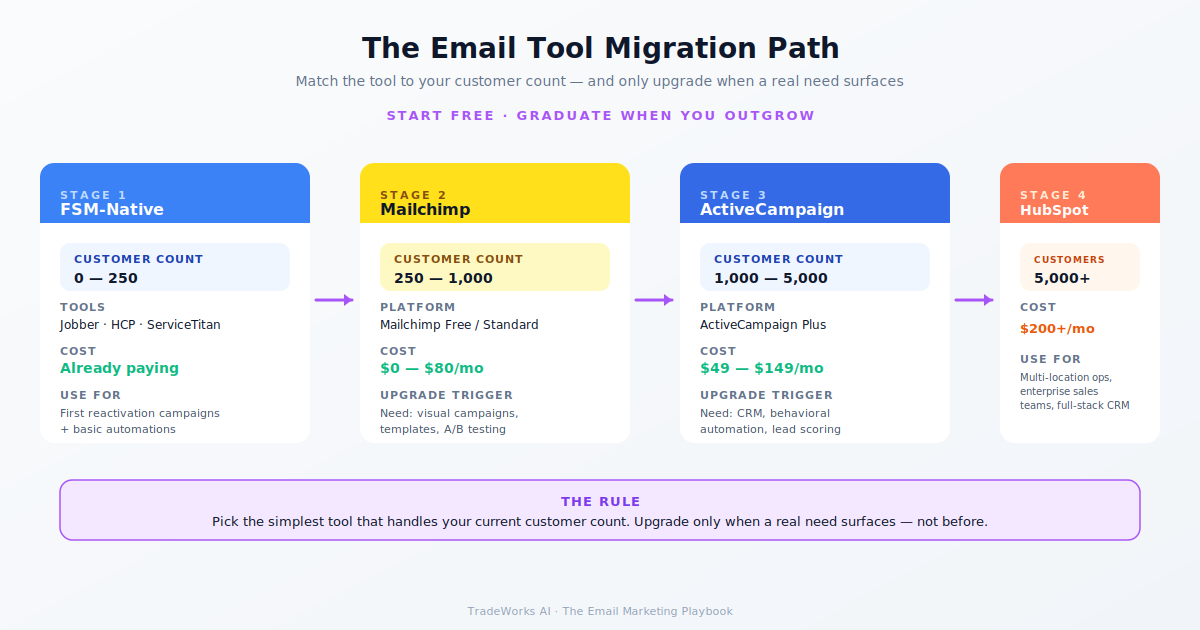
The platform does not make the email marketing work. The Re-Revenue Framework, the segmentation from Part 2, and the campaigns from Parts 5–12 make it work. The platform is just the delivery mechanism. Choose the platform that fits your stage and technical comfort. Read Part 5 next: the first revenue-generating campaign.
Yes. Every platform allows CSV export of your contact list with tags and custom fields. Switching takes 1–2 hours of export/import plus rebuilding automations in the new platform. Automations do not transfer between platforms — you rebuild them.
For Stage 1 (under 500 contacts), yes. The free tier includes basic Customer Journeys (automations), segmentation by tags, and the template library. You can build the welcome sequence, run reactivation campaigns, and send monthly newsletters.
ActiveCampaign visual automation builder supports unlimited steps, conditional if/then branching, tag-based routing, wait-until conditions, and goal tracking within automations. Mailchimp Customer Journeys are more limited in branching and conditions.
For Stage 3–4 contractors already on ServiceTitan, potentially yes. The direct revenue attribution (tracking from email send to booked job to completed revenue) is something no dedicated email platform provides without manual CRM work.
Drip and ConvertKit are designed for ecommerce and creators respectively. They work but are not optimized for service businesses. Stick with the four paths covered here for contractor use cases.
If using a dedicated platform with Jobber or HCP, Zapier is the standard connector. Free tier handles 100 tasks per month which covers most Stage 1–2 contractors. ServiceTitan Marketing Pro does not need Zapier because it is built into the FSM.
Most contractors pay for email features they never use. Our free audit reviews your current platform setup, automation, and deliverability and recommends the right path forward.
5 automated emails that turn first-time customers into repeat revenue.
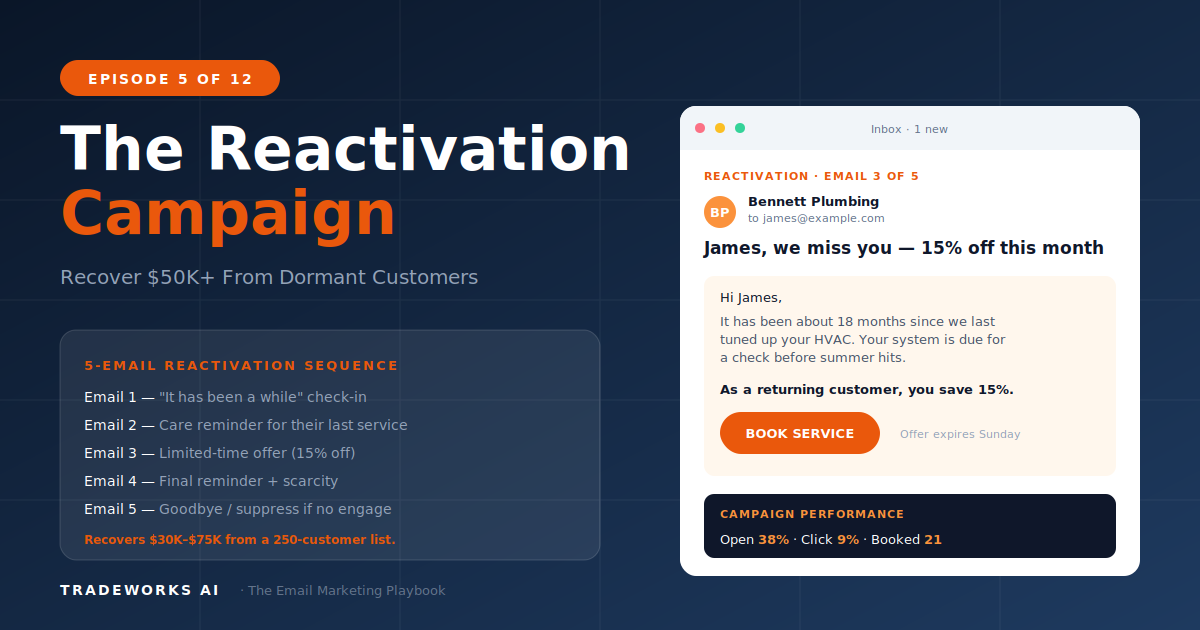
5-email sequence that recovers $30K-$75K from dormant customers.