Google Ads · Part 4
Google Ads Keywords for Contractors: What to Bid On, What to Block, and the Negative Keywords List That Saves Thousands
Continue the Google Ads Playbook with Part 4 of 10.
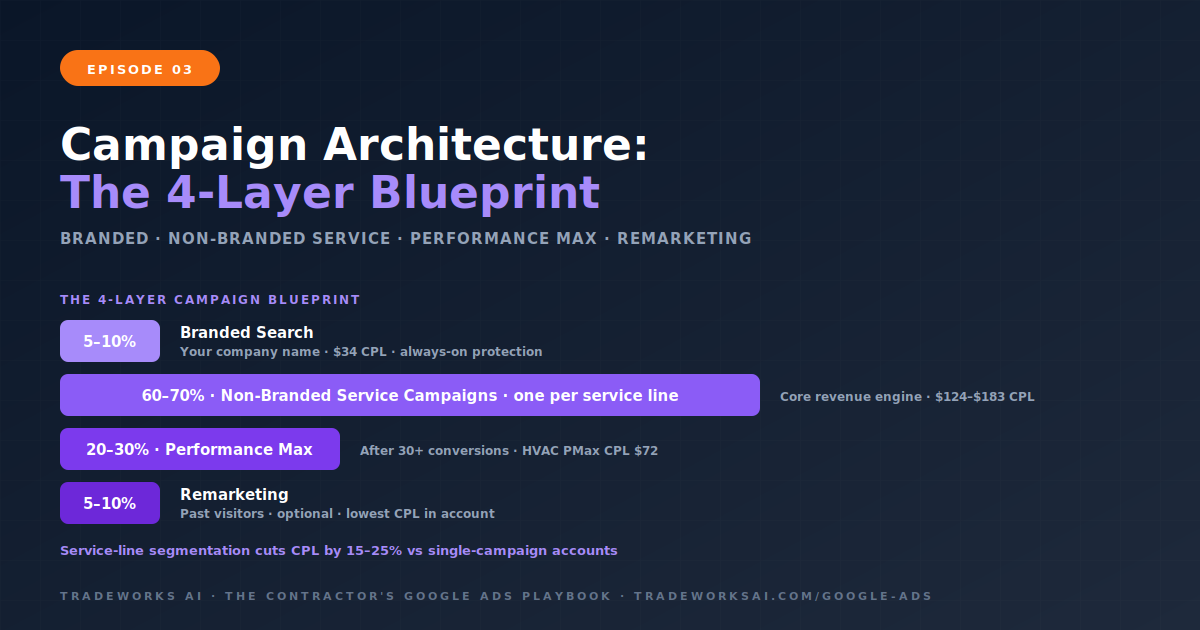
The correct Google Ads campaign structure for contractors uses service-line segmentation: separate campaigns for each major service (AC repair, plumbing, water heater replacement, electrical) with ad groups organized by specific service type and intent level within each campaign. This structure reduces cost per lead by 15 to 25% compared to running a single campaign with all services combined. The Campaign Architecture Blueprint has four layers: branded campaign (your company name, 5–10% of budget, always running), non-branded service campaigns (one per major service line, 60–70% of budget), Performance Max campaign (20–30% of budget after 30 or more conversions), and a remarketing campaign (optional, 5–10% of budget). Each non-branded campaign contains 3 to 7 ad groups organized by specific service type, with 5 to 15 tightly themed keywords per ad group and a dedicated landing page per ad group.
Most contractors who start Google Ads create one campaign, dump all their services into it, send every click to their homepage, and wonder why their cost per lead is $200 or higher. The structure of your campaign determines its success before a single ad runs. SearchLight’s data shows that contractors who segment campaigns by service line see 15 to 25% lower CPLs than those running broad, single-campaign accounts. The reason is relevance. When a homeowner searches AC repair near me and your ad, keywords, and landing page all focus specifically on AC repair, Google assigns a higher Quality Score. Higher Quality Score means lower cost per click and better ad position. When the same search triggers an ad from a generic HVAC campaign pointing to a homepage that covers 12 different services, relevance drops, Quality Score drops, and you pay more for a worse position.
The Blueprint organizes your Google Ads account into four campaign layers. Each layer serves a distinct purpose with its own budget, bidding strategy, and performance expectations.
This campaign protects your brand name from competitors bidding on it. Branded CPL averages $34 (Episode 1 data). Many contractors skip this because they assume organic results handle brand searches. That is a mistake—competitors can and do bid on your company name, placing their ad above your organic listing. Run this from day one. Add your brand terms as negative keywords in all non-branded campaigns to prevent them from cannibalizing branded data.
This is the core of the Blueprint and where most contractors get it wrong. Instead of one campaign for all services, create separate campaigns for each major service line your business offers.
Why separate campaigns per service line? Budget control. AC Repair might generate your best ROI while AC Installation has a longer sales cycle. With separate campaigns, you allocate more budget to the service line producing the best return without starving or overfeeding others. A single campaign gives Google control over which services get more spend—and Google optimizes for clicks, not for your business priorities.
PMax runs your ads across Search, Maps, YouTube, Display, Gmail, and Discover simultaneously. HVAC PMax CPL averages $72 versus $149 for non-branded search (Episode 1 data). But PMax needs existing conversion data to optimize effectively. Launching PMax before your search campaigns have generated 30 or more tracked conversions is premature—the algorithm lacks the data to make intelligent decisions. Episode 9 covers PMax setup in full.
Remarketing targets homeowners who visited your website but did not call or submit a form. These display ads follow them across the web, reminding them your business exists. Remarketing CPLs are typically the lowest in any account because the audience already knows you. For contractors, remarketing is most effective for planned-purchase services like AC installation, bathroom remodels, or roof replacement where the homeowner researches for days or weeks before deciding.
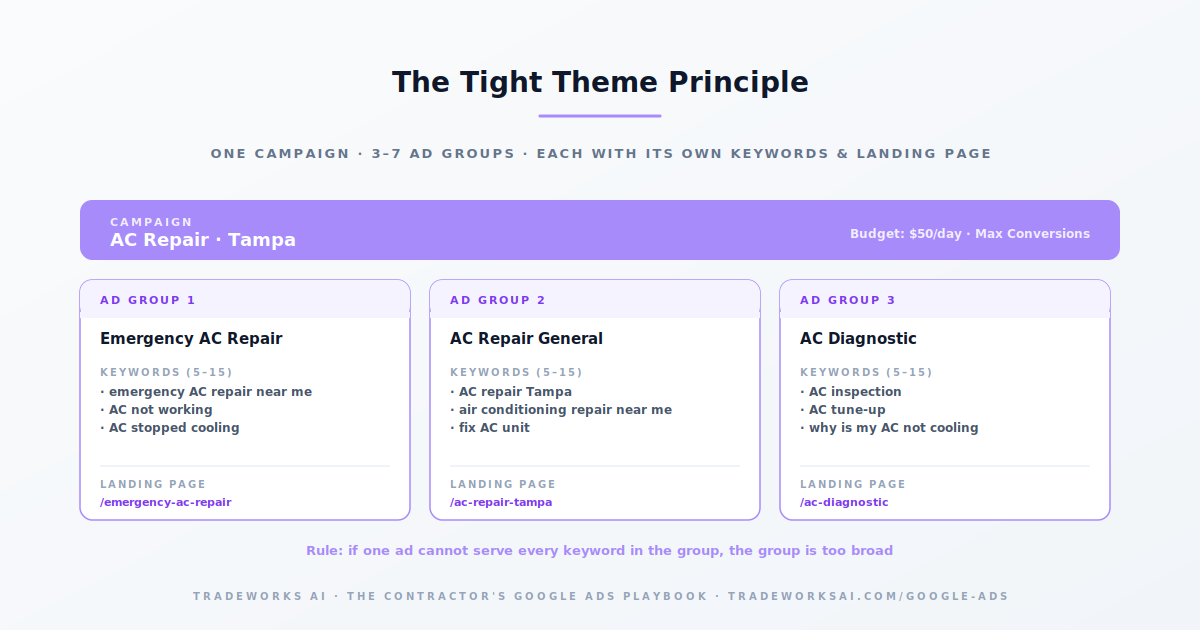
Within each service campaign, ad groups organize your keywords by specific service type and intent. The rule: if you cannot write one ad that is relevant to every keyword in the ad group, the group is too broad and needs to be split. For an AC Repair campaign, the ad groups might include: Emergency AC Repair (keywords: emergency AC repair near me, AC not working, AC stopped cooling), AC Repair General (keywords: AC repair [city], air conditioning repair near me, fix AC unit), and AC Diagnostic (keywords: AC inspection, AC tune-up, why is my AC not cooling). Each ad group contains 5 to 15 tightly themed keywords. Each ad group points to a dedicated landing page matching the specific service. Each ad group has Responsive Search Ads (RSAs) with headlines and descriptions written specifically for that service.
In 2026, Google’s match type system has three options. Exact match (most control): your ad shows only for searches that match your keyword closely. Use for your highest-intent, highest-value terms. Phrase match (moderate control): your ad shows for searches that include the meaning of your keyword. Good balance of reach and relevance. Broad match (least control): your ad shows for searches Google deems related. Only use with Smart Bidding after 30 or more conversions—broad match without Smart Bidding bleeds budget on irrelevant queries. The starter approach for contractors: begin with exact and phrase match on 15 to 25 high-intent keywords per campaign. After 30 days with solid conversion data, consider adding broad match keywords in a separate ad group to discover new converting queries while maintaining control.
Location targeting: set to your actual service area cities and zip codes. Use Presence: People in or regularly in your targeted locations, not the default which includes people interested in your locations (travelers, researchers). Ad schedule: adjust bids up during peak call hours (7 AM to 9 AM, 5 PM to 8 PM for residential) and down during low-conversion hours. If you do not answer phones overnight, consider pausing ads during those hours rather than paying for calls that go to voicemail. Networks: uncheck Search Partners and Display Network on search campaigns. These networks dilute your data and typically produce lower-quality leads for contractors.
Most contractors need 4 to 8 campaigns: one branded campaign, 2 to 5 non-branded service campaigns (one per major service line), one Performance Max campaign, and optionally one remarketing campaign. The exact number depends on how many distinct service lines you offer.
5 to 15 keywords per ad group is the effective range. All keywords should share the same intent and be addressable by the same ad copy. If your ad group has more than 15 keywords, it is likely too broad and should be split.
Only after you have 30 or more conversions and are running Smart Bidding (Maximize Conversions or Target CPA). Broad match without Smart Bidding generates large volumes of irrelevant traffic. With Smart Bidding and conversion data, broad match can discover valuable queries you would not have found with exact or phrase match alone.
Service-line segmentation reduces CPL by 15 to 25% compared to a single broad campaign. The improvement comes from higher relevance (better Quality Score), tighter budget control (spend goes to your best services), and better landing page matching (each ad group sends to a service-specific page).
The difference between a $400 cost-per-customer (profit) and a $700 cost-per-customer (loss) is rarely the bid — it is campaign architecture, landing pages, and tracking. The Google Ads Audit grades your account against the 10-part playbook, identifies the highest-leverage gaps, and shows the one optimization that compounds.
Continue the Google Ads Playbook with Part 4 of 10.
Continue the Google Ads Playbook with Part 5 of 10.