Google Ads · Part 10
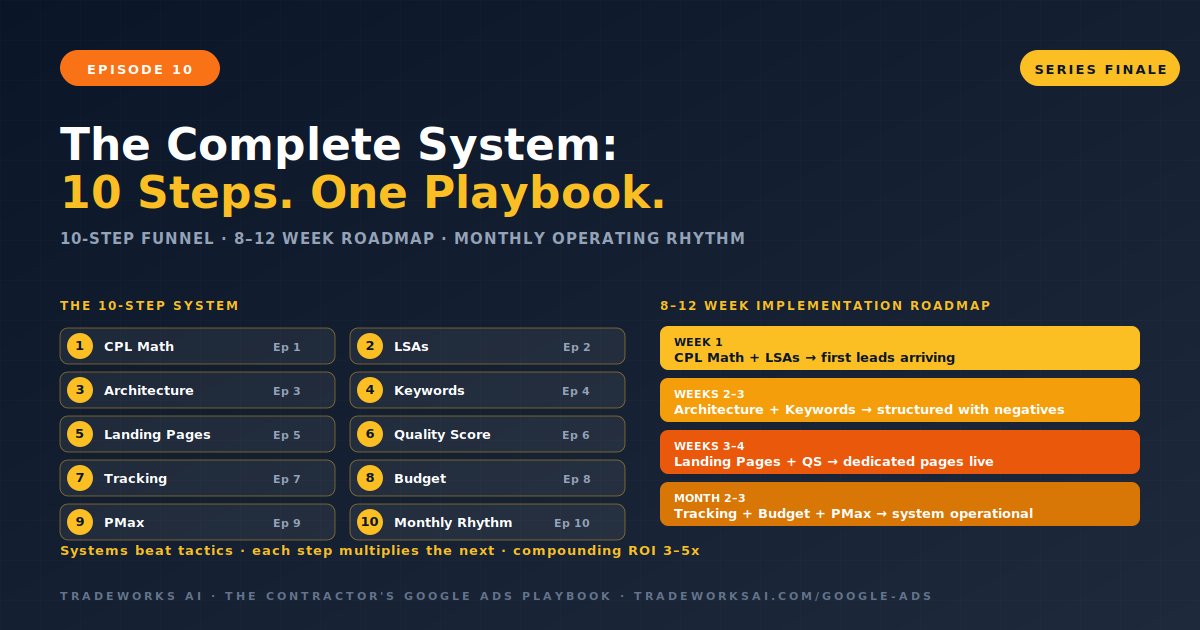
The Complete Google Ads System for Contractors: 10 Steps from First Click to Paying Customer
Continue the Google Ads Playbook with Part 10 of 10.
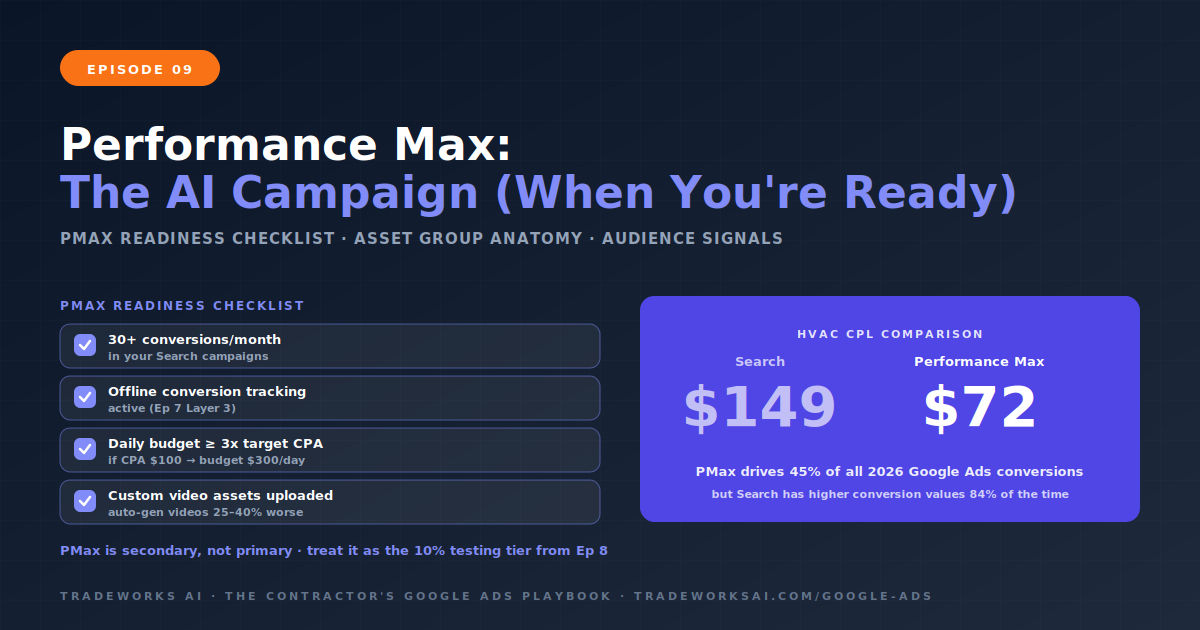
Performance Max for contractors is Google’s AI-powered campaign type that serves ads across Search, YouTube, Display, Gmail, Maps, and Discover from a single campaign. PMax now drives 45% of all Google Ads conversions in 2026. For HVAC contractors, PMax has delivered leads at $72 per lead versus $149 for non-branded search campaigns. However, PMax is a secondary campaign type—start with Search campaigns first. The Readiness Checklist: 30 or more conversions per month in your existing Search campaigns, offline conversion tracking active (Episode 7’s Layer 3), a daily budget of at least 3 times your target CPA, and custom video assets uploaded (auto-generated videos perform 25 to 40% worse). For local service contractors, an Adalysis study found Search campaigns had higher conversion values 84% of the time on overlapping terms versus PMax. PMax works best as a complement to Search, not a replacement.
Performance Max is Google’s most advanced AI campaign type. Instead of creating separate campaigns for Search, YouTube, Display, and Maps, you provide creative assets (headlines, descriptions, images, videos), audience signals (who your ideal customer is), and conversion goals. Google’s AI automatically assembles ads, selects placements across all channels, and optimizes bids in real time. PMax now accounts for 45% of all Google Ads conversions. It is the direction Google’s ad platform is heading—contractors who understand it gain a significant advantage.
What PMax is not: a replacement for Search campaigns. PMax is a complement. For local service contractors, standard Search campaigns and LSAs (Episode 2) remain the highest-intent, highest-converting campaign types. An Adalysis study of 3,300 non-retail PMax campaigns found that Search had higher conversion values 84% of the time on overlapping search terms. PMax excels at reaching homeowners earlier in their journey—before they search, while they watch YouTube, read email, or browse websites. It expands your reach beyond pure search intent. But it should never replace the search campaigns that capture homeowners actively looking to hire.
PMax is not for new accounts or untested campaigns. Launching PMax without the foundation from Episodes 1 through 8 leads to wasted spend and poor-quality leads. Before launching PMax, confirm all four criteria.
Select Leads as your campaign goal. Then configure your conversion actions carefully. Be selective—include only your highest-value conversions (phone calls over 60 seconds, qualified form submissions) as primary goals. Demote informational actions (page views, time on site) to secondary or remove them entirely. PMax optimizes toward whatever you define as a conversion. If you include page views as a conversion, the algorithm will find people who view pages, not people who call. If you have offline conversion imports active (Episode 7), set conversion values based on actual job revenue. A $2,500 AC repair job and a $150 tune-up should not have equal conversion values.
Set your daily budget to at least 3 times your target CPA. For a contractor targeting $100 CPL, the minimum PMax daily budget is $300. Start with Maximize Conversions or Maximize Conversion Value without setting a target CPA or ROAS for the first 30 to 60 days. The algorithm needs data to learn. Setting a restrictive target too early limits the learning phase and produces inconsistent results. After 50 or more conversions in the PMax campaign, you can add a target CPA or ROAS constraint.
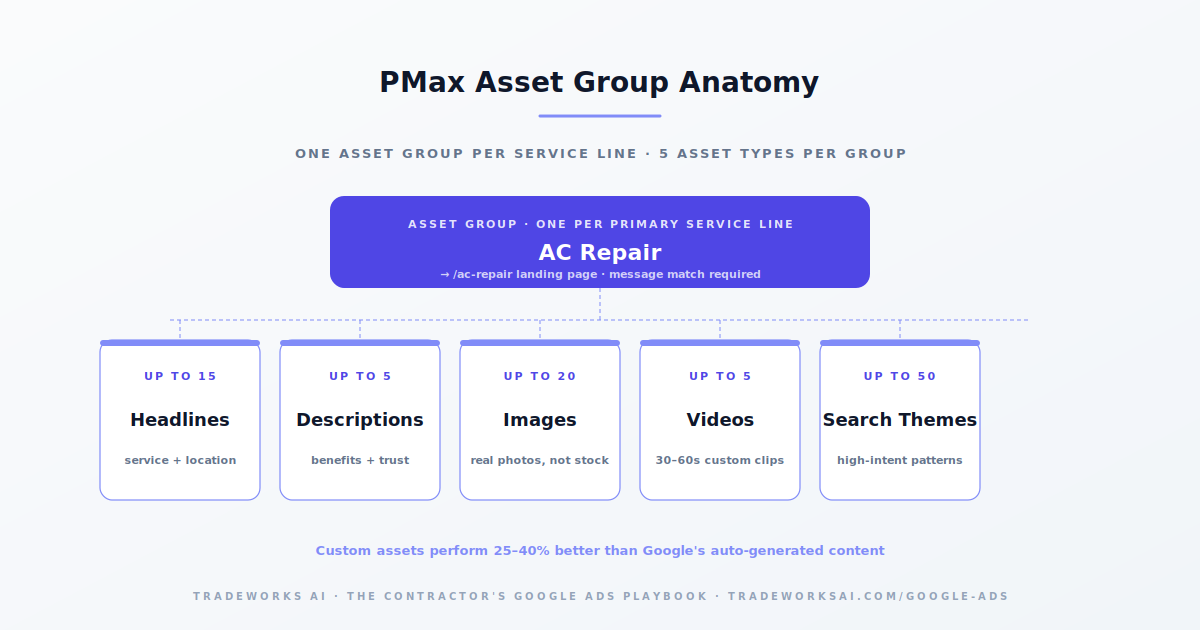
Asset groups are the building blocks of PMax—each group contains your creative assets organized around a single theme or service. For a contractor, create one asset group per primary service line: AC Repair, Plumbing Emergency, Roof Repair. Each asset group should include up to 15 headlines (include service name, location, and urgency modifiers), up to 5 descriptions (specific benefits and trust signals), up to 20 images (job site photos, team photos, before/after work, truck photos—real, not stock), and up to 5 videos (30 to 60 second service-specific clips). Each asset group points to its own landing page (Episode 5’s dedicated service pages). The landing page URL must match the asset group theme for message match.
Audience signals tell Google who your ideal customer is. They are suggestions, not restrictions—Google will expand beyond them to find additional converters. But strong signals accelerate learning and reduce early-phase waste. The priority order for contractors: Customer Match list (upload your existing customer email/phone list—this is the highest-quality signal), website visitors from the past 30 to 90 days, converters from existing Search campaigns, in-market segments (people actively researching home services in your area). Avoid generic interest audiences. Each asset group should have its own audience signals matching the service theme.
Search themes are PMax’s version of keyword guidance—up to 50 per asset group. They are not matched directly to search queries like traditional keywords. Instead, they signal to Google what types of searches are relevant. For an AC Repair asset group: AC repair, AC not working, air conditioning broken, emergency AC repair, AC repair near me, AC repair [city], HVAC repair. Use the same high-intent keyword patterns from Episode 4. Google now shows a usefulness indicator—replace themes with low usefulness scores that the algorithm would find without guidance.
Critical for contractors: add brand exclusions for your own company name and common variations. Without brand exclusions, PMax will cannibalize your branded Search campaigns—showing PMax ads when homeowners search for your company name. Since branded searches already convert at high rates through your branded Search campaign, PMax serving those queries wastes budget without incremental value. Additionally, apply campaign-level negative keywords (available since January 2025) using the same Negative Keywords Master List from Episode 4.
PMax requires 2 to 6 weeks to learn, depending on conversion volume. During this period, performance will fluctuate—cost per lead may be higher than your Search campaigns. This is expected. Do not make major changes during the first 2 weeks. After any adjustment, wait 3 to 5 days before evaluating. The algorithm is testing asset combinations, audiences, and placements across all channels simultaneously. After 50 conversions in the PMax campaign, performance stabilizes and the algorithm has enough signal to optimize effectively.
PMax for lead generation presents specific challenges for local service contractors. Without offline conversion data, the algorithm cannot distinguish between a qualified lead and a spam form submission. YouTube and Display placements can generate low-quality leads from bot activity and accidental clicks. The fix: ensure offline conversion tracking (Episode 7’s Layer 3) is active before launching PMax. Use call-duration thresholds (60 seconds minimum) to filter short, unqualified calls. Review placement reports regularly and exclude sites generating high cost and zero conversions. PMax should be the 10% testing allocation from Episode 8—not the core of your budget.
Yes, but as a secondary campaign type—not a replacement for Search. PMax works best alongside existing Search campaigns and LSAs, adding 8 to 12% incremental conversion volume. Launch PMax only after meeting the Readiness Checklist: 30+ monthly conversions, offline tracking active, sufficient budget, and custom video assets.
Daily budget should be at least 3 times your target CPA. For a contractor targeting $100 per lead, the minimum PMax daily budget is $300 (approximately $9,000 per month). Start with the 10% testing allocation from Episode 8 and scale only after proving positive ROAS.
Search campaigns target homeowners actively searching for your services—highest intent, highest conversion rate. PMax reaches homeowners across Search, YouTube, Display, Gmail, Maps, and Discover—expanding reach beyond pure search intent. Search captures demand. PMax creates and captures demand across the full journey.
Without offline conversion data, PMax optimizes for call and form volume—not paying customers. It treats a spam form submission and a $5,000 job equally. Offline conversion imports (Episode 7) tell the algorithm which clicks produce revenue, enabling it to find more high-value leads.
The difference between a $400 cost-per-customer (profit) and a $700 cost-per-customer (loss) is rarely the bid — it is campaign architecture, landing pages, and tracking. The Google Ads Audit grades your account against the 10-part playbook, identifies the highest-leverage gaps, and shows the one optimization that compounds.
Continue the Google Ads Playbook with Part 10 of 10.
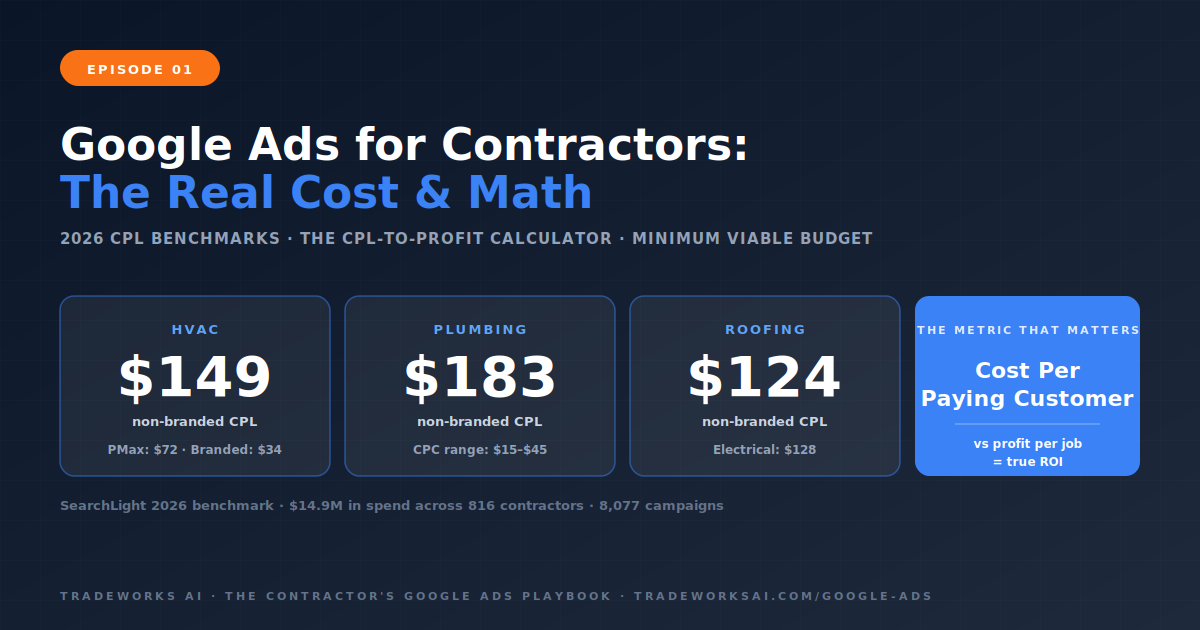
Continue the Google Ads Playbook with Part 1 of 10.