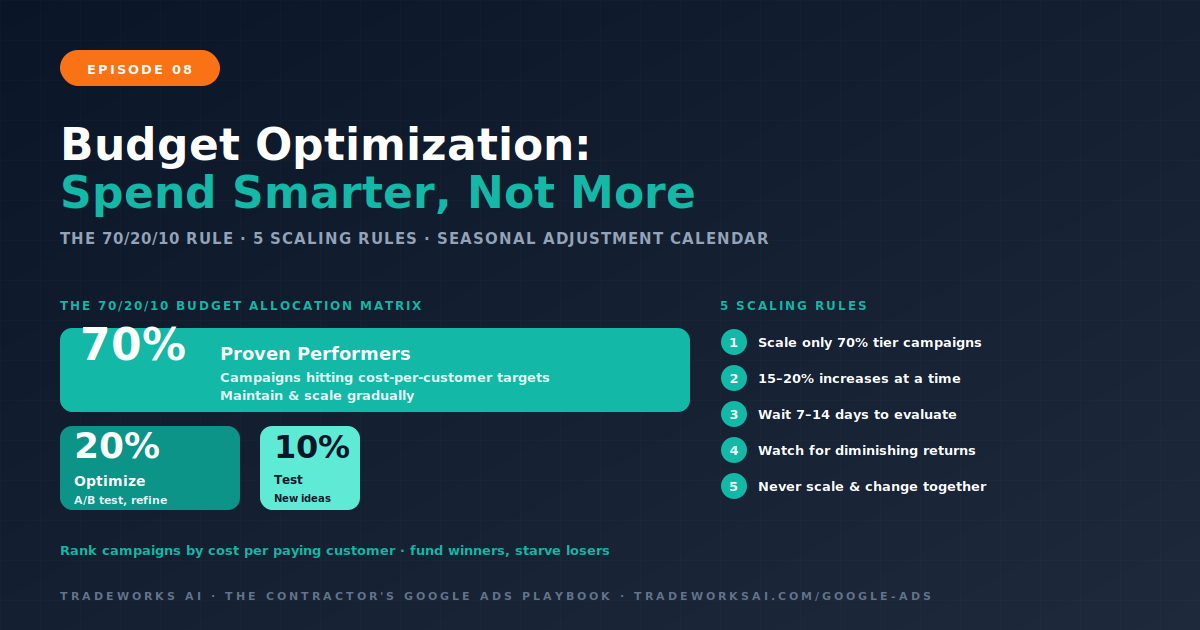
Google Ads · Part 8
Google Ads Budget Optimization for Contractors: How to Spend Smarter Without Spending More
Continue the Google Ads Playbook with Part 8 of 10.
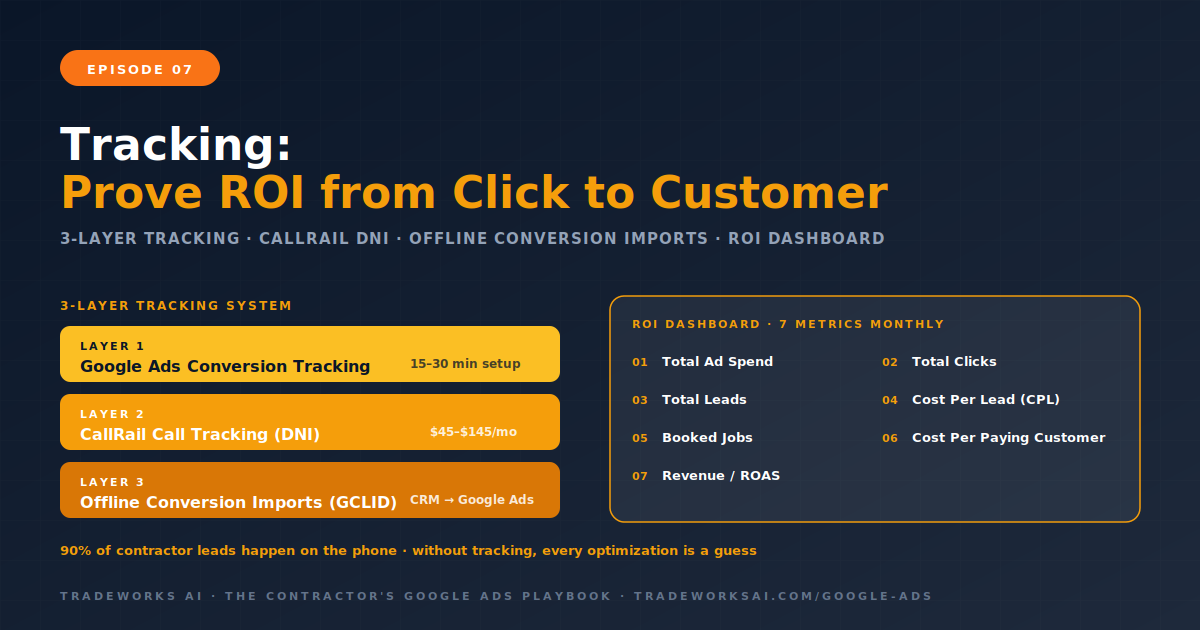
Google Ads tracking for contractors requires three layers: Google Ads conversion tracking (records when a click produces a phone call or form submission), call tracking software like CallRail ($45 to $145 per month) with dynamic number insertion (shows which specific keyword generated which phone call), and offline conversion imports (connects your CRM or FSM data back to Google Ads so the platform knows which clicks became paying customers). 90% of contractor leads happen over the phone, making call tracking essential—without it, Google Ads cannot optimize for the conversions that actually matter. The ROI Tracking Dashboard records 7 metrics monthly: total ad spend, total clicks, total leads, cost per lead, booked jobs, cost per paying customer, and return on ad spend. Without this closed-loop tracking, every optimization decision from Episodes 1 through 6 is based on incomplete data.
Most contractors can tell you how much they spend on Google Ads each month. Few can tell you which specific keywords produced which phone calls, which calls became booked jobs, and which jobs produced revenue that exceeded the ad cost. Without that connection—from click to call to job to invoice—every optimization decision is a guess. You think AC repair near me is your best keyword because it gets the most clicks. But what if drain cleaning near me produces half the clicks and twice the booked jobs? Without tracking, you would never know. You would continue allocating 60% of your budget to the high-click keyword while the high-conversion keyword is starved.
90% of contractor leads happen over the phone. A homeowner searches, clicks your ad, and calls. That call is invisible to Google Ads unless you set up tracking. Google sees the click but not the call. Without call tracking, Google Ads cannot optimize for phone leads—it can only optimize for clicks, which is a fundamentally different and less valuable metric. The three-layer tracking system solves this by connecting every click to a call, every call to a job outcome, and every outcome back to the original ad spend.
The foundation. Google Ads conversion tracking records when a click on your ad results in a defined action: a phone call from the ad itself (call extensions), a phone call from your website (requires a tracking snippet), or a form submission on your landing page. Setup takes 15 to 30 minutes through the Google Ads interface under Tools and Settings, then Conversions. Create separate conversion actions for phone calls and form submissions so you can see which conversion type each keyword produces. Use the Google Ads conversion tag as your primary tracking source for bid optimization—it is more accurate and responsive than Google Analytics 4 for this purpose. GA4 serves as a complement for behavioral analysis and audience enrichment.
Call tracking software bridges the gap between the click and the phone call. CallRail ($45 to $145 per month) is the industry standard for contractors. The key feature is dynamic number insertion (DNI): your website automatically displays a unique phone number for each visitor based on their traffic source. When a visitor from a Google Ads click calls that number, CallRail records: the specific keyword that triggered the ad, the campaign and ad group, the landing page, the call duration, the call recording, and whether the call was answered. This data feeds back to Google Ads as a conversion, closing the loop between click and call.
Why not just use Google’s built-in call tracking? Google’s call forwarding works for basic tracking but lacks the depth contractors need. CallRail provides call recording (essential for CSR training and quality assurance), call scoring (automated or manual tagging of calls as qualified or unqualified), integration with your CRM or FSM (ServiceTitan, Housecall Pro, Jobber), and multi-channel attribution (track calls from Google Ads, organic search, Facebook, GBP, and offline sources in one dashboard). The Contractor Stack series (Episode 9) covered CallRail setup in detail.
The most powerful and most underutilized layer. Offline conversion imports tell Google Ads what happened after the call. Did the lead book an appointment? Did the technician complete the job? Did the customer pay the invoice? When you import this data—typically from your CRM or FSM—Google Ads can see the full picture: this keyword produced a click that became a call that became a $2,500 job. With that data, Google’s Smart Bidding algorithms optimize for actual revenue, not just calls. The system learns which types of clicks produce paying customers and bids more aggressively on those patterns.
The technical process: when a visitor clicks your Google Ad, a unique identifier called a GCLID (Google Click ID) is appended to the URL. Your landing page captures the GCLID through a hidden form field or your call tracking software. When the lead is entered into your CRM and eventually converts to a paying customer, you upload the GCLID along with the conversion value back to Google Ads. This can be automated through integrations (CallRail to Google Ads via Zapier, ServiceTitan to Google Ads, or direct API connections) or done manually via CSV upload monthly.
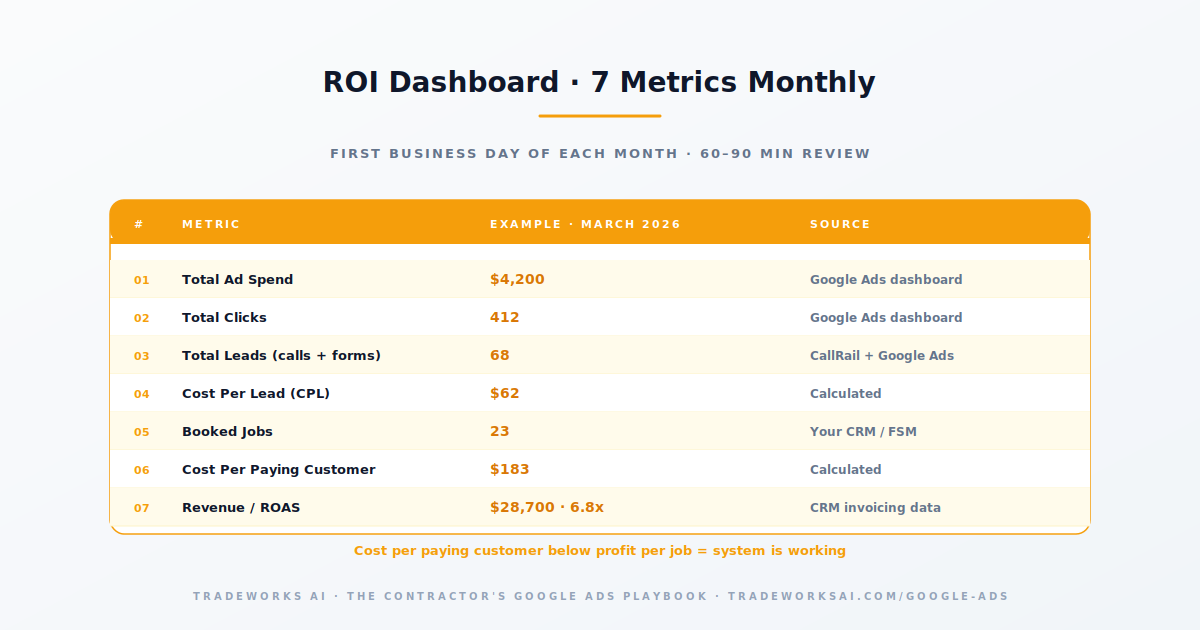
Every contractor running Google Ads needs a single document that answers one question: is this making money? The ROI Tracking Dashboard records 7 metrics monthly.
The first four metrics are available directly from Google Ads and CallRail. The last three require connecting your CRM or FSM data—or at minimum, manually tracking which Google Ads leads booked and what they paid. Without metrics 5 through 7, you are running the CPL-to-Profit Calculator from Episode 1 on assumptions rather than real data.
The tracking data produces a monthly report that drives every budget and optimization decision. On the first business day of each month, pull the ROI Dashboard data for the previous month. Compare CPL to the trade benchmarks from Episode 1. Compare cost per customer to your profit per job (Episode 1’s calculator). Identify the top 3 keywords by revenue attribution—these get more budget. Identify the bottom 3 keywords by cost per customer—these get reduced budget or paused. Review call recordings for the 5 highest-spend keywords—are the calls relevant and high-quality? Cross-reference with the Monday ritual from Episode 4: are the Search Terms clean? This monthly review takes 60 to 90 minutes and is the difference between a Google Ads account that improves every month and one that slowly degrades.
No conversion tracking at all. The most common and most expensive mistake. Without it, Google Ads optimizes for clicks, not conversions. You pay for volume instead of quality.
Tracking calls from the ad but not from the website. Google’s call extensions track calls directly from the ad. But many leads click through to the website and then call. Without website call tracking (CallRail DNI), these conversions are invisible.
Using the same phone number everywhere. If your Google Ads landing page, organic pages, GBP, and social media all show the same number, you cannot attribute calls to their source. Dynamic number insertion solves this.
Not importing offline conversions. Google Ads sees the click and the call but not whether that call became a $3,000 job. Without offline imports, Smart Bidding optimizes for call volume rather than revenue.
Checking tracking once and assuming it works forever. Tracking breaks. Tags get removed during website updates. Phone numbers get changed. Check your conversion tracking monthly to confirm data is flowing correctly.
Use call tracking software like CallRail ($45–$145/month) with dynamic number insertion on your website. CallRail shows which specific keyword generated each phone call, records the call, and reports the conversion back to Google Ads automatically.
Offline conversion tracking imports data from your CRM or FSM back into Google Ads. When a lead from a Google Ad click becomes a paying customer, you upload the conversion and its value so Google Ads knows which clicks produce revenue, not just calls.
CallRail, the industry standard, costs $45 to $145 per month depending on call volume and features. The ROI is typically immediate: knowing which keywords produce paying customers versus which produce tire-kickers allows you to reallocate budget to the profitable keywords.
Seven metrics monthly: total ad spend, total clicks, total leads (calls + forms), cost per lead, booked jobs from ads, cost per paying customer, and return on ad spend (ROAS). The first four come from Google Ads and CallRail. The last three require CRM or FSM data.
The difference between a $400 cost-per-customer (profit) and a $700 cost-per-customer (loss) is rarely the bid — it is campaign architecture, landing pages, and tracking. The Google Ads Audit grades your account against the 10-part playbook, identifies the highest-leverage gaps, and shows the one optimization that compounds.
Continue the Google Ads Playbook with Part 8 of 10.
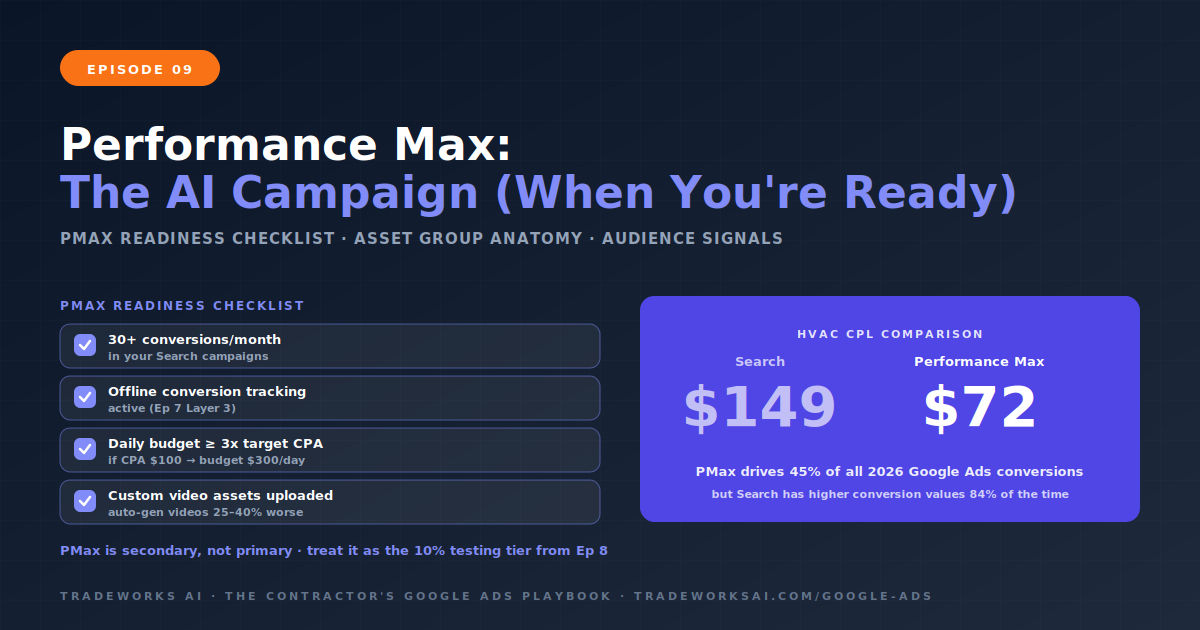
Continue the Google Ads Playbook with Part 9 of 10.