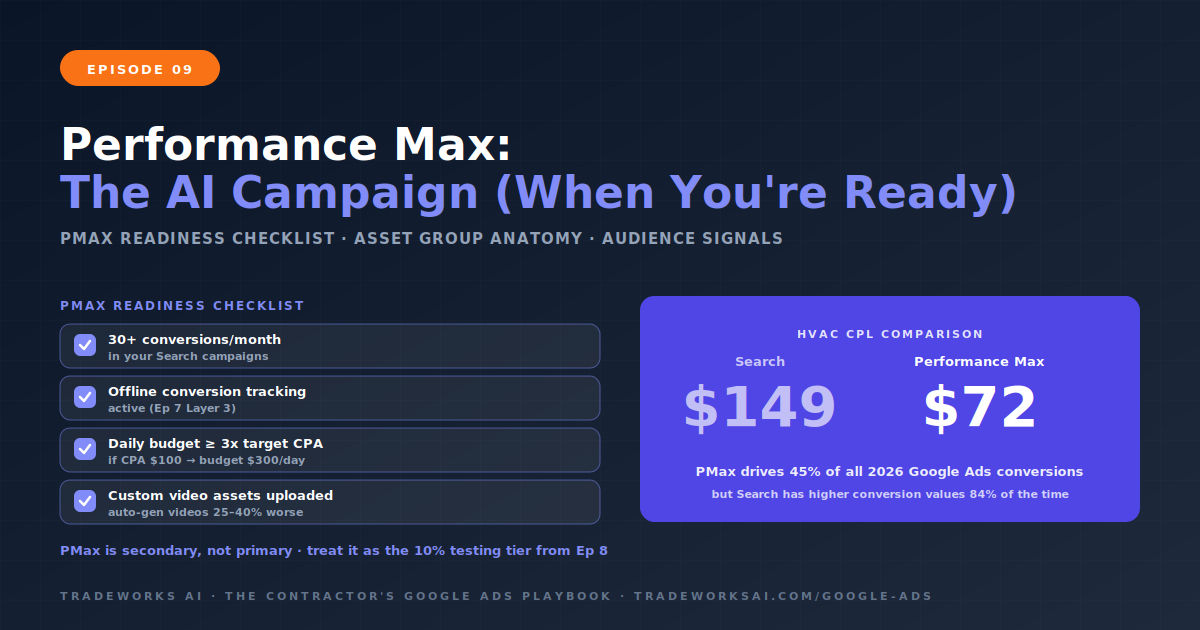
Google Ads · Part 9
Performance Max for Contractors: The AI Campaign That Cut HVAC Leads from $149 to $72 (When You Are Ready for It)
Continue the Google Ads Playbook with Part 9 of 10.
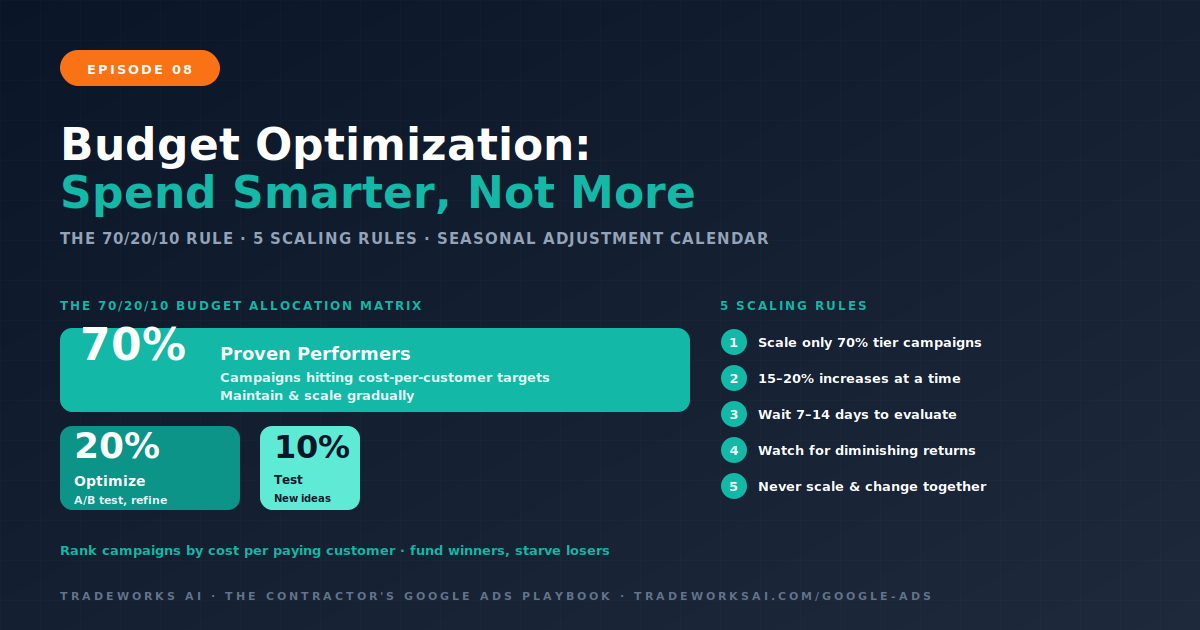
Google Ads budget optimization for contractors follows the 70/20/10 rule: 70% of budget to proven campaigns hitting your cost per customer target, 20% to optimizing existing campaigns (testing new ad copy, landing pages, keywords), and 10% to testing new opportunities (new service lines, new geographic areas, Performance Max). Scale gradually—15 to 20% budget increases at a time, then wait 7 to 14 days before evaluating. Diminishing returns signal: rising cost per customer with flat conversion volume means optimize first, do not spend more. Seasonal adjustments for contractors: HVAC companies should increase cooling campaign budgets 40 to 60% from April through September and shift to heating from October through March. The Budget Allocation Matrix ranks campaigns by cost per paying customer from Episode 7’s ROI Dashboard, then allocates more budget to winners and reduces or pauses losers.
The most common budget mistake is not spending too little or too much. It is spending the same amount on every campaign regardless of performance. A contractor with 5 campaigns spending $600 each per month is treating AC Repair (which produces $4 in revenue per $1 spent) the same as AC Installation (which produces $0.80 per $1 spent). The profitable campaign is budget-starved. The unprofitable campaign is overfunded. The total spend looks reasonable, but the allocation is destroying ROI. Episode 7’s ROI Dashboard gives you the data to see this. This episode teaches you what to do with that data.
The 70/20/10 rule is the proven framework for allocating Google Ads budget in 2026. It balances proven performance, active optimization, and controlled experimentation.
Campaigns consistently hitting your cost per paying customer target (from the CPL-to-Profit Calculator in Episode 1) and delivering positive ROAS. These campaigns are your revenue engine. They get the majority of budget because they have demonstrated, through Episode 7’s tracking data, that every dollar produces a measurable return. Do not experiment with these campaigns. Protect their performance by maintaining their keywords, landing pages, and ad copy. Scale them gradually when ready.
Budget dedicated to improving existing campaigns that are performing but have room to improve. This includes A/B testing new ad headlines and descriptions, testing landing page variants (Episode 5), expanding keyword lists based on Search Terms discoveries (Episode 4’s Monday ritual), and adjusting bid strategies as conversion data accumulates. The goal of the 20% allocation is incremental improvement: a 10% conversion rate becoming 12%, a $150 CPL becoming $130. Small gains that compound over months.
Budget for controlled experiments with clear boundaries. New service line campaigns that have not been tested. New geographic areas. New campaign types like Performance Max (Episode 9). New audience targeting. The 10% allocation limits risk—if the test fails, you have lost a manageable amount. If it succeeds, you have discovered a new revenue stream that can be promoted to the 70% allocation. Every test runs for at least 30 days with a predefined success metric (target CPL or cost per customer) before a scale or kill decision.
Using Episode 7’s ROI Dashboard data, rank all active campaigns by cost per paying customer (lowest to highest). Then apply the allocation.
This matrix is updated monthly using the ROI Dashboard. Campaigns move between tiers as performance changes. A 20% tier campaign that improves its cost per customer graduates to 70%. A 70% tier campaign that degrades moves to 20% for optimization. The matrix creates a meritocracy where every dollar flows to the campaigns that earn it.
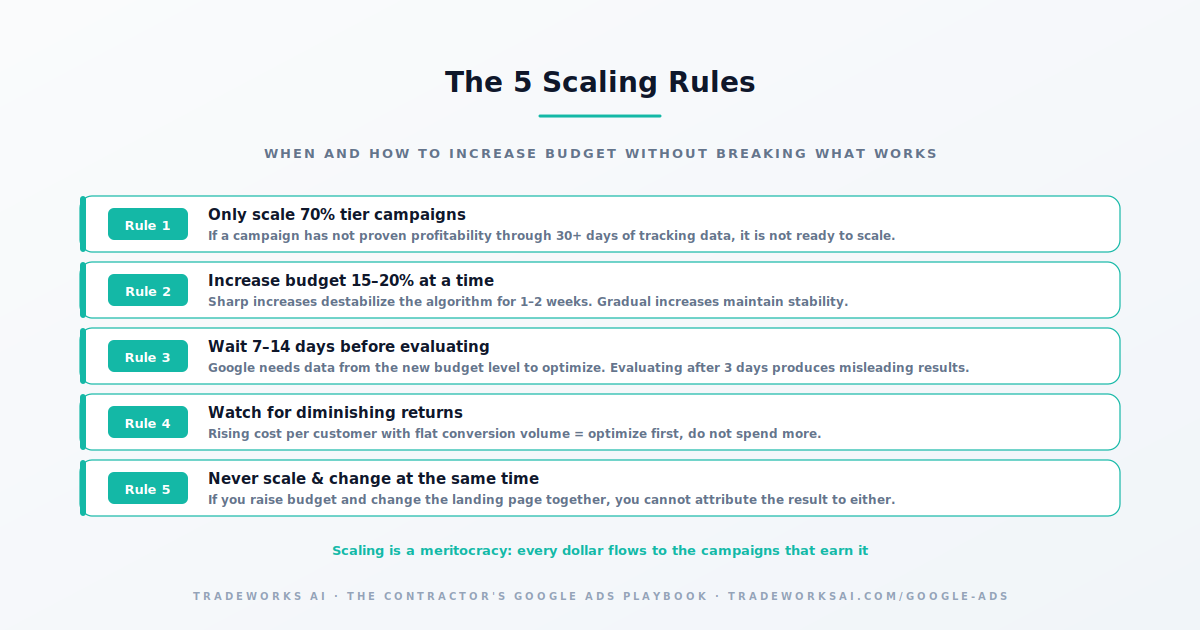
Scaling means increasing budget on campaigns that are already profitable. The rules prevent the most common scaling mistakes.
Rule 1: Only scale campaigns in the 70% tier. If a campaign has not proven profitability through at least 30 days of tracking data, it is not ready to scale.
Rule 2: Increase budget 15 to 20% at a time. Google’s algorithm recalibrates after budget changes. Sharp increases (doubling overnight) destabilize performance for 1 to 2 weeks. Gradual increases maintain stability.
Rule 3: Wait 7 to 14 days after each increase before evaluating. The algorithm needs data from the new budget level to optimize. Evaluating after 3 days produces misleading conclusions.
Rule 4: Monitor for diminishing returns. If cost per customer rises while conversion volume stays flat after a budget increase, you have reached the point of diminishing returns for that campaign in that market. Optimize (keywords, landing page, targeting) before scaling further.
Rule 5: Never scale and change simultaneously. If you increase budget and change the landing page at the same time, you cannot attribute the performance change to either action. Scale budget or optimize creative, never both in the same week.
Contractor demand is seasonal. Your Google Ads budget should match demand, not remain flat year-round. HVAC contractors in Florida and the Sun Belt see cooling demand surge from April through September—CPCs increase 30 to 40% during peak summer months as more competitors bid on the same keywords. Heating demand peaks from November through February. The seasonal calendar for HVAC: increase cooling campaign budgets 40 to 60% from April through September, reduce cooling budgets in winter, shift budget to heating campaigns from October through March. Plumbing sees emergency demand spikes during cold snaps (pipe freezes) and heavy rain (flooding). Roofing sees surges after storm events and during spring and fall inspection seasons.
The principle: allocate more budget when homeowner demand is high and competition is at peak. This seems counterintuitive—spending more when CPCs are highest. But the math works because conversion rates also increase during peak demand: homeowners searching for AC repair in July are not researching—they are hiring immediately. The higher CPC is offset by a higher close rate. During shoulder seasons (spring and fall), shift budget toward maintenance, tune-up, and inspection campaigns where competition is lower and CPCs are more favorable.
Running 10 campaigns at $300 per month each is less effective than running 3 campaigns at $1,000 each. Fragmented budgets prevent any single campaign from generating enough clicks and conversions for Google’s algorithm to optimize. Each campaign needs a minimum volume of conversions (15 or more per month) for Smart Bidding to function effectively. If your total budget is $3,000 per month, focus on your 2 to 3 highest-opportunity service lines with dedicated campaigns. Add new campaigns only when budget increases justify the additional split. Consolidate underperforming campaigns before expanding.
Follow the 70/20/10 rule: 70% to proven campaigns with positive ROAS, 20% to optimizing existing campaigns, 10% to testing new opportunities. Rank campaigns by cost per paying customer using your ROI Dashboard and allocate budget to the campaigns that earn it.
15 to 20% increases at a time, with 7 to 14 days between each increase. Rapid budget increases destabilize Google’s algorithm and often increase cost per lead temporarily. Gradual scaling maintains performance stability while growing volume.
Rising cost per customer with flat or declining conversion volume after a budget increase signals diminishing returns. When this happens, optimize first (keywords, landing page, targeting) before increasing budget further. The highest-intent queries are captured first; additional budget reaches progressively lower-intent searches.
Yes. HVAC contractors should increase cooling budgets 40–60% from April through September and shift to heating from October through March. Plumbing sees emergency demand spikes during cold snaps and heavy rain. Roofing surges after storms and during inspection seasons. Match budget to demand, not a flat monthly amount.
The difference between a $400 cost-per-customer (profit) and a $700 cost-per-customer (loss) is rarely the bid — it is campaign architecture, landing pages, and tracking. The Google Ads Audit grades your account against the 10-part playbook, identifies the highest-leverage gaps, and shows the one optimization that compounds.
Continue the Google Ads Playbook with Part 9 of 10.
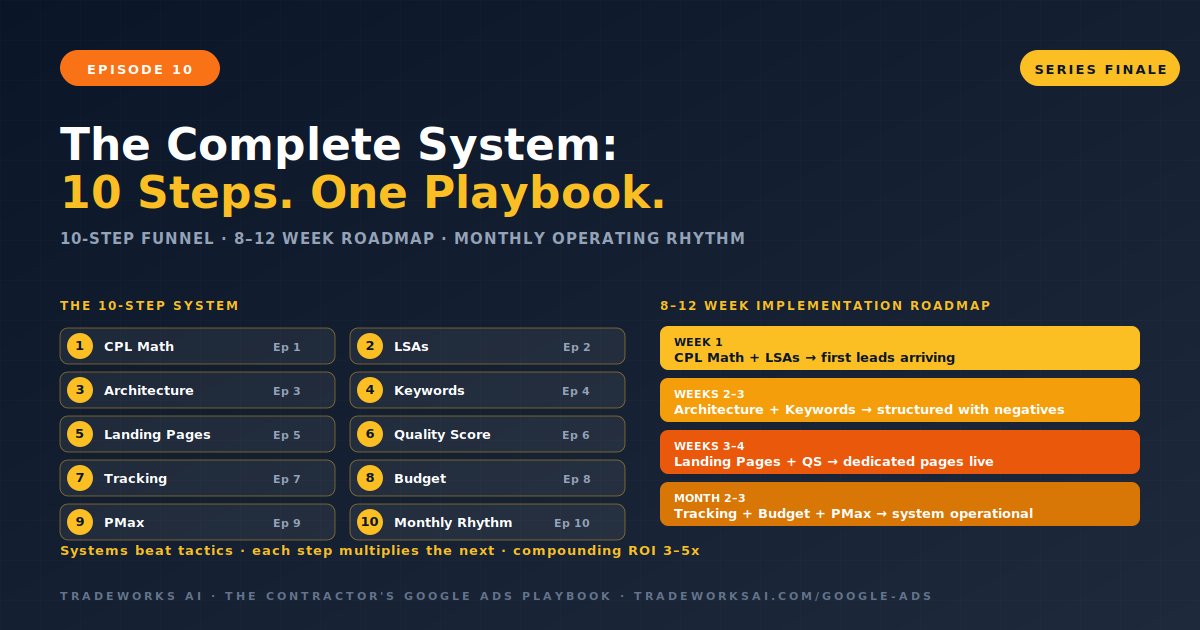
Continue the Google Ads Playbook with Part 10 of 10.