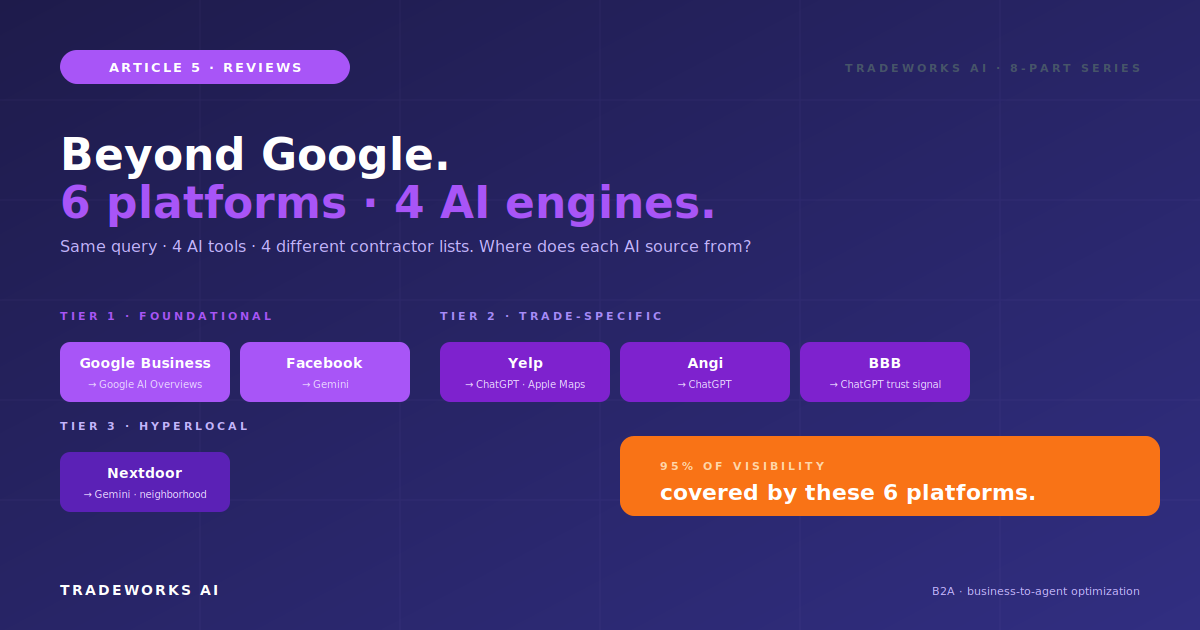
Reviews & Reputation · Part 5
Beyond Google: Multi-Platform Review Strategy
Continue the Reviews & Reputation series with Part 5 of 8.
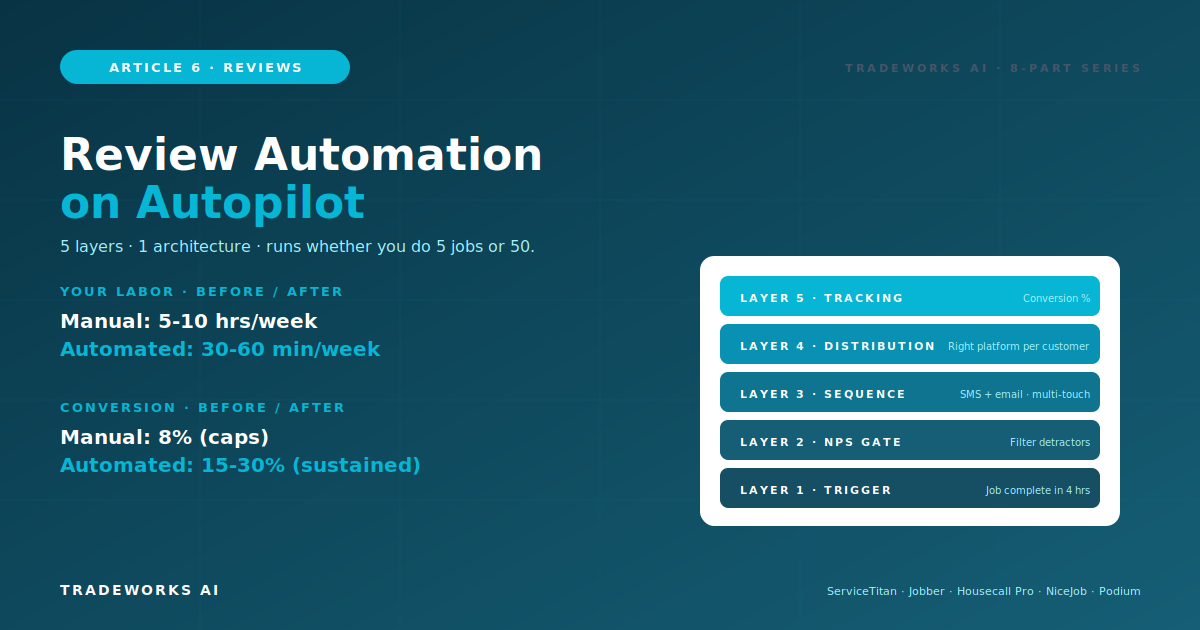
Manual review acquisition breaks down at 5 jobs per day. The technician forgets on routine jobs. The office staff misses the same-day window. The follow-up sequence is inconsistent. Conversion rates plateau at 3-8 percent regardless of effort. The fix is automation - a 5-layer architecture that fires on every job completion, routes through an NPS gate to filter detractors, executes a multi-channel sequence across SMS and email, distributes across the right platforms per customer, and tracks conversion at every step. The architecture runs on three implementation tiers: FSM-native automation in ServiceTitan, Jobber, or Housecall Pro for contractors with established platforms, standalone tools like NiceJob, Podium, or BirdEye for contractors who need more sophistication or operate on lighter FSMs, and DIY stacks combining Twilio plus email plus form tools for contractors building from scratch on tight budgets. This article covers the full architecture, the configuration logic per layer, the three implementation tiers with cost and capability tradeoffs, the trigger event decisions that determine workflow timing, the multi-channel sequence configuration, common implementation pitfalls, and the 90-day rollout that takes a contractor from manual asks to fully automated multi-platform review generation.
Part 2 in this series covered the 5-Pillar Acquisition System that takes contractors from 3-8 percent to 15-30 percent job-to-review conversion. The system works. Most contractors do not run it. The reason is not lack of intent - it is lack of automation.
Manual asking depends on three fragile components. The technician remembering at the right moment. The office staff sending follow-ups on schedule. The owner monitoring conversion to catch failures. At 2-3 jobs per day, manual works. At 5 jobs per day, the system breaks. At 10 plus jobs per day, manual is impossible.
Automation produces three benefits manual cannot. First: consistency - every job triggers the request, no exceptions, no forgotten asks. Second: timing - the same-day SMS fires at the optimal 4-hour window automatically. Third: scale - the same workflow handles 5 jobs per day or 50 jobs per day with identical quality.
The labor savings are substantial. A contractor manually running review requests on 8 jobs per day spends roughly 5-10 hours per week of office time on the workflow. Automation cuts that to 30-60 minutes per week of monitoring and exception handling.
The conversion gains are larger than the labor savings. Manual operations top out around 8 percent conversion. Automated workflows hold steady at 15-30 percent. The difference shows up in review count, AI visibility, and ultimately revenue.
Every effective review automation system has the same five layers. Tools differ. Architecture is consistent.
When does the workflow fire? The trigger event is the most consequential configuration decision in the architecture.
Primary trigger: job completion. The technician marks the job complete in the FSM. This fires the workflow within 4 hours - the optimal same-day window from Part 2.
Alternative triggers: invoice paid, appointment closed, service order completed. These work but require careful timing logic - invoice paid often happens days after job completion, missing the satisfaction peak.
Recurring service triggers: for maintenance plans, the trigger fires after each scheduled service visit, not just initial install. This produces ongoing review velocity from existing customers.
Failure mode to design around: technician forgets to mark complete. Build a fallback - if a job has been on the schedule for 24 hours past expected completion without status update, the system flags it for office review. The job either gets marked complete or removed from the trigger pool.
This is the layer most contractors skip - and the one that protects rating most. Before the public review request goes out, the workflow sends a Net Promoter Score question to filter the response.
Question: On a scale of 0 to 10, how likely are you to recommend us to a friend or family member?
Response 9-10 (Promoters): Workflow proceeds to public review request. Highest probability of 5-star reviews.
Response 7-8 (Passives): Workflow sends a clarifying question - What could we have done to make it a 10? Based on response, route to either review request or internal alert.
Response 0-6 (Detractors): Workflow stops the public review request flow entirely. Customer gets a private resolution message instead. Owner alerted for direct outreach.
Implementation note: the NPS gate is feedback filtering for issue resolution, not review suppression. The detractor still has the right to leave a review on any platform if they choose. The system simply does not invite a public review from a customer who is going to leave a negative one - the customer gets a resolution attempt instead.
After a customer passes the NPS gate, the multi-channel sequence executes. The sequence uses different channels at different times to maximize conversion across customer preferences.
Day 0 (within 4 hours): SMS with direct review link. Highest converting channel at 22-28 percent. Customer just experienced the service - peak satisfaction window.
Day 2 (48 hours): Email follow-up if no review yet. Different format catches customers who ignore SMS. Adds 8-12 percent conversion.
Day 7: Second SMS or postcard with different angle. Reference what the customer said they were happy about during the NPS gate.
Day 14: Phone call for high-value jobs only. Triggered when invoice exceeds threshold. 15-25 percent conversion on premium customers.
Sequence end: Day 14 stops the workflow regardless. Further outreach crosses into harassment territory. Most reviews come in by Day 7 anyway.
Conditional logic: workflow stops the sequence the moment a review is detected on any platform. No customer gets a Day 7 follow-up if they left a review on Day 1.
The workflow does not just request reviews - it routes to the right platform based on customer characteristics and platform strategy from Part 5.
Default routing: Google Business Profile is the primary destination for every review request.
Cross-platform expansion: customers who already left a Google review at the 30-day mark get invited to leave a Facebook review. This builds Tier 1 multi-platform presence without diluting the primary Google effort.
Demographic-based routing: customers in older demographics get BBB-direction. Customers in urban markets where Yelp is dominant get a passive Yelp link in invoice signatures (not active solicitation due to Yelp policy).
Special handling: Yelp gets passive treatment only - no automated requests due to Yelp solicitation penalties. Nextdoor recommendations come through neighborhood engagement, not direct workflows. The automation handles Google, Facebook, BBB, and Angi for direct requests.
What gets measured gets improved. The tracking layer captures per-channel conversion, per-platform distribution, NPS gate flow, and overall workflow performance.
Iteration cadence: weekly check during first 60 days of implementation, monthly check thereafter. A/B test message variants when conversion plateaus.
If you operate on a major FSM, the review automation is likely already available within the platform. Native integration uses your customer data, work order events, and payment status without separate configuration.
ServiceTitan Marketing Pro includes review request automation with NPS gating, multi-channel sequencing, and reporting. Trigger from job completion, dispatch close, or invoice paid. Configurable timing and message templates.
Jobber AI tier includes review request workflows triggered from job completion or invoice paid. AI-powered drafting available for response automation as well.
Housecall Pro Pro plan includes integrated review tools with automated requests from job completion. CSR AI tools handle related communication.
Cost: usually included in your existing FSM subscription tier. ROI window: immediate.
Limitations: feature depth varies by FSM. ServiceTitan offers the most sophisticated NPS gating. Jobber and HCP have lighter implementations that work for most contractors but may require standalone tools for advanced workflows.
If your FSM does not include review automation or you want more sophisticated tooling, standalone platforms integrate with most FSMs.
NiceJob (~75 dollars/month). Most cost-effective for solo and small operations. Strong NPS gating. SMS-first workflows. Multi-platform distribution.
Podium (~300 dollars/month). SMS-heavy workflow specialist. Webchat integration that converts website visitors into review opportunities. Strong for contractors who run their phones heavily.
BirdEye (~400 dollars/month and up). Enterprise tier. Multi-platform syndication, AI response capabilities, sophisticated reporting. Best fit for Stage 4-plus contractors with established operations.
Other options: GatherUp, Reputation, Reviews on My Website, Trustpilot Business. Each has specific strengths - evaluate against your specific FSM and trade.
Integration: standalone tools require API or Zapier connections to your FSM. Most major standalone tools have native integrations with ServiceTitan, Jobber, HCP, and other major contractor platforms.
If budget is tight or you operate on a lighter FSM without integrated tools, a DIY stack runs the same architecture for 30-50 dollars per month total.
Stack components: Twilio for SMS (pay-per-message, ~10-30 dollars/month for typical contractor volume). Mailchimp or SendGrid for email follow-ups (free at low volume, ~10 dollars/month at scale). Google Forms or Typeform for NPS gate (free tier sufficient for most). Zapier or Make to connect components and trigger from FSM events (~20 dollars/month).
Total cost: roughly 30-50 dollars per month for the full stack. Capabilities cover all 5 architecture layers though with more office labor than FSM-native or standalone tools.
Trade-offs: more configuration time during setup. More monitoring labor during operation. Less sophisticated reporting. But the architecture works.
Best fit: Stage 1-2 contractors building from scratch. Operations where existing FSM does not support review automation and standalone tool budget is constrained.
Different trigger events produce different conversion outcomes. The decision matters more than most contractors realize.
Job completion (recommended): fires when technician marks job complete in FSM. Captures peak satisfaction. Fastest to the same-day SMS window. Risk: technicians forget to mark complete.
Invoice paid: fires when payment processes. Reliable trigger because payment is unambiguous. Risk: payment often happens days after completion, missing satisfaction peak.
Service appointment closed: fires when dispatch closes the appointment. Timing similar to job completion but depends on dispatch workflow rather than tech action. Risk: closed appointments may include cancellations or reschedules.
Hybrid approach (best practice): primary trigger on job completion with 4-hour delay. Backup trigger on invoice paid if job completion did not fire within 24 hours. Catches the cases where technicians forget to mark complete.
Triggering before job is actually complete. Tech marks complete on the truck en route to next job. Customer hasn't even paid yet. NPS gate fires while customer is mid-conversation. Build a 4-hour minimum delay before any customer-facing message.
Skipping the NPS gate. Sending review requests to detractors drops your rating fast. The NPS gate is the single most important layer - never skip it.
Over-frequency. Multiple touches in same week feels harassing. Stick to the Day 0, 2, 7, 14 sequence. Stop the moment a review is detected.
Stale customer contact info. SMS to disconnected numbers. Emails to old addresses. Audit contact data freshness as part of the workflow setup.
No fallback for non-marked-complete jobs. Tech forgets, workflow never fires, review opportunity lost. Build the 24-hour fallback alert.
Not monitoring detractor flow. Detractors get routed to private resolution but if nobody responds to the alert, the issue festers and may still surface as a public review. Detractor alerts need same-day owner response.
Working automation in 90 days. Three phases.
Days 1-7: Choose implementation tier. Audit existing FSM capabilities. Decide FSM-native vs standalone vs DIY based on Stack Blueprint stage.
Days 8-21: Configure the 5 layers. Trigger event setup. NPS gate logic. Channel sequence templates. Multi-platform routing. Tracking dashboard.
Days 22-30: Test on 5-10 jobs manually. Verify each layer fires correctly. Adjust message templates and timing.
Days 31-37: Run automation on every job with manual quality check on each request. Monitor for technical issues.
Days 38-49: Track per-channel conversion rates. Adjust messaging based on early data. A/B test if conversion is below 12 percent.
Days 50-60: Refine NPS gate routing. Audit detractor flow - are they being resolved? Document the playbook for office staff handoffs.
Days 61-74: Full automation on every job, every day. Office staff role shifts from running requests to monitoring exceptions.
Days 75-84: Add multi-platform expansion. Customers with Google reviews start receiving cross-platform requests for Facebook, BBB.
Days 85-90: 90-day audit. Conversion rate, NPS distribution, total reviews added, detractor resolution rate. Document what worked and refine the playbook.
Part 2 covered why the 5-Pillar Acquisition System works. Part 5 covered which platforms to target. Part 6 covers how to make all of it run automatically across every job, every customer, every platform.
Manual review acquisition is the bottleneck most contractors do not realize they have. Removing the bottleneck means consistent 15-30 percent conversion at scale, 5-10 hours per week of office time recovered, and a multi-platform review presence that compounds month over month without ongoing manual effort.
Read Part 7 next: Reviews in the AI Era - How ChatGPT, Gemini, and Perplexity Use Reviews to Recommend Contractors. The B2A (business-to-agent) deep dive that explains why your review automation matters even more in 2026 than it did in 2024.
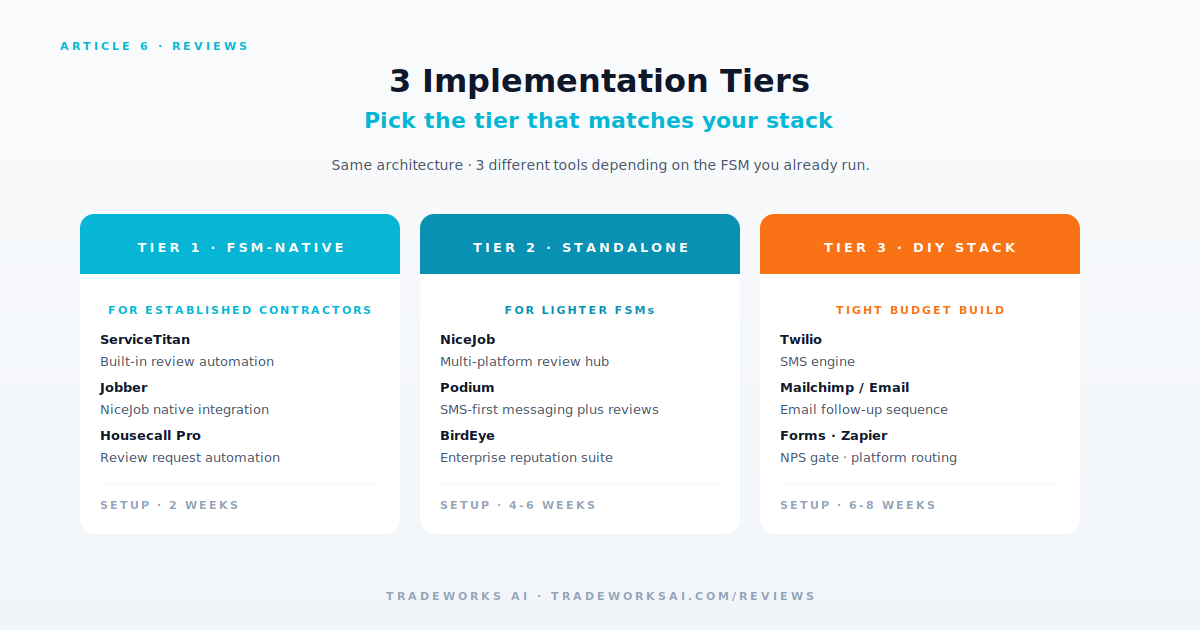
The DIY stack at 30-50 dollars per month using Twilio for SMS, free email tools, and Zapier for workflow logic. More setup time and office labor than FSM-native or standalone tools, but the architecture works for any contractor stage.
Most major FSMs include some level of review automation. ServiceTitan Marketing Pro, Jobber AI tier, and Housecall Pro Pro plan all support automatic review request workflows. Configuration depth and NPS gating sophistication vary - audit your specific FSM tier capabilities. Cat 10 Part 4 of TradeWorks AI covers FSM AI activation in detail with platform-specific PDFs.
30 days for setup if your FSM has native automation. 45-60 days for standalone tool implementations. 60-75 days for DIY stack builds. Full 90-day rollout includes soft launch and optimization phases regardless of tier.
Yes, with the DIY stack. Twilio plus email tool plus form-based NPS gate plus Zapier workflow logic. The architecture works without FSM integration - the manual labor and integration friction increase. If you are doing 4-plus jobs per day without an FSM, an FSM with built-in review automation is usually a better investment than the standalone DIY stack.
Passive treatment only. Yelp explicitly penalizes review solicitation, which means your automated SMS or email request can result in review filtering. Standard practice: include a passive Yelp link in invoice signatures and on your website without active solicitation. Customers who want to leave Yelp reviews find the path; customers who do not are not pushed.
The workflow should stop the sequence immediately. No follow-up messages get sent after a review is detected on any platform. This requires a webhook or API listener that watches for new reviews on monitored platforms - most standalone tools and FSM-native automations include this. DIY stacks need explicit configuration for this listener.
Most contractors think their review profile is "fine." Then we benchmark it against the local competitors who are taking the AI recommendation slots. Our free audit checks volume, recency, rating, response rate, and platform coverage — and shows you the highest-leverage moves to get to 4.7+ stars and 200+ reviews this year.
Continue the Reviews & Reputation series with Part 5 of 8.
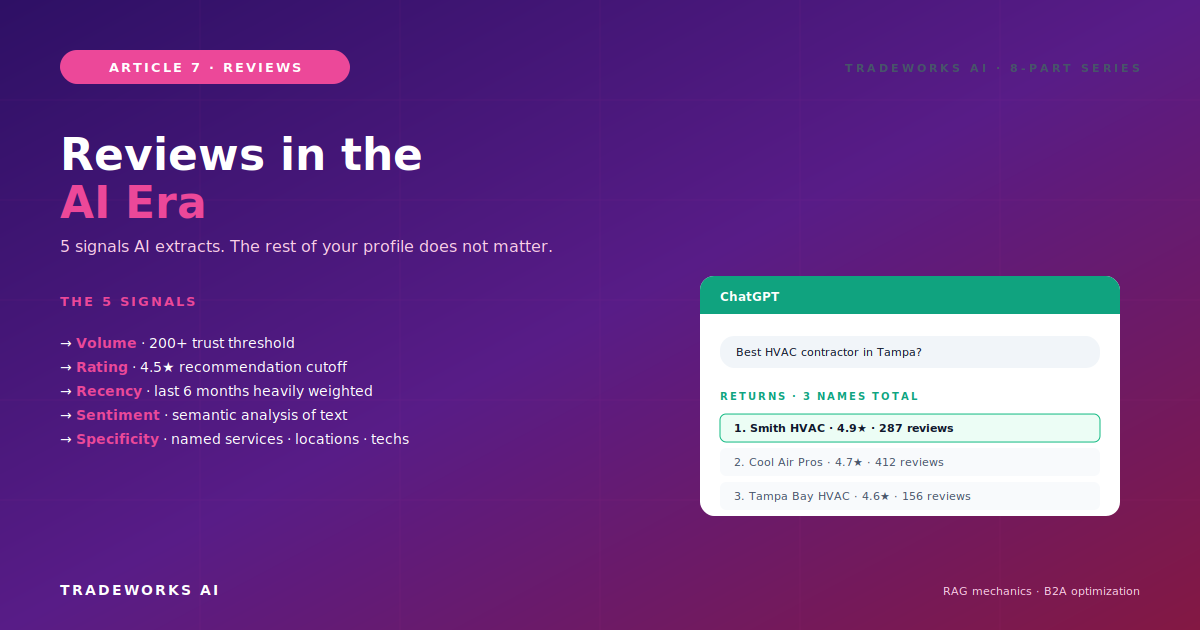
Continue the Reviews & Reputation series with Part 7 of 8.