Real Estate Tech · Part 10
Property Management Software in 2026: Buildium vs AppFolio vs Rent Manager for Real Estate Professionals
Continue the Real Estate Tech Stack series with Part 10 of 14.
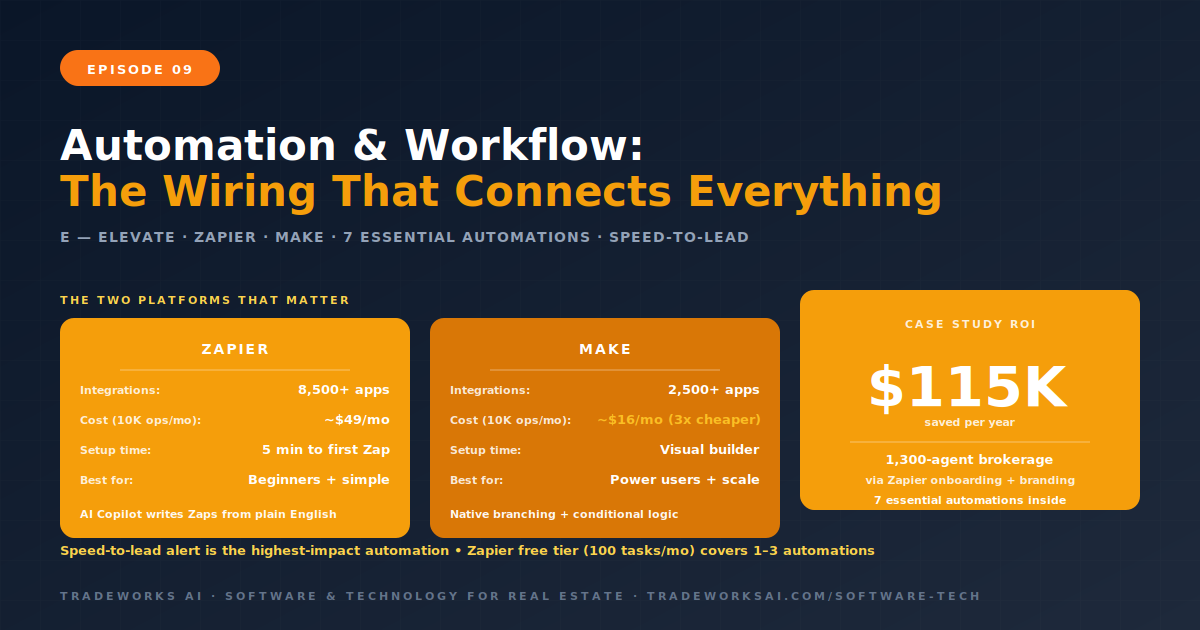
Every tool in your real estate technology stack — your CRM, website, email platform, transaction management, social media scheduler, and lead sources — generates and consumes data. A new lead arrives on your website. That lead’s contact information needs to appear in your CRM. The CRM needs to trigger a welcome email sequence. The email engagement data needs to update the CRM record. When the lead becomes a client under contract, the transaction data needs to flow into your transaction management platform. When the deal closes, the client needs to move to your past-client nurture sequence. None of these transfers should require manual data entry. Automation and workflow integration tools — primarily Zapier and Make — are the wiring that connects your entire CLOSE Stack into a single, self-operating system. A 1,300-agent brokerage in the Pacific Northwest saved $115,000 per year by automating onboarding, branding setup, and marketing workflows through Zapier alone.
Automation sits in the Elevate layer of the CLOSE Stack. While the first four layers — Capture, Leverage, Operate, Showcase — are individual tool categories, the Elevate layer is the connective tissue that wires them together. Without automation, your tech stack is a collection of disconnected tools that require manual data transfer at every handoff. With automation, your stack operates as an integrated system where data flows between tools automatically, triggers fire based on events, and the agent’s only role is the work that requires human judgment: conversations, negotiations, and relationship building.
The promise of automation is not that it replaces agents. It replaces the administrative tasks that prevent agents from doing what they are uniquely qualified to do. Every minute spent copying a lead’s phone number from an email into a CRM is a minute not spent calling that lead. Every hour spent manually updating a transaction checklist is an hour not spent prospecting for the next deal.
| Feature | Zapier | Make (formerly Integromat) |
|---|---|---|
| Integrations | 8,500+ native apps | 2,500+ native apps |
| Ease of Use | Simplest setup — 5 min to first automation | Visual builder — steeper learning curve, more power |
| Pricing (10K ops/mo) | ~$49/month | ~$16/month (3x cheaper) |
| Free Tier | 100 tasks/month, unlimited Zaps | 1,000 operations/month |
| Complex Workflows | Requires multiple Zaps + workarounds | Native branching, conditional logic in one scenario |
| AI Features | AI Copilot, AI Agents, natural language workflow creation | AI scenarios with prompt engineering interfaces |
| Best For | Beginners, simple automations, largest app library | Power users, complex workflows, cost-conscious teams |
Zapier is the most widely used automation platform with over 8,500 native integrations covering virtually every business tool. The platform uses a trigger-and-action model: when an event happens in one app (trigger), Zapier performs an action in another app. For example: when a new lead submits a form on your website (trigger), create a contact in Follow Up Boss (action) and send a welcome email via Mailchimp (action).
Zapier’s strength is accessibility. Most agents can build their first automation in under 5 minutes. The AI Copilot feature allows users to describe workflows in natural language — “when I get a new Zillow lead, add them to my CRM and send a welcome text” — and Zapier generates the workflow automatically. Tables provides lightweight data storage within Zapier for lookup tables and logs. Interfaces enables building basic forms and dashboards without code.
The free tier includes 100 tasks per month with unlimited Zaps. Paid plans start at $20 per month for 750 tasks. At enterprise scale, task consumption adds up, but for solo agents and small teams running 5 to 15 automations, Zapier’s pricing is manageable and the integration breadth is unmatched.
Make, formerly Integromat, approaches automation through a visual scenario builder that displays your entire workflow as a flowchart on one canvas. This visual model makes it easier to build complex, branching workflows with conditional logic, loops, and error handling — all within a single scenario rather than requiring multiple separate automations.
For real estate, this matters. A sophisticated lead automation is not just “new lead arrives, add to CRM.” It is “new lead arrives, check budget, if over $500K assign to senior agent and send premium email template, if under $500K add to standard drip sequence, log everything in CRM.” Make handles this conditional branching natively. Zapier requires multiple separate Zaps and workarounds to achieve the same result.
Make’s pricing advantage is significant at scale: 10,000 operations per month costs approximately $16 on Make versus $49 on Zapier — roughly 3 times cheaper at the same volume. For teams processing hundreds of leads per month, the cost difference compounds. The tradeoff is a steeper learning curve and fewer native integrations (2,500 versus 8,500). For most common real estate tools, Make has the integrations you need. For niche or legacy tools, Zapier’s broader library may be necessary.
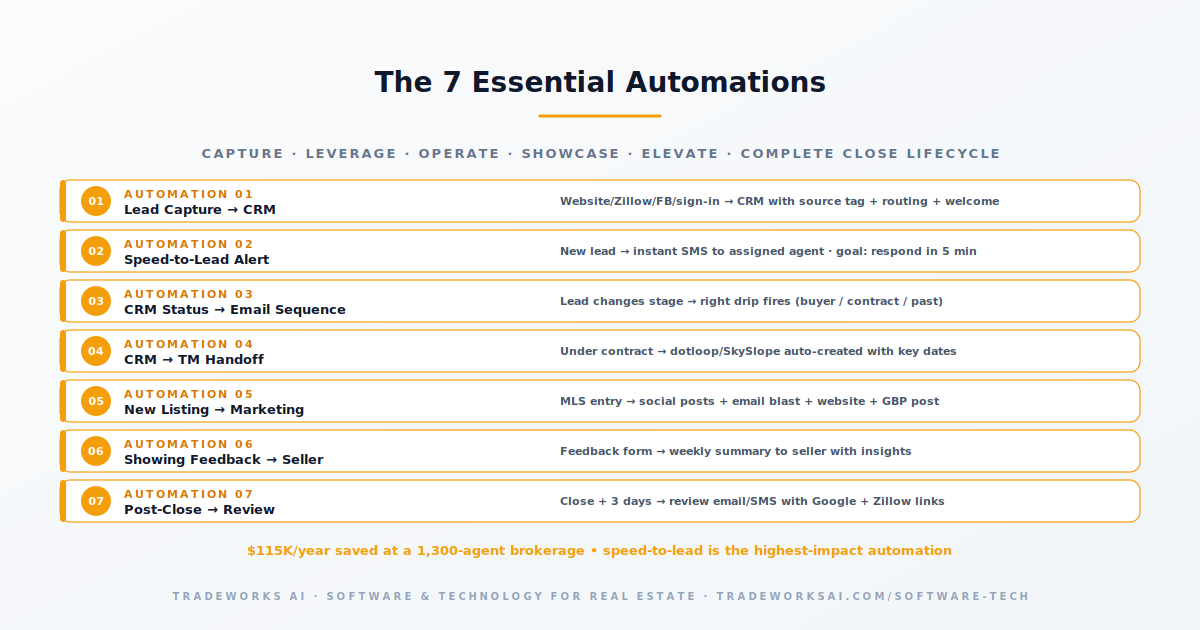
These seven automations cover the complete CLOSE Stack lifecycle: lead arrives (Capture), gets nurtured (Leverage), moves to transaction (Operate), gets marketed (Showcase), and feeds performance data back into the system (Elevate). An agent who builds all seven has automated the administrative backbone of their business. The only remaining manual work is the work that requires human presence: showing homes, negotiating offers, and building relationships.
Before touching Zapier or Make, draw a simple diagram of how data moves through your business. Start with “Lead arrives” on the left and “Deal closes” on the right. Every tool that touches the data between those two points goes on the diagram. Every handoff between tools is a potential automation. Identify the handoffs that are currently manual — those are your automation opportunities.
Do not try to build all seven automations in one weekend. Start with the one that saves the most time or prevents the most dropped balls. For most agents, that is Automation 1 (Lead Capture to CRM) or Automation 2 (Speed-to-Lead Alert). Build it, test it, and run it for two weeks before adding the next one.
Every automation should be tested with real data before going live. Submit a test lead through your website form and verify it appears in your CRM with the correct tags, triggers the correct email sequence, and sends the speed-to-lead notification. Test the entire chain end to end. A broken automation is worse than no automation because it creates the illusion of working while leads fall through cracks.
Automation is not set-and-forget. Check your Zapier or Make dashboard weekly for the first month to catch errors, failed runs, and unexpected behavior. After the first month, check monthly. Most automations run reliably once configured correctly, but app updates, API changes, and edge cases can cause failures that need attention.
Three mistakes agents make with automation. First, automating before they have a process. If you do not have a consistent manual process for lead follow-up, automating it just makes an inconsistent process run faster. Build the process first, then automate it.
Second, over-automating communication. Automated emails and texts should feel personal. If every touchpoint in your client experience is clearly automated, you lose the relationship advantage that makes real estate a human business. Automate the administrative tasks. Keep the meaningful communication personal.
Third, building fragile chains. An automation that depends on five tools working perfectly in sequence will break more often than one that depends on two. Keep automations as simple as possible. If a workflow requires more than five steps, consider whether it can be split into two simpler automations with a shared CRM record as the connecting point.
CRMs like Follow Up Boss, Lofty, and kvCORE include native automation for internal tasks like email triggers, lead routing, and status-based actions. You need Zapier or Make when you want to automate connections between your CRM and external tools that do not have native integrations: connecting your website form to your CRM, sending data to your transaction management platform, triggering social media posts, or syncing with your email marketing platform.
Zapier’s free tier (100 tasks per month) is sufficient for 1 to 3 simple automations. Most solo agents can operate on Zapier’s $20 per month plan or Make’s $16 per month plan. The time savings from automating lead capture, speed-to-lead alerts, and CRM-to-email triggers typically saves 3 to 5 hours per week — making the platform cost negligible compared to the value of recovered time.
Speed-to-lead notification. When a new lead arrives, an instant alert to your phone with the lead’s name, phone number, and inquiry details enables a response within minutes. Research shows that contacting a lead within 5 minutes makes you 100 times more likely to connect than waiting 30 minutes. This single automation has a direct, measurable impact on conversion rates.
Yes. Most Zapier automations can be recreated in Make within an hour. Make’s documentation and templates facilitate the transition. Run both platforms in parallel for 30 days on critical workflows before fully switching to ensure stability.
Zapier is designed for non-technical users — its AI Copilot can generate workflows from plain English descriptions. Make has a steeper learning curve but comprehensive documentation and templates. The seven automations listed in this article are achievable by any agent willing to invest 2 to 4 hours in setup per automation. No coding required for any of them.
Most agents buy tools in reaction to problems. The result: disconnected subscriptions that duplicate data and create more friction than they solve. The CLOSE Stack Self-Assessment grades your stack across all 5 layers and identifies the highest-leverage gap to close first.
Continue the Real Estate Tech Stack series with Part 10 of 14.
Continue the Real Estate Tech Stack series with Part 11 of 14.