Instagram · Part 5
Instagram Stories & Highlights for Contractors: The Daily Engagement System
Continue the Instagram for Contractors series with Part 5 of 8.
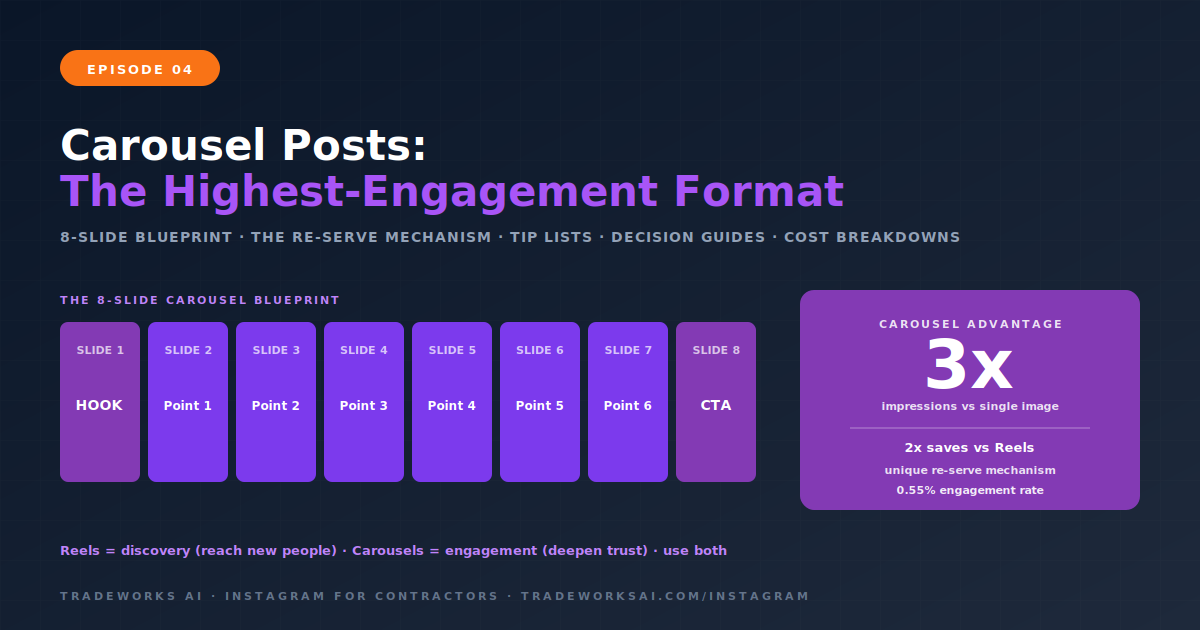
Instagram carousel posts are the highest-engagement feed format available to contractors in 2026. Carousels—multi-slide swipe-through posts with up to 20 images or videos—generate three times the impressions of single images, earn twice the saves of Reels, and achieve the strongest engagement rate of any feed format at 0.55 percent (compared to 0.50 percent for Reels and a declining rate for static images). Instagram’s algorithm actively promotes carousels through a unique re-serve mechanism: when a user scrolls past your carousel without engaging, Instagram shows them a different slide later in the day, giving your content a second chance that no other format receives.
For contractors, carousels are the ideal format for the Education content pillar covered in Episode 2. A five-slide carousel teaching homeowners how to spot water heater failure or an eight-slide walkthrough of a panel upgrade process earns saves, builds authority, and positions your business as the knowledgeable choice—all without requiring video. This guide covers the anatomy of a high-performing carousel, eight carousel structures built for contractor content, design best practices using free tools, and the metrics that tell you whether your carousels are converting.
The carousel advantage comes from three algorithm mechanics that no other feed format benefits from:
When Instagram shows your carousel to a follower and they scroll past without engaging, the algorithm flags it for re-distribution. Twenty-four to forty-eight hours later, it shows the same carousel again—but starts on a different slide. This means your carousel effectively gets two opportunities to capture attention from the same user, while a single image or Reel gets one.
The trigger for re-serving is your swipe-through rate. Instagram measures how many viewers swipe to slide three or beyond. If your swipe-through rate exceeds the platform average for your account size, you enter the re-serve queue. This makes your first two slides critically important—they determine whether the algorithm gives your entire post a second life.
Carousels generate two to three times more saves than any other format in 2026. Saves carry heavy algorithmic weight because they signal lasting value—the viewer found your content useful enough to return to later. Educational carousels with actionable tips, checklists, and step-by-step processes trigger saves at the highest rate. For contractors, a carousel titled “5 Signs Your Water Heater Is About to Fail” is not just education—it is a save magnet that keeps working in the algorithm for days after posting.
Each swipe through your carousel increases the time a user spends on your post. The algorithm interprets extended dwell time as a signal that your content is engaging and worth promoting to more users. An eight-slide carousel where a viewer reads each slide for three to five seconds generates 24 to 40 seconds of engagement—comparable to a Reel, but without requiring video production.
Every effective carousel follows a predictable structure. Once you learn the anatomy, you can build carousels in minutes using free tools.
The first slide determines whether someone swipes. It must create an information gap or promise clear value. For contractors, strong hook slides include a bold question (“Is your AC killing your electric bill?”), a numbered promise (“5 Signs Your Roof Needs Replacement”), or a surprising claim (“This $12 Part Saves Tampa Homeowners $2,000/Year”). The hook slide should be visually bold—large text, high contrast, minimal clutter. If a viewer cannot read it in under two seconds, the text is too small or too busy.
Each middle slide delivers one point, one tip, one step, or one piece of evidence. The key principle: every slide should stand alone as a complete idea. Viewers sometimes skip slides, and the algorithm may re-serve your carousel starting on slide three or four—so each slide needs to make sense independently.
Design each middle slide with a consistent template: headline at the top, supporting detail in the body, and a visual element (icon, photo, or diagram) that reinforces the point. Consistency across slides creates a polished, professional look that builds credibility.
The final slide is your conversion moment. After delivering value across seven slides, the viewer is primed to take action. Strong final slides for contractors include: a booking CTA (“Schedule your free inspection at [URL]”), a save CTA (“Save this for the next time your AC acts up”), a comment prompt (“Which of these signs have you noticed? Drop it in the comments.”), or a profile visit prompt (“Follow for weekly home maintenance tips”).
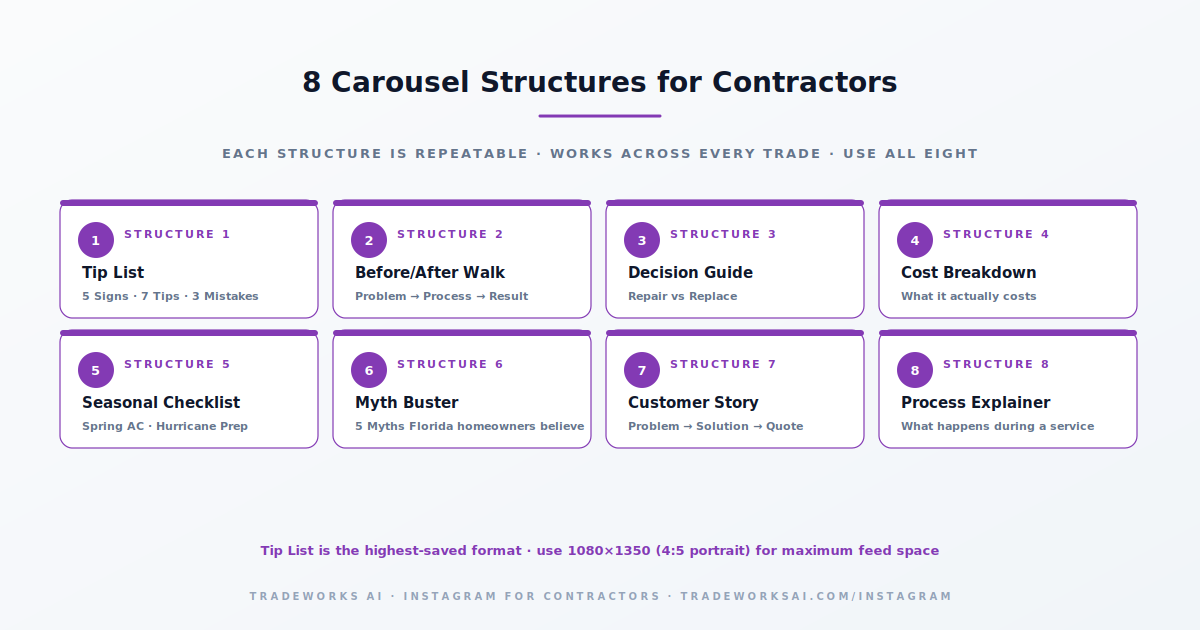
The most versatile and highest-performing structure. Hook slide names the count, each subsequent slide covers one tip with a headline and 1–2 sentences of explanation, final slide is the CTA. Works across every trade and every content pillar.
Examples: “5 Signs Your Water Heater Is About to Fail” • “7 Things Your HVAC Tech Checks During a Tune-Up” • “3 Electrical Mistakes Homeowners Make During Remodels”
Slide 1: the problem (before photo with context). Slides 2–4: the process (what was done and why). Slides 5–6: the result (after photos from multiple angles). Slide 7: technical details (what was installed, efficiency gained, cost saved). Slide 8: CTA. This is the Portfolio pillar in carousel format—more engaging than a single before/after photo because it tells the full story.
Slide 1: the question (“Should You Repair or Replace Your AC?”). Slides 2–4: when to repair (with specific criteria). Slides 5–7: when to replace (with specific criteria). Slide 8: decision framework or “call us for a free assessment” CTA. This earns massive saves because homeowners reference it when they are actually facing the decision.
Slide 1: “What a [Service] Actually Costs in [City]”. Slides 2–6: each cost component broken out (labor, parts, permits, etc.). Slide 7: total range with factors that affect price. Slide 8: CTA for a free estimate. Transparency about pricing builds trust and qualifies leads—homeowners who contact you after seeing the cost breakdown already understand the investment.
Slide 1: “Your Spring AC Checklist” or “Hurricane Prep: 8 Steps to Protect Your Home.” Slides 2–7: one checklist item per slide with a brief explanation. Slide 8: “Save this checklist” CTA. Seasonal content has a built-in urgency trigger and these carousels get shared to neighbors and family.
Slide 1: “5 HVAC Myths Florida Homeowners Still Believe.” Slides 2–6: one myth per slide with “Myth” header and “Truth” explanation below. Slide 7: summary of what actually matters. Slide 8: CTA. The myth-truth format is inherently swipeable—each slide creates a mini information gap.
Slide 1: “How We Saved the Martinez Family $4,800.” Slides 2–3: the problem they called about. Slides 4–5: what you found and the solution. Slide 6: the result. Slide 7: the customer’s own words (review quote). Slide 8: CTA. This blends Portfolio and Social Proof pillars into a narrative arc.
Slide 1: “What Happens During an Electrical Panel Upgrade.” Slides 2–7: step-by-step process with photos from an actual job. Slide 8: timeframe and CTA. Homeowners fear the unknown. Showing them exactly what happens during a service visit removes friction and builds confidence.
Use 1080 x 1350 pixels (4:5 portrait ratio) for all carousel slides. This format occupies the maximum screen space in the Instagram feed without requiring users to zoom. Use the same aspect ratio for every slide in the carousel—mixing portrait and square slides creates jarring transitions that reduce engagement.
Canva (free tier): Pre-built carousel templates. Duplicate one slide and customize for consistency across all eight to ten slides. The fastest option for contractors without a designer.
Instagram’s native editor: For simple text-over-photo carousels using actual job-site images.
CapCut (free): For carousels that include video slides mixed with static images.
Use your brand colors consistently. Every slide should be immediately recognizable as yours.
Maximum two fonts: one for headlines (bold, sans-serif), one for body text (clean, readable).
Large text. If a viewer cannot read your slide without zooming, the text is too small. Minimum 24pt effective size for body text, 36pt+ for headlines.
One point per slide. Do not cram three tips onto one slide to save space. Each slide earns its own swipe.
Use real photos from your jobs whenever possible. Stock-style graphics signal inauthenticity. A real photo of a corroded coil beats a clipart illustration every time.
White space is your friend. Do not fill every pixel. Clean, scannable slides outperform cluttered ones.
Slide numbers or progress indicators (1/8, 2/8) encourage swiping by showing the viewer how much content remains.
| Trade | Carousel Ideas |
|---|---|
| HVAC | “5 Signs Your AC Is Dying” • “Filter Types Explained” • “What a Tune-Up Actually Includes” • “SEER2 Ratings: What the Numbers Mean” • “Repair vs. Replace Decision Guide” • “Hurricane AC Prep Checklist” |
| Plumbing | “7 Things You Should Never Flush” • “Tankless vs. Tank Water Heater Comparison” • “Signs of a Slab Leak” • “What Happens During a Drain Camera Inspection” • “Water Softener Benefits for Florida Well Water” |
| Electrical | “Is Your Panel Dangerous? 5 Warning Signs” • “GFCI vs. AFCI: What’s the Difference?” • “EV Charger Installation: What to Expect” • “Generator Sizing Guide for Your Home” • “The Real Cost of a Panel Upgrade in Tampa” |
| Roofing | “Spot Storm Damage in 5 Steps” • “Shingle vs. Metal vs. Tile: Florida Edition” • “Insurance Claim Process Explained” • “Roof Age and Your Insurance: What You Need to Know” • “What Happens During a Roof Inspection” |
| Painting | “5 Prep Steps That Make Paint Last 10 Years” • “Exterior Paint in Florida Sun: What Holds Up” • “Color Selection: Warm vs. Cool Tones for Your Home” • “Cabinet Refinishing Process Step-by-Step” |
| Cleaning | “Deep Clean vs. Regular Clean: What’s the Difference?” • “Move-Out Cleaning Checklist” • “Eco-Friendly Products We Use and Why” • “Airbnb Turnover Cleaning Standards” |
| Metric | What It Tells You | Good Benchmark |
|---|---|---|
| Swipe-Through Rate | How many viewers swipe past slide 2 | Above 50% triggers re-serve |
| Saves | Content perceived as reference-worthy | 2–5% of reach (highest for tip lists and checklists) |
| Shares | Content worth recommending | 1–3% of reach |
| Comments | Depth of engagement | Higher with question CTAs on final slide |
| Reach vs. Impressions | Impressions > Reach means re-serves are working | Impressions should be 1.3–2x Reach |
| Profile Visits | Viewers checking your business after the carousel | Track weekly; correlates to lead quality |
The key diagnostic: if your carousel gets high saves but low comments, your content is valuable but not conversational. Add a direct question on the final slide. If saves are low but comments are high, the content is engaging but not reference-worthy—shift toward checklists and tip lists that viewers want to revisit.
Eight to ten slides is the optimal range based on 2026 engagement data. Engagement drops after slide three but picks up again at slide eight when committed viewers finish the carousel. Carousels under five slides do not generate enough dwell time to trigger strong algorithmic distribution. Carousels with more than ten slides work for highly engaged audiences but risk losing casual browsers. Start with eight slides and test from there.
Yes. Instagram carousels now support up to 20 mixed images and videos. Adding a video slide—particularly with music—can push your carousel into the Reels feed algorithm, giving it broader discovery reach while maintaining the engagement depth that carousels deliver. A common high-performing structure: image hook on slide one, video walkthrough on slide three, image tips on slides four through seven, CTA on slide eight.
They serve different functions. Reels reach new audiences through Instagram’s discovery algorithm—they are the growth engine. Carousels deepen engagement with your existing followers—they are the trust engine. The data shows carousels earn higher engagement rates and more saves, while Reels generate broader reach. A strong contractor Instagram strategy uses both: two to three Reels per week for discovery and one to two carousels per week for education and authority building.
Use 1080 x 1350 pixels (4:5 portrait) for all carousel slides. This aspect ratio occupies the maximum feed space on mobile screens. Use the same ratio for every slide in the carousel to prevent jarring transitions. Avoid square (1080x1080) unless you are repurposing content from another platform—portrait carousels outperform square carousels on engagement because they take up more screen real estate.
Most contractors post inconsistently with low-quality photos and no strategy. The bar is low. The Instagram Audit grades your profile, content pillars, posting cadence, and bio-to-lead pipeline — and identifies the one change that turns followers into booked jobs this month.
Continue the Instagram for Contractors series with Part 5 of 8.
Continue the Instagram for Contractors series with Part 7 of 8.