Instagram · Part 1
Instagram for Contractors: The Complete Strategy Guide for Home Service Businesses
Continue the Instagram for Contractors series with Part 1 of 8.
Instagram ads are the paid amplification layer that accelerates every organic strategy built across this series. While your Reels, carousels, Stories, and pipeline generate leads organically, Instagram ads let you push proven content to a larger, precisely targeted audience of homeowners in your service area—on demand. In 2026, Meta’s advertising platform (which powers both Instagram and Facebook ads through a single system) offers contractors targeting capabilities unavailable on any other platform: homeowner status, property size, household income, specific interests, geographic targeting down to zip codes, and the ability to retarget homeowners who visited your website but did not book.
This guide covers the critical difference between boosting posts and running Ads Manager campaigns, the three campaign types that work for contractors, homeowner targeting strategy, budget guidance for home service businesses, ad creative that converts, retargeting website visitors, and the metrics that separate profitable campaigns from expensive ones. This is not a beginner’s guide to clicking buttons in Ads Manager—it is a strategic framework for contractors who want to add paid fuel to the organic engine they have already built.
Most contractors who try Instagram ads start with the Boost Post button. It is the easiest path—tap boost, set a budget, select an audience, and go. But boosted posts are the most expensive way to buy attention on Instagram, and here is why.
When you boost a post, you are typically optimizing for engagement—likes, comments, and shares. Meta’s algorithm is excellent at finding what you ask it to find. If you ask it to find people who like posts, it will serve your ad to serial likers who rarely take action beyond a double-tap. You end up paying for engagement that looks good in your metrics but generates zero phone calls, zero estimate requests, and zero revenue.
Ads Manager gives you full control over campaign objectives, audience targeting, placements, bidding strategy, and creative testing. For contractors, the difference between boosting a post and running an Ads Manager campaign is the difference between shouting into a crowd and having a conversation with a qualified homeowner.
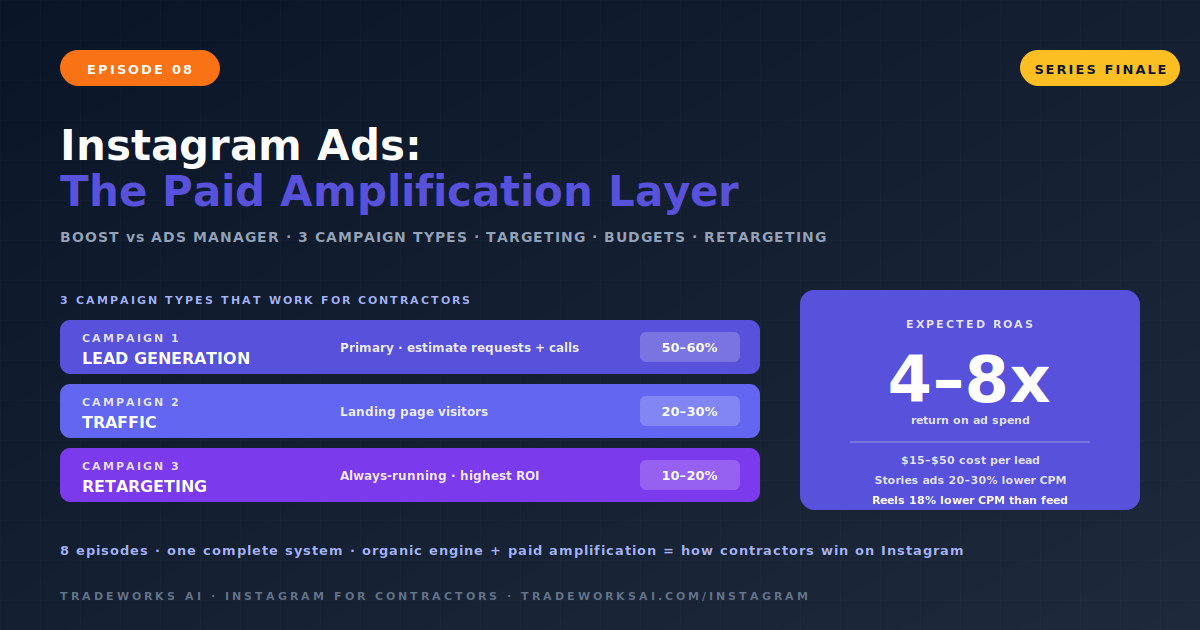
Not every campaign objective makes sense for home service businesses. After testing across hundreds of contractor campaigns, three campaign types consistently deliver results.
Objective: Generate estimate requests, phone calls, and booking form submissions. This is your bread-and-butter campaign. Meta’s lead generation objective can use either a dedicated landing page (recommended, covered in Episode 7) or Instagram’s native lead forms that keep the user inside the app. Native lead forms reduce friction—the homeowner never leaves Instagram—and automatically pre-fill name and email from their profile.
For contractors, the lead form should capture: name, phone number, service needed (dropdown), and zip code. Keep it to four fields maximum. Every additional field reduces completion rates.
Objective: Drive homeowners to your dedicated landing page where they can call, book, or request an estimate. This works best when you have a high-converting landing page (Episode 7) with a tracking number, a booking form, and strong trust signals. Traffic campaigns give you more control over the post-click experience than lead forms do.
Objective: Re-engage homeowners who visited your website, watched your Reels, or engaged with your profile but did not convert. Retargeting is the highest-ROI campaign type because you are advertising only to people who have already shown interest. A homeowner who visited your AC repair page but did not call sees your ad in their Instagram feed the next day with a specific offer—“Free AC inspection this week.” That reminder often triggers the call.
Retargeting requires the Meta Pixel installed on your website. If you do not have the Pixel installed, that is step one before running any retargeting campaign.
| Campaign Type | Objective | Best For | Budget Allocation |
|---|---|---|---|
| Lead Generation | Estimate requests, calls, form fills | Primary growth driver. Run continuously. | 50–60% of ad budget |
| Traffic | Landing page visits | High-converting landing page required | 20–30% of ad budget |
| Retargeting | Re-engage warm audiences | Highest ROI. Always running. | 10–20% of ad budget |
Meta’s targeting capabilities give contractors an advantage unavailable on any other advertising platform. You can reach homeowners—and only homeowners—in your exact service area, filtered by income, property ownership, and specific interests related to home maintenance.
Radius targeting: draw a circle around your service area (15–30 mile radius typical for contractors)
Zip code targeting: select specific zip codes where your ideal customers live
Exclude areas you do not serve to prevent wasted spend
For multi-location contractors: run separate ad sets per service area for more relevant messaging
| Targeting Layer | Options for Contractors |
|---|---|
| Homeownership | Likely homeowners, first-time homebuyers, home value ranges |
| Income | Household income brackets (target middle-to-upper for premium services) |
| Property | Property size, home type, recent movers |
| Home Interests | Home improvement, home maintenance, DIY, home renovation, specific brands (Trane, Lennox, Rheem for HVAC) |
| Life Events | Recently moved, new homeowner, home anniversary |
| Behaviors | Engaged shoppers, research-oriented consumers |
In 2026, Meta’s algorithm has become sophisticated enough that overly narrow targeting can actually hurt performance. The most effective approach for contractors is broad geographic targeting (your service area) with age and homeownership filters, then letting your ad creative act as the filter. A Reel showing an AC installation in Tampa with the caption “Tampa Bay homeowners—is your AC ready for summer?” naturally attracts the right audience and repels the wrong one. The algorithm learns from early engagement signals who responds to your content and finds more people like them.
Start broad. Let the creative filter. Let the algorithm optimize. Narrow only if you have data showing a specific segment converts better.
The most common question contractors ask about Instagram ads: how much should I spend? The answer depends on your market, your average job value, and your conversion infrastructure. Here are the benchmarks.
| Metric | Average Range | Notes |
|---|---|---|
| Cost Per Click (CPC) | $0.50–$2.00 | Varies by market competitiveness and targeting |
| Cost Per 1,000 Impressions (CPM) | $5–$15 | Reels ads deliver ~18% lower CPM than feed ads |
| Cost Per Lead (CPL) | $15–$50 | Native lead forms typically produce lower CPL than landing pages |
| Story Ad CPM | 20–30% lower than feed | Stories are currently the most cost-effective placement |
| Expected ROAS | 4–8x | Based on average contractor job values and close rates |
The critical rule: never judge Instagram ad performance on cost per lead alone. A $50 lead that converts into a $5,000 roofing job is infinitely more valuable than a $10 lead who never answers the phone. Track cost per lead AND lead-to-customer conversion rate AND revenue per closed job. The full chain determines whether your ads are profitable.
The creative—the image, video, or carousel that the homeowner sees—determines 80 percent of your ad’s performance. No amount of targeting sophistication can overcome a weak creative. Here are the formats and approaches that consistently convert for contractor ads.
Before/After Reels (Highest Performer): The same before/after format from Episode 3, but promoted as an ad. Real job footage outperforms studio-produced content. Authenticity signals trust. The first 3 seconds hook with the dramatic “before” state, and the reveal drives the action.
Customer Testimonial Videos: A real customer on camera for 15–30 seconds describing their experience. “They showed up on time, explained everything, and the price was exactly what they quoted.” Social proof in video format is the strongest trust signal in paid advertising.
Seasonal Offer Graphics: Clean, branded graphics with a specific offer: “$49 Spring AC Tune-Up — Book Before May 31.” Clear price, clear deadline, clear CTA. Urgency drives action.
Educational Carousels as Ads: Take a high-performing organic carousel (Episode 4) and promote it. “5 Signs Your AC Is Dying” as a promoted carousel reaches homeowners who need the information and positions you as the expert to call.
Problem/Solution Reels: Open with the problem (“If your AC is running but not cooling, here is what is happening”), show the diagnosis, show the fix, end with a CTA. Educational ads build authority AND generate leads simultaneously.
Real job photos and video always outperform stock imagery. Authenticity beats polish.
Hook in the first 3 seconds—the same principles from Episode 3 apply to paid Reels.
Every ad needs a clear, specific CTA: “Call (813) 555-0199 for a free estimate” or “Tap Book Now to schedule.”
Include trust signals: star rating, review count, license number, years in business.
Test multiple creatives. Run 3–5 ad variants simultaneously and let the algorithm distribute budget to the winner. Kill underperformers after 72 hours of data.
Refresh creative every 2–4 weeks. Ad fatigue is real—performance degrades when the same audience sees the same creative repeatedly.
Retargeting is the most profitable advertising strategy for contractors because you are only spending money to re-engage people who have already shown interest in your business. Three retargeting audiences every contractor should build:
Anyone who visited your website in the last 30 to 90 days but did not submit a form or call. These homeowners were interested enough to visit but did not convert. A retargeting ad with a specific offer (“Still thinking about that AC inspection? Here is a free one.”) re-engages them at the moment they are most likely to act. Requires the Meta Pixel installed on your website.
Anyone who engaged with your Instagram content—liked a post, watched a Reel, visited your profile, sent a DM—in the last 30 to 90 days. These are warm audiences who know your brand but have not taken action yet. Retargeting them with a service-specific offer moves them from awareness to action.
Upload your existing customer list (email addresses and phone numbers) to Meta and create a lookalike audience—1 percent lookalike of your best customers within your service area. This audience statistically resembles your existing customers in demographics, interests, and behavior. Lookalike audiences consistently outperform interest-based targeting for established contractors because they are modeled on people who have already hired you.
| Metric | What It Tells You | Target |
|---|---|---|
| Cost Per Lead (CPL) | How much you pay per estimate request or call | $15–$50 (varies by service and market) |
| Lead Quality Score | Are these real homeowners with real needs? | Track: lead-to-appointment rate should exceed 40% |
| Cost Per Acquisition (CPA) | How much you pay per closed job | Calculate: total ad spend ÷ jobs closed from ads |
| Return on Ad Spend (ROAS) | Revenue generated per dollar spent | 4–8x for contractor campaigns |
| Frequency | How many times the average person sees your ad | Keep below 3.0 for prospecting; up to 7.0 for retargeting |
| Creative Performance | Which ad variants generate the most leads | Kill underperformers after 72 hours; scale winners |
The ultimate measurement for contractor Instagram ads is revenue attribution: how many dollars of closed revenue can you trace directly to Instagram ad spend? Track this monthly. If your ad spend is $1,500 and it generates $12,000 in closed jobs, your ROAS is 8x. That is a profitable campaign. If it generates $2,000, your ROAS is 1.3x and you need to fix targeting, creative, or your conversion infrastructure.
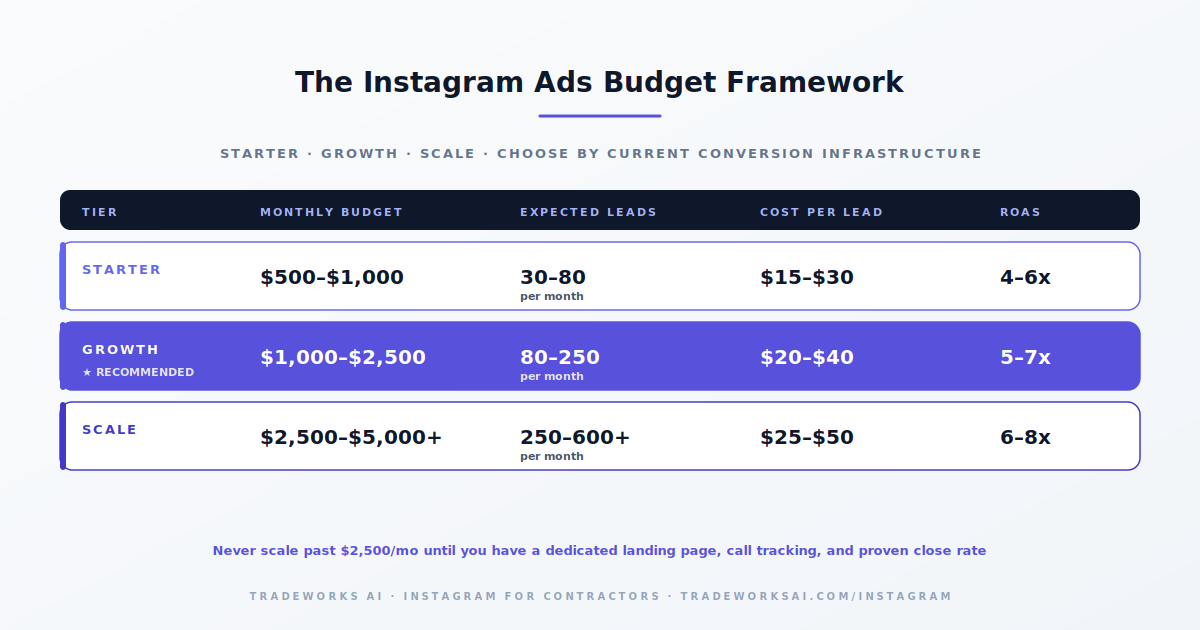
Start with $500 to $1,000 per month to test creative and build initial data. Most contractor campaigns need four to eight weeks to gather enough data for the algorithm to optimize. Once you identify winning creative and targeting, scale to $1,000 to $2,500 per month for consistent lead generation. Do not scale past $2,500 until you have a dedicated landing page, call tracking, and a proven lead-to-close conversion rate.
Use Ads Manager for any campaign with a revenue goal. Boosted posts optimize for engagement (likes and comments), not conversions (leads and calls). Ads Manager gives you full control over campaign objectives, audience targeting, placements, and creative testing. The only time to boost is when an organic post is performing well and you want to extend its reach for brand awareness with a small budget (under $50).
Before/after Reels consistently deliver the highest conversion rates for contractor ads. Real job footage outperforms studio-produced or stock content because it signals authenticity and builds trust. Customer testimonial videos are the second-best format. Educational carousels promoted as ads are effective for authority building and lead capture. Test multiple formats simultaneously and let the data determine your winner.
Install the Meta Pixel on your website. This tracking code identifies visitors and allows you to create custom audiences of people who visited specific pages (like your AC repair page) but did not convert. Then run retargeting ads to this audience with a specific offer related to the page they visited. Retargeting campaigns typically deliver the lowest cost per lead and highest ROAS of any campaign type because the audience already knows your business.
Most contractors post inconsistently with low-quality photos and no strategy. The bar is low. The Instagram Audit grades your profile, content pillars, posting cadence, and bio-to-lead pipeline — and identifies the one change that turns followers into booked jobs this month.
Continue the Instagram for Contractors series with Part 1 of 8.
Continue the Instagram for Contractors series with Part 2 of 8.