Facebook for Contractors Playbook · Part 2 of 12

Facebook Business Page Setup for Contractors: The Complete Optimization Guide

By Trevor Bennett · May 2026 · 11 min read

Series

The Facebook for Contractors Playbook

Part 2 of 12
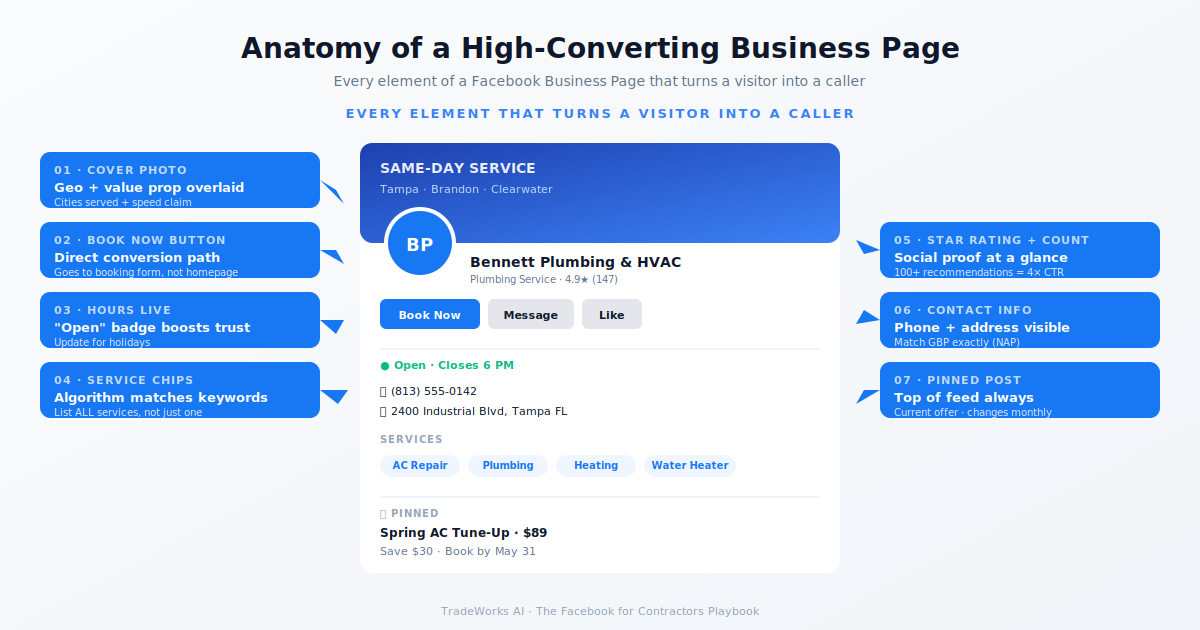
Contractor Facebook Business Page mockup with callouts on profile photo, cover, CTA, and about section

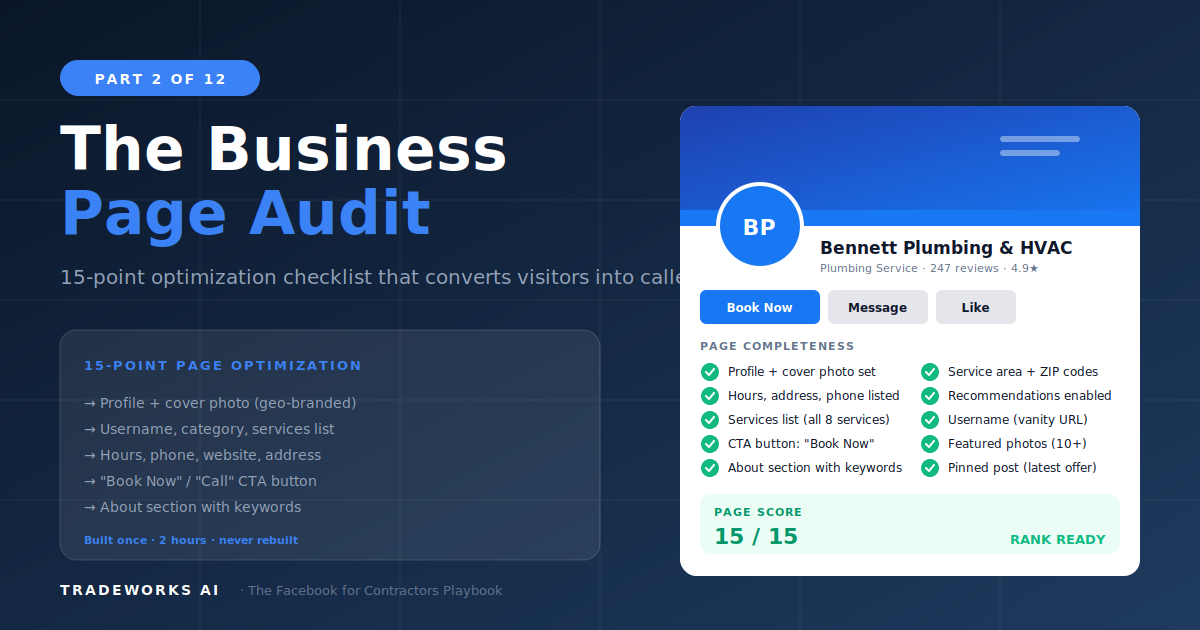
A fully optimized Facebook Business Page takes approximately 2 hours to build and should never need to be rebuilt. It is the digital storefront of your Facebook presence, and for a significant percentage of homeowners in your service area, it is the first or second place they check when evaluating your business. The difference between a page that converts visitors into callers and one that gets dismissed as unprofessional comes down to 15 specific optimization points: from your profile photo resolution and cover photo strategy to your CTA button configuration, auto-response setup, and the trust signals that turn a browsing homeowner into a booked appointment.

This is the Digital Foundation component of the DEMAND Engine introduced in Part 1. Everything that follows in Parts 3 through 12 depends on this foundation being solid.

Profile Photo: Your Brand's First Impression

Your profile photo appears in every post, every comment, every ad, and every Messenger conversation. It is the most-seen visual element of your Facebook presence.

  • Dimensions: 170×170 pixels on desktop, 128×128 on mobile. Upload at 360×360 minimum for clarity on high-resolution screens.
  • Format: PNG with transparent background preferred. JPEG acceptable if the background is clean.
  • Content: Your logo. Not a photo of your truck, not a stock image of a wrench, not the owner's headshot (unless the owner IS the brand for a solo operation).
  • Circular crop: Facebook crops the profile photo into a circle. Ensure critical elements are centered. Test the crop before publishing.

Cover Photo: Your Digital Billboard

The cover photo is the largest visual element on your page and the most underutilized by contractors. It is a free billboard that every page visitor sees.

  • Dimensions: 820×312 pixels on desktop, 640×360 on mobile. Design at 820×360 with critical content in the center 640×312 safe zone.
  • Content strategy: Rotate quarterly to align with seasonal campaigns. Summer: outdoor AC tune-up CTA. Winter: heating maintenance promotion. The cover photo is free advertising space.
  • Required elements: Company name, primary phone number, one CTA, and a visual that represents your work.
  • Avoid: Cluttered designs with too much text. Clean, professional, one clear message.

About Section: The Copy That Converts

The About section is where serious prospects go to verify your business before calling. It is also indexed by search engines and AI systems.

Short Description (155 Characters)

Appears directly below your page name. Must include your primary service, your location, and one differentiator. Examples:

  • HVAC: "Tampa Bay's trusted HVAC contractor. Same-day AC repair, seasonal tune-ups, and 24/7 emergency service. Family-owned since 2008."
  • Plumbing: "Licensed Tampa plumber. Residential and commercial. Water heaters, drain cleaning, leak repair. 4.8 stars on Google."
  • Electrical: "Electrical contractor serving Hillsborough County. Panel upgrades, generator installation, EV chargers. Licensed and insured."

Long Description (2–3 Paragraphs)

  • Paragraph 1: Who you are, what you do, where you serve. Full business name, primary services, service area cities/counties.
  • Paragraph 2: What makes you different. Years in business, certifications, awards, guarantees, maintenance plans. Specific, verifiable claims.
  • Paragraph 3: How to hire you. Phone, website, hours, service area boundaries.

Service Listings

Facebook allows you to list individual services with descriptions and price ranges. Most contractors skip this. Do not skip this.

For each service, include: service name (matching your website service pages), 1–2 sentence description with the primary keyword, price range or "Contact for quote", and a relevant photo if available. List AC Repair, AC Installation, Heating Repair, Tune-Ups, Indoor Air Quality, etc as separate services.

CTA Button Configuration

Your page's CTA button appears prominently at the top of your page and in ad placements. It is the single highest-converting element on your page. For most residential contractors, "Call Now" is the correct default. It removes every step between "I need help" and "I am talking to someone." If you run a Messenger qualification flow, "Send Message" becomes the primary CTA with phone number displayed prominently in the About section.

Auto-Responses and Instant Reply

Facebook's Instant Reply sends an automatic message when someone contacts your page through Messenger. This is your speed-to-lead layer for Facebook.

The auto-response should: confirm receipt (reducing the chance they message a competitor), provide an immediate phone option for urgent needs, and qualify the lead by requesting basic information before your team responds.

After-hours variation: Add: "Our office is currently closed and will reopen at [time]. We will respond first thing in the morning. For emergencies, call our 24/7 line at [phone]."

Trust Signals: The Elements That Convert Visitors

  • Response Time Badge: Aim for "within 1 hour" or better. Earned by consistently responding to Messenger sub-1-hour for ~2 weeks.
  • Recommendations (Reviews): Pages with 20+ recommendations display a percentage ("95% of people recommend"). Critical trust signal.
  • Page Transparency: Shows when the page was created and the page's location. A page from 2015 looks more established than one from last month.
  • Verification Badge: Available for businesses that meet verification requirements. Adds credibility.
  • Complete Information: Hours, parking, service area, founding year, price range, email, website. Complete pages rank higher in Facebook search.

Page Settings and Admin Configuration

  • Page Roles: Owner is primary admin. Marketing staff or agency partners are editors. Use Meta Business Suite for role management.
  • Messaging Settings: Enable Messenger. Enable "Allow people to contact my Page privately" and "Prompt people who visit your Page to send messages."
  • Notifications: Configure so the responder receives alerts for new messages, comments, and recommendations.
  • Linked Instagram Account: Connect your Instagram business account. Allows cross-posting and unified messaging.
  • Meta Pixel: Install on your website through your Facebook page settings. Required for retargeting (Part 6) and email-to-ads sync.

The 15-Point Facebook Page Optimization Checklist

  1. Profile photo: high-res logo, circular-safe.
  2. Cover photo: current, professional, with CTA.
  3. Page name: matches legal/DBA name, no keyword stuffing.
  4. Page username: short, brand-aligned (facebook.com/yourbrand).
  5. Short description: 155 characters with service + location + differentiator.
  6. Long description: 3 paragraphs structured for humans and AI.
  7. Services list: every service entered with description and price.
  8. Categories: most specific primary + 1–2 secondary.
  9. Hours: accurate, with special hours for holidays.
  10. CTA button: "Call Now" or "Send Message" configured.
  11. Phone number, website, email all populated and accurate.
  12. Instant Reply auto-response written and active.
  13. Linked Instagram + Meta Pixel installed.
  14. Page Transparency information complete.
  15. First wave of 5–10 recommendations from real customers.

Total time for a new page: ~2 hours. For an existing page: 30–60 minutes.

Frequently Asked Questions

Should I use a personal profile or a Business Page?

A Business Page. Always. Personal profiles cannot run ads, do not provide analytics, and violate Facebook's terms of service when used for commercial purposes. The owner's personal profile should be connected to the page and can share page content for additional organic reach.

What if I already have a page but it was set up poorly?

Optimize the existing page rather than creating a new one. Your existing page has history (creation date, follower count, recommendation count, post history) that a new page does not. Use this part's checklist to bring it to standard.

How often should I update my cover photo?

At minimum quarterly, aligned with seasonal campaigns. Many contractors update monthly with their latest promotion or project spotlight. The cover photo is free advertising space that most competitors never change.

Do I need Business Manager or Meta Business Suite?

Yes. Meta Business Suite is the centralized platform for managing your page, ad account, Pixel, and connected Instagram. It provides analytics, scheduling, and role management that the basic page interface does not. Setup takes 15–20 minutes and is free.

What page category should I choose?

Select the most specific category available. For HVAC: 'Heating, Ventilating & Air Conditioning Service.' For plumbing: 'Plumber' or 'Plumbing Service.' For electrical: 'Electrician' or 'Electrical Service.' Add secondary categories for broader visibility.

How do I get the first 20 recommendations to unlock the percentage display?

Direct outreach to your 30 to 50 most loyal customers via personal text or email asking them to leave a Facebook recommendation. Keep the link explicit (facebook.com/[your-page]/reviews) and the ask warm. Most contractors hit 20 within the first 2 weeks of asking deliberately.

Score Your Facebook Page Against the 15-Point Checklist

We run your Facebook Business Page through every optimization point in this part and return a punch list of every gap costing you visibility, trust, and click-to-call conversions.

Continue the Series

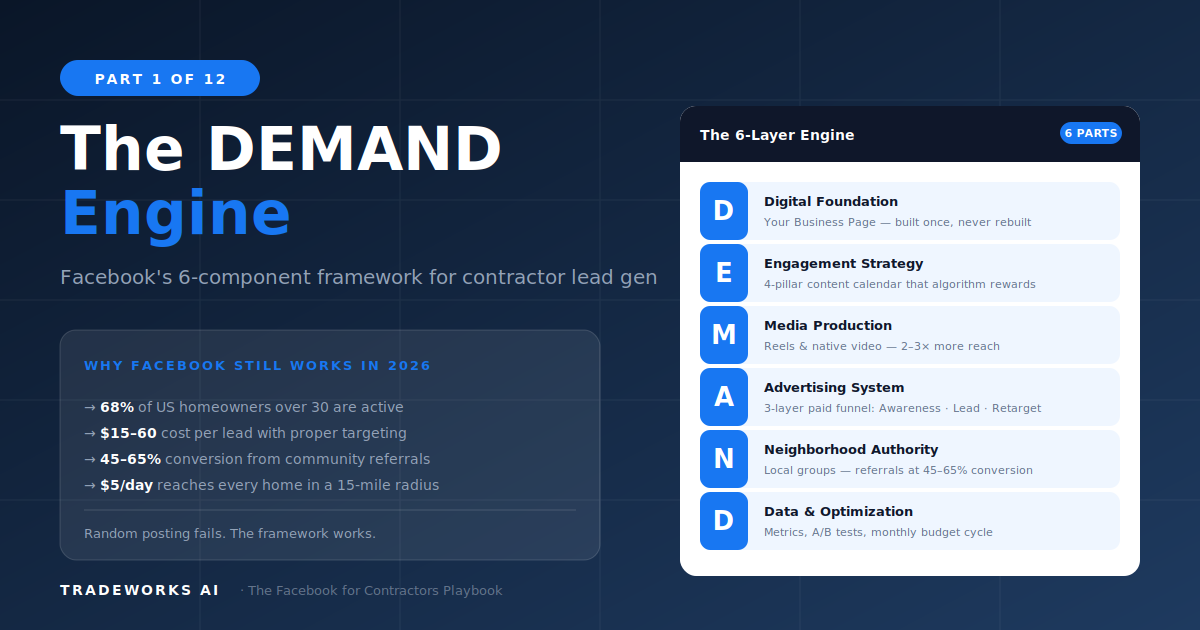
The DEMAND Engine
Facebook · Part 1

The DEMAND Engine

Why Facebook still works for contractors and the 6-component framework that makes it work.
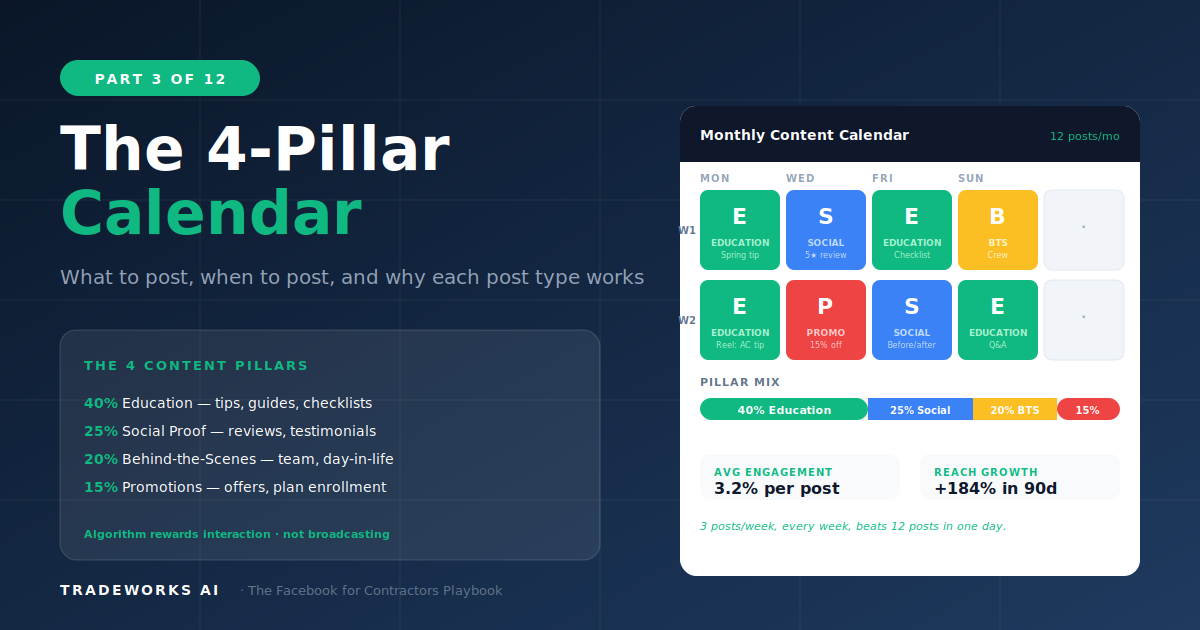
4-Pillar Content Calendar
Facebook · Part 3

4-Pillar Content Calendar

What to post, when to post, and the engagement model that keeps the algorithm working for you.

Related Services

Digital Marketing Pricing