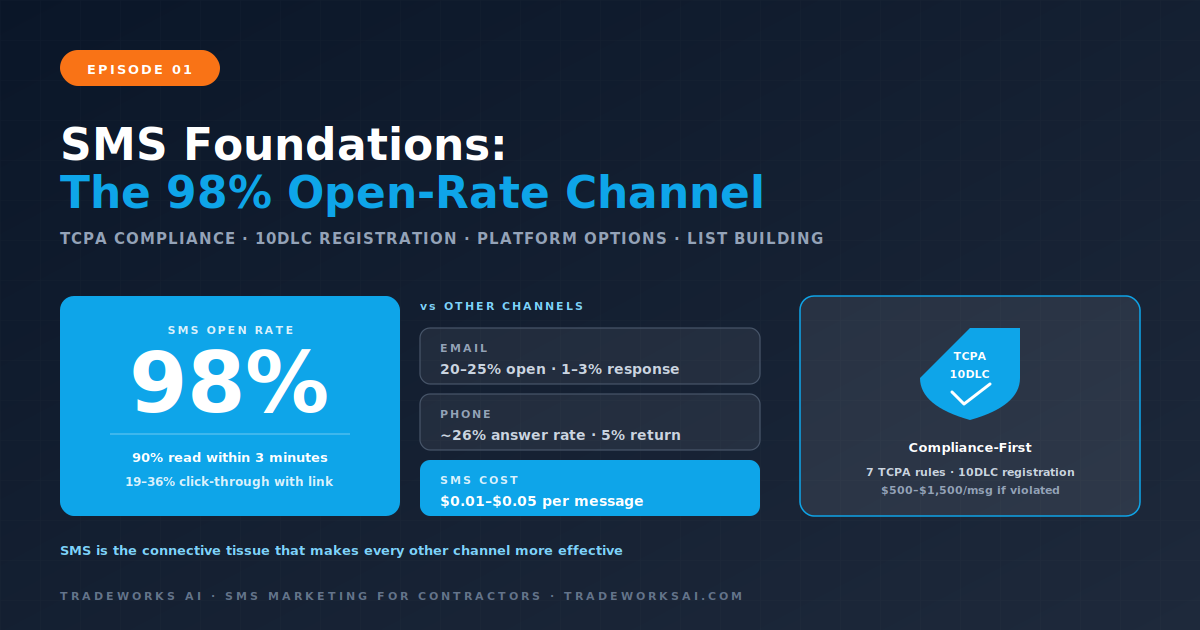
SMS Marketing · Part 1
SMS Marketing for Contractors: Why Text Messaging Is the Highest-ROI Channel for Home Service Businesses
Continue the SMS Marketing series with Part 1 of 4.
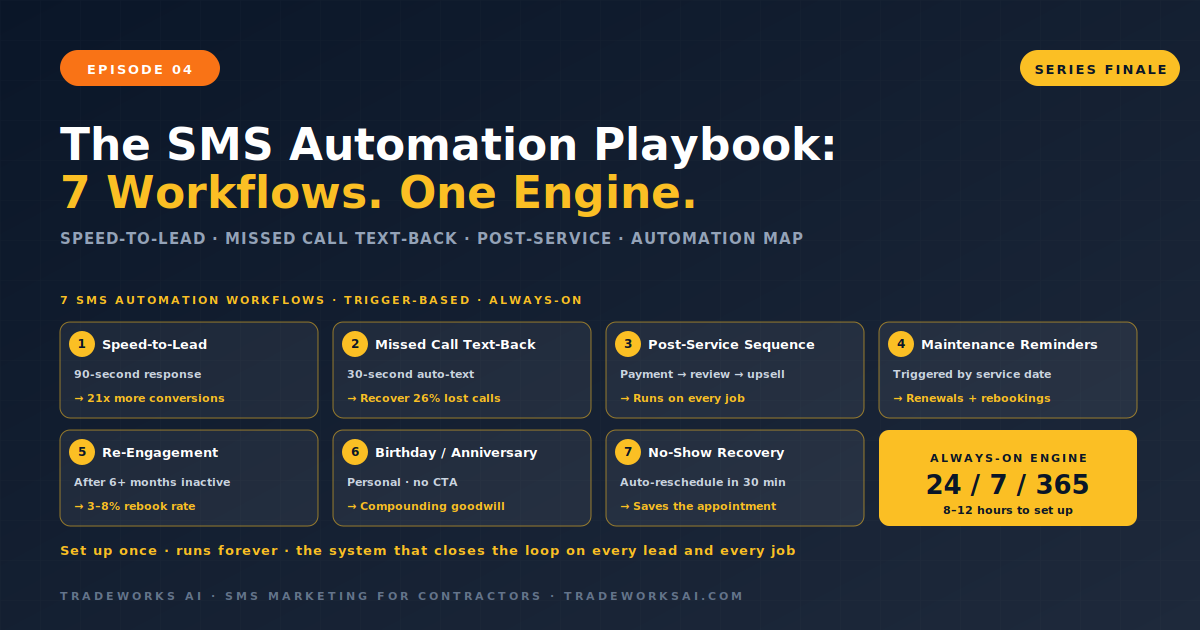
Over three episodes, we built the SMS system component by component: compliance and list building in Episode 1, transactional sequences in Episode 2, and promotional campaigns in Episode 3. Each piece works on its own. But the real power of SMS marketing for contractors is not in individual messages or campaigns—it is in the automation engine that connects them all into one system that runs without manual effort.
This episode—the series finale—builds the seven automation workflows that turn your SMS program from “texts we send manually sometimes” into “a machine that runs 24 hours a day, responds in seconds, and never forgets a follow-up.” Every workflow in this guide is trigger-based: an event happens in your business (a new lead, a completed service, a missed call, a lapsed maintenance plan), and the system responds automatically with the right message at the right time. Set up once. Runs forever.
Responding to a new inquiry within five minutes makes you 21 times more likely to convert that lead compared to waiting 30 minutes. Most contractors respond in four to six hours. The speed-to-lead workflow eliminates this gap entirely.
This workflow alone can double or triple a contractor’s lead conversion rate. The key principle: the first text should ask a question that moves the conversation forward—not a generic “thanks for reaching out.” Offer specific time slots. Give them something to respond to.
Twenty-six percent of contractor calls go unanswered. Every missed call is a potential lost customer who will call the next contractor on their list. The missed call text-back sends an instant SMS when a call goes unanswered—turning a missed opportunity into a live conversation.
Most SMS platforms and CRM tools (including GoHighLevel, ServiceTitan, and Housecall Pro) support missed call text-back as a native feature or a simple workflow trigger. The 30-second response time means the homeowner gets a text while they are still thinking about their problem—before they have time to call your competitor.
The post-service sequence is the most comprehensive automation workflow for contractors. It handles everything that happens after a job is complete—from payment confirmation to review request to maintenance plan upsell to referral ask. This is the transactional sequence from Episode 2, fully automated and extended.
Triggered by service date data in your CRM, this workflow sends maintenance reminders at the right interval for each service type—without anyone on your team having to remember or calculate dates.
This workflow activates when a contact has been inactive for a set period—no service booked, no messages exchanged, no website visits.
A simple personalization that generates outsized goodwill. When your CRM stores a customer’s birthday or their service anniversary date, this workflow sends a personal text that has nothing to do with selling—which makes it more effective at generating future bookings than most promotional texts.
When a customer no-shows, this workflow sends an immediate follow-up text to reschedule—recovering revenue that would otherwise be permanently lost.
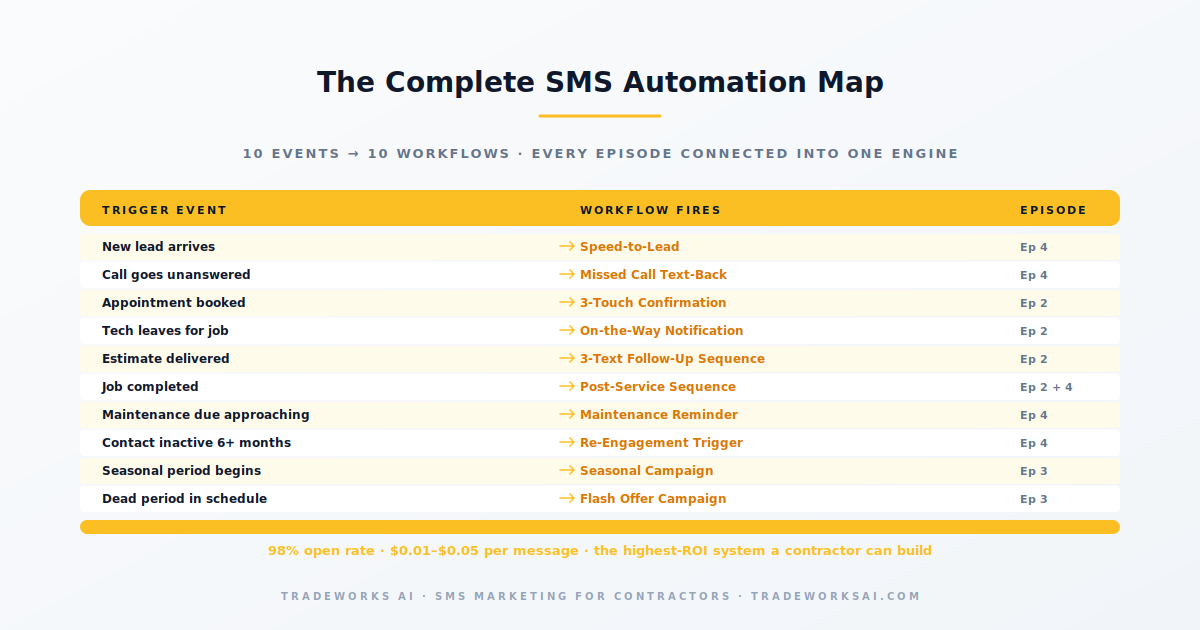
Here is how all seven workflows and all four episodes connect into one machine:
For a contractor using an all-in-one platform like GoHighLevel, expect eight to twelve hours to build and test all seven workflows. The speed-to-lead and missed call text-back can be deployed in under one hour each and will show results within the first week. The post-service sequence and maintenance reminders take two to three hours each due to branching logic. Build and deploy the highest-impact workflows first (speed-to-lead, missed call text-back), then add the rest over two to three weeks.
Absolutely. At 50 to 100 monthly jobs, the post-service automation alone recovers thousands in no-shows, generates 15 to 25 reviews per month, and follows up on every estimate automatically. The speed-to-lead workflow ensures every inquiry gets a response in 90 seconds. The total SMS cost at this volume is $25 to $75 per month. The ROI is typically 100x or more.
All automation should pause when the customer replies, and the conversation should transfer to a human team member through your platform’s unified inbox. Automated systems open the conversation; humans close it. The hybrid model—automated opening, human close—is the standard for service businesses in 2026.
98% of texts get read in 3 minutes. 26% of contractor calls go unanswered. The SMS Audit grades your text-message infrastructure: TCPA compliance, 10DLC registration, automation workflows, and the platform fit for your trade. Find the highest-leverage SMS sequence that fills your schedule next month.
Continue the SMS Marketing series with Part 1 of 4.
Continue the SMS Marketing series with Part 2 of 4.